jrgn9
September 5, 2023, 11:42am
1
Hi, total noob here!
I am not sure what caused this. The last thing I did was entering tty3 by accident, and I didn’t remember how to get back to desktop (I’m a noob, as I said) so I just rebooted instead of bothering to figure it out.
This is the logs from 6.4.12-arch-1:
inxi -Fxxc0z | eos-sendlog
http://ix.io/4Fqy
journalctl -k -b -0 | eos-sendlog
http://ix.io/4FqA
lsblk -o name,type,size,PTTYPE,FSTYPE
NAME                                          TYPE    SIZE PTTYPE FSTYPE
nvme0n1                                       disk  476,9G gpt
├─nvme0n1p1                                   part  105,5G gpt    ext4
├─nvme0n1p2                                   part     17G gpt    swap
├─nvme0n1p3                                   part  353,9G gpt    crypto_LUKS
│ └─luks-18757f0a-35ed-4b2c-8edf-68e35ad65498 crypt 353,9G        ext4
└─nvme0n1p4                                   part    554M gpt    vfat
nvme1n1                                       disk  931,5G        ext4
Please tell me if there are more relevant info needed.
dalto
September 5, 2023, 12:01pm
2
Try running sudo dracut-rebuild
jrgn9
September 5, 2023, 12:13pm
3
From emergency mode or from 6.4.12-arch-1?
jrgn9
September 5, 2023, 12:23pm
5
No dice! I tried from both
dalto
September 5, 2023, 12:25pm
6
Does it work if you boot the fallback entry?
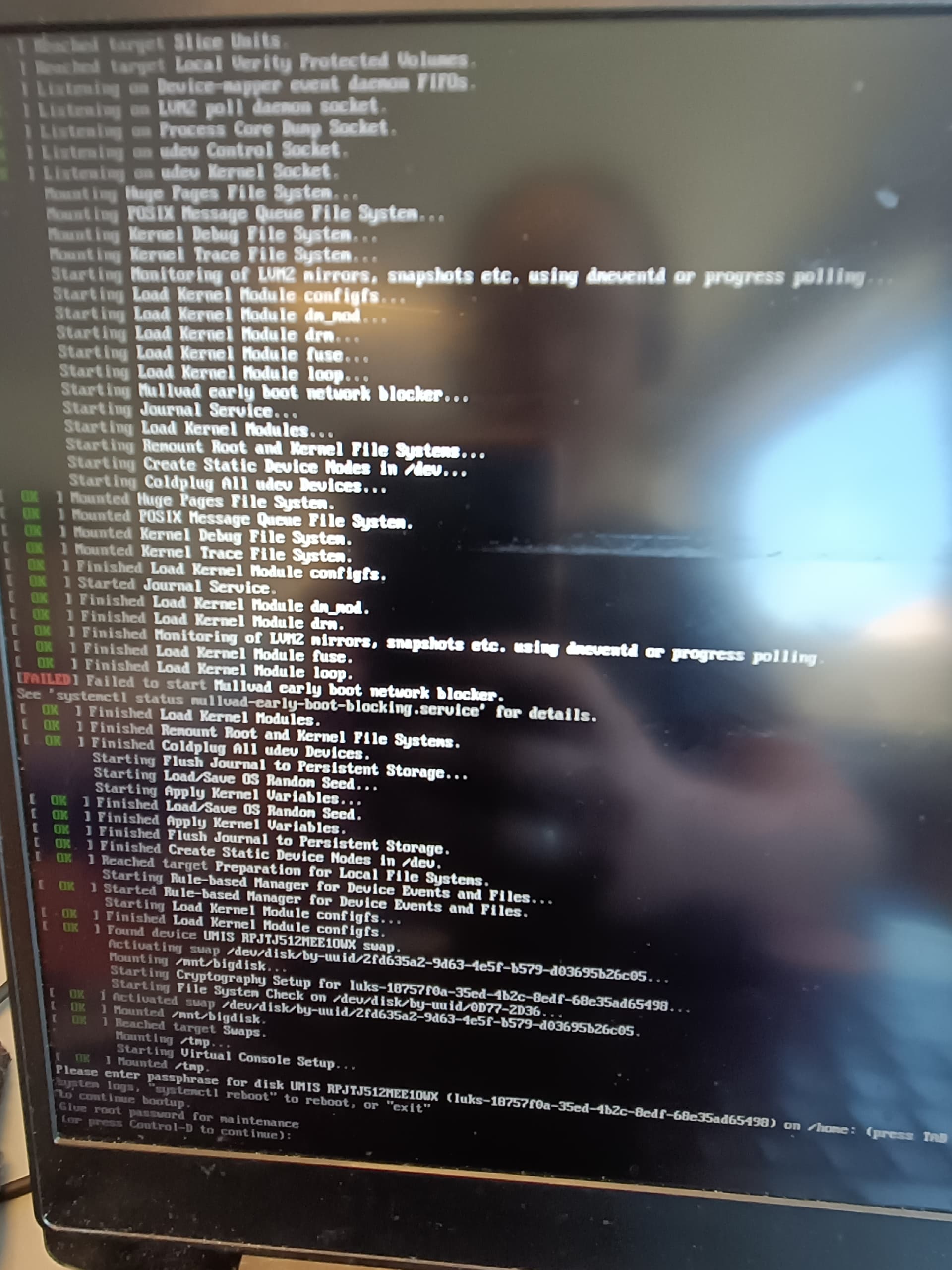
Can share a photo of the output on the screen before you are dropped into emergency mode?
jrgn9
September 5, 2023, 12:32pm
7
Yes, from fallback too. Sorry, not the best picture, but I hope you are able to read it none the less. The emergency mode starts as I am typing my LUKS password.
dalto
September 5, 2023, 12:49pm
8
Does it work if you disable the “Mullvad early boot blocker”?
jrgn9
September 5, 2023, 1:02pm
9
Removed Mullvad entirely, but it didn’t help
dalto
September 5, 2023, 1:03pm
10
Can you share the output of pacman -Q | grep "^linux"
jrgn9
September 5, 2023, 1:06pm
11
pacman -Q | grep "^linux"
linux 6.4.12.arch1-1
linux-api-headers 6.4-1
linux-firmware 20230804.7be2766d-2
linux-firmware-whence 20230804.7be2766d-2
linux-headers 6.4.12.arch1-1
linux-lts 6.1.51-1
linux-lts-headers 6.1.51-1
dalto
September 5, 2023, 1:07pm
12
What happens if you downgrade linux-lts and linux-lts-headers to the prior version that was working for you?
jrgn9
September 5, 2023, 1:13pm
13
The current linux-lts was working for me up to my fuckup. How do I downgrade them?
dalto
September 5, 2023, 1:16pm
14
In that case, don’t downgrade them, just reinstall them.
jrgn9
September 5, 2023, 1:23pm
15
Still panic mode. Is the EOS lts version number supposed to be different from the linux lts version number?
dalto
September 5, 2023, 1:31pm
16
jrgn9:
EOS lts version number
What are you referring to?
jrgn9
September 5, 2023, 1:40pm
17
EndeavourOS (6.1.48-1-lts) is the option when booting, but linux-lts 6.1.51-1 is the Linux lts from pacman
dalto
September 5, 2023, 2:23pm
18
That isn’t right, reinstall the package linux-lts
jrgn9
September 5, 2023, 4:38pm
19
Can I reinstall it just by using sudo pacman -S linux-lts? Because I have already done that. Or is it another way to reinstall it?
When did you last update your system, and are your mirrors up to date?