I’m afraid I have to disagree with you on this. I just ran the system info on the newly installed Win10, it’s indeed in UEFI mode. Then I ran the “sudo parted --list” on the EnOS, everything is same as it used to be.
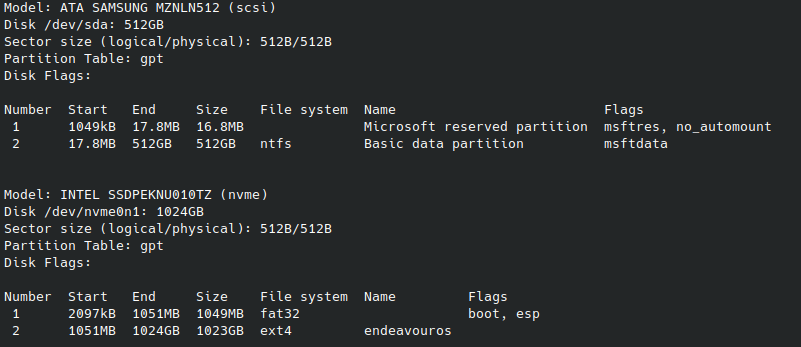
I’m baffled!
Speaking for myself, this is the first time I see a UEFI install of Windows with this partition scheme .
I cannot tell for sure if there has been a change in the way Windows installs nowadays since I haven’t done it for quite some time.
Would you be kind to show the output of:
efibootmgr
as well?
Please share me with you find so I can learn. Thanks again.
BootCurrent: 0002
Timeout: 1 seconds
BootOrder: 0002,0000
Boot0000* Windows Boot Manager  HD(1,GPT,571811b1-1992-b44f-bfac-811ba1db7ce7,0x1000,0x1f4000)/File(\EFI\Microsoft\Boot\bootmgfw.efi)57494e444f5753000100000088000000780000004200430044004f0042004a004500430054003d007b00390064006500610038003600320063002d0035006300640064002d0034006500370030002d0061006300630031002d006600330032006200330034003400640034003700390035007d0000004d000100000010000000040000007fff0400
Boot0002* endeavouros   HD(1,GPT,571811b1-1992-b44f-bfac-811ba1db7ce7,0x1000,0x1f4000)/File(\EFI\endeavouros\grubx64.efi)
Boot0000* Windows Boot Manager HD(1,GPT,571811b1-1992-b44f-bfac-811ba1db7ce7,0x1000,0x1f4000)/File(\EFI\Microsoft\Boot\bootmgfw.efi)
This looks like a pretty standard path to bootmgfw.efi for a UEFI install of Windows.
Normally this resides on ESP (EFI System Partition). Most of the time it is located as second partition after some Microsoft Reseved partition (or some such).
As said before, this is a first for me. Perhaps they have changed the way of their installation and no longer require an ESP.
I have a rather old-ish Win 10 install. I’ll post an screenshot of the partition scheme of what used to be the “normal”.
Later!
The way I installed the Win10 was probably a bit different. I deleted all existing partitions on that SSD during the guided process, then let the system start from scratch. I don’t know if that makes a difference…
No. That’s quite normal. The installer then will have its way to set the whole thing up on the whole disk.
Here is the partition scheme of a Windows UEFI install. This installation is the last one I did and perhaps is almost 2.5 years old.

$ efibootmgr

BootCurrent: 0003
Timeout: 2 seconds
BootOrder: 0002,0001,0003

Boot0001* UEFI: WDC WDS240G2G0B-00EPW0, Partition 2     HD(2,GPT,efa75299-856c-44b4-8ade-8e6fc43005ce,0x109000,0x32000)/File(EFI\Microsoft\Boot\bootmgfw.efi)

Boot0002* Windows Boot Manager  HD(2,GPT,efa75299-856c-44b4-8ade-8e6fc43005ce,0x109000,0x32000)/File(\EFI\MICROSOFT\BOOT\BOOTMGFW.EFI)

Boot0003* UEFI: SanDisk, Partition 1    PciRoot(0x0)/Pci(0x14,0x0)/USB(0,0)/HD(1,MBR,0x2abb4ad9,0x4bc,0x2090)
Usually there are 4 partitions on Windows sometimes 3. There is UEFI, Recovery, Reserved and the C: partition where Windows is installed. When you shrink Windows partition you are only shrinking C: if done in Windows. Usually you cannot see the 16MB reserved from Windows disk management. You can see it from gparted though.

Edit: As you posted above. This is more recent Windows 11. 
Windows usually creates the partitions on the install right at the beginning from the Windows installer. But it depends on how you have done this? 
This is the $ESP partition used from both WinOS and EnOS.
HD(1,GPT,571811b1-19…
OP can confirm that WinOS bootloader file (path) is inside the EnOS efi partition. 
Right! How could I miss that?
All that talk about having separated ESP:s … and then …

Where is that partition located exactly? I mean in which SSD? The Win one or the EnOS one? Thanks.
On the one that the EnOS efi folder resides. You can check in your /etc/fstab for a vfat partition.
If I wouldn’t have reinstalled Win10. Is there a way to bring back the original WBM from the Ubuntu folder?
I sincerely cannot understand what you are saying. Maybe rephrase?
If you look at my output of efibootmgr under thread #18 or 19, you can see that Linux Mint (Ubuntu) is there instead of Windows / Microsoft boot manager. Does that mean Ubuntu made change or simple “EAT” the original WBM? If so, is there a way to bring it back. If I still confuse you, please forgive me…lol…I guess this question is not important anymore.
Boot0000* Windows Boot Manager  HD(1,GPT,78830e46-1bad-4fa9-a4a6-5ddb934bc911,0x800,0x100000)/File(\EFI\ubuntu\grubx64.efi)57494e444f5753000100000088000000780000004200430044004f0042004a004500430054003d007b00390064006500610038003600320063002d0035006300640064002d0034006500370030002d0061006300630031002d006600330032006200330034003400640034003700390035007d00000033000100000010000000040000007fff0400
Boot0001* Diskette Drive        BBS(Floppy,Diskette Drive,0x0)0000424f
This is a NVRAM entry (UEFI Boot menu), not an actual file. It is a pointer to a file/path.
You can safely delete this entry with efibootmgr (Read man efibootmgr for how)
Bring what back? Windows?
Is it still installed?
Edit: I don’t know any way to create a proper WinOS UEFI entry (like we do for Linux with efibootmgr), apart from using Windows (installer or other utilities, which I don’t know anything about).
As you said, Windows should be able to fix their bootloader. You may want to ask at a Windows forum or other support page. 