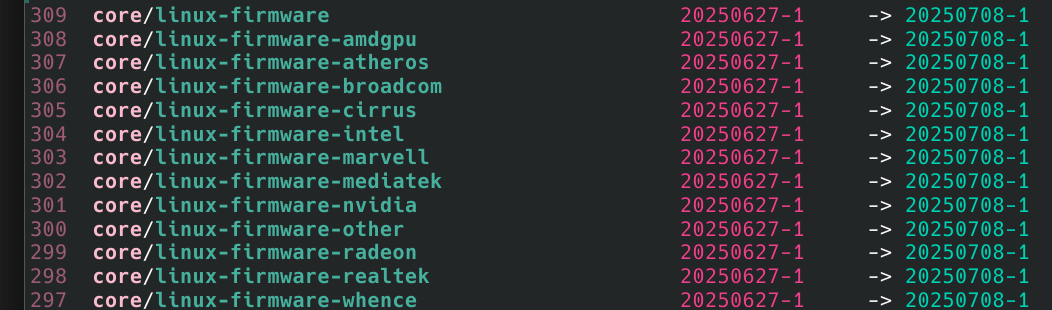
while i dont have nvidia nor radeon for example, do i need to install it every time? or i need to remove all these apcakges and re install linux-firmware? which i did before when i read the firmware split messages in the forums
You might want to consider the install sizes of those packages and determine which of them are worth uninstalling. Note that some of them are required, so if you uninstall such a package, you may need to have the USB installer stick available to boot your system again.
Quick and easy answer: You don’t. If you are willing to risk you got it wrong and your computer won’t boot or performs erratically, or there is a future change to your computer system and you do.
Note that those numbers mean the installed size, not download size. Then again, installed and download sizes are not much different…
Also, package linux-firmware will install them again at update unless you remove linux-firmware. But that might lead to new problems as linux-firmware is managed by the Arch devs and we don’t know what further changes they have in mind.
Essentially that means, we’re kind of stuck being beholden to having packages installed that are not even remotely relevant or needed, because they’re tied to the dependency of linux-firmware (unless you manually force the removal with an -Rdd).
That strikes me as odd, - or being more frank, absurd..
If you don’t want it then remove it. There’s nothing absurd about it. The whole point of the recent firmware split is to enable user to do exactly that.
Before the linux-firmware package was recently turned into a metapackage and the individual firmware was split, you did not have the option to selectively remove any firmware packages - you either had them all or had none. Did you complain about that in the past?
Now you’ve got the optional ability to remove packages that you don’t need. But you’re unhappy about that optional ability?
No, this isn’t me bitching about a package, it’s me not fully understanding the root cause for it, because I’m not balls-deep in the arch linux mailing lists every second of my life. The fact that people are asking about this and wondering why, should be indicative that it’s a point of confusion.
Not need to. Can. Remember, you had all the firmware before the split, now if you want to, you can remove the unused firmware, which you couldn’t before.
You can be lazy like me and leave it all installed. You’ll be no worse off than before the split.
Plus if you have a high speed broadband, it downloads in a couple of blinks anyway. It’s not a hill to die upon. It typically is at least a month between updates.
It doesn’t explicitly state that. Anyone who has a hint of understanding what the linux-firmware package was/is should be able to figure that out. If someone doesn’t know what linux-firmware is all about, that’s a good opportunity for them to visit the Arch wiki and learn about it.
And the Arch wiki does explicitly mention the option of selectively removing firmware packages:
Install the linux-firmware meta package to pull all commonly used firmware. This is the recommended way for most users…
To save some space you could opt into installing firmware only for individual hardware vendors your system use.
Warning: Lack of necessary firmware could make your system unoperable.
Name : linux-firmware-nvidia
Version : 20250708-1
Description : Firmware files for Linux - Firmware for NVIDIA GPUs and SoCs
Architecture : any
URL : https://gitlab.com/kernel-firmware/linux-firmware
Licenses : LicenseRef-WHENCE LicenseRef-nvidia
Groups : None
Provides : None
Depends On : linux-firmware-whence
Optional Deps : None
Required By : linux-firmware
Optional For : None
Conflicts With : None
Replaces : None
Installed Size : 103.55 MiB
Packager : Tobias Powalowski tpowa@archlinux.org
Build Date : Wed 09 Jul 2025 06:24:10 BST
Install Date : Sat 12 Jul 2025 22:06:11 BST
Install Reason : Installed as a dependency for another package
Install Script : No
Validated By : Signature
As long as the only Required By is the root package (linux-firmware), users can safely assume that they can -Rdd. Would that be a logical assumption?
No. Hardware that’s in your computer is not necessarily represented by a package dependency, and pacman only handles packages. That’s why installing the entire metapackage is recommended for most users.
I’d like to thing the Arch devs do have a master plan for packages like linux-firmware. It was a big chunk before, now they split it to smaller parts and made linux-firmware a meta package (meaning it depends on other packages so the other packages will be installed too).
The problem of having various firmware packages is not easy to manage generally. There are different needs by users, and Arch devs chose to install a reasonably large set of firmware packages that covers most use cases. It can be helpful in cases when a user changes the GPU or even a motherboard. And considering the size of disks nowadays the space usually is not a big issue.
In theory the Arch devs might (I don’t know if they do) consider detecting the hardware before installing the dependencies of linux-firmware. But that is also not easy, and new hardware is coming out frequently so that would mean simply a lot of additional work. An easier and also a working approach is to install a good default set of firmware packages.