Hello Everyone,
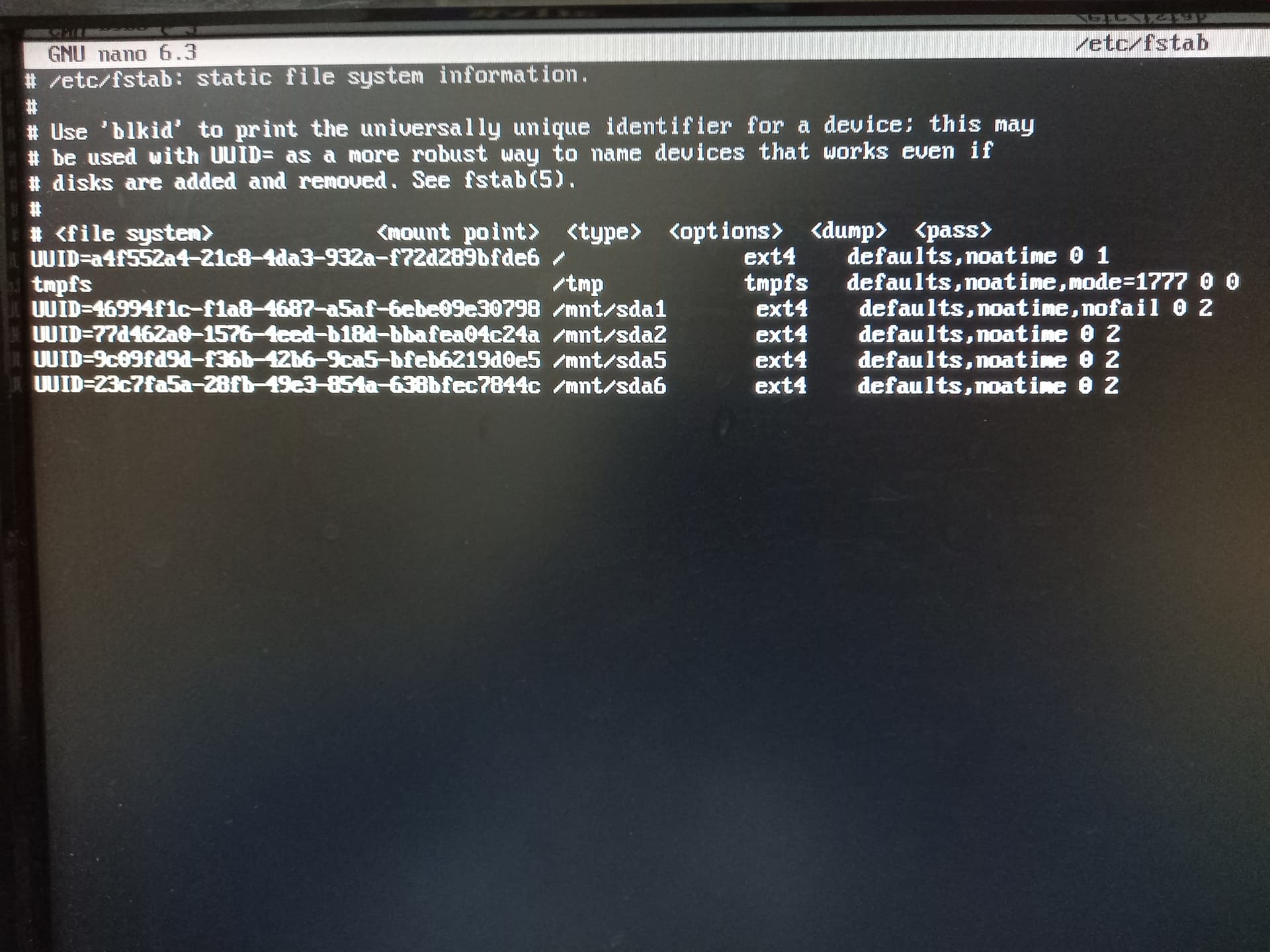
As you all might know that my previous topics included conflicts b/w hdd and ssd, now after the previous topic, I disabled HDD named sda after suggestion of @ricklinux . But now device is not booting up and is showing that it failed to mount sda. How should I proceed?
pebcak
August 8, 2022, 3:10pm
2
Looking at your /etc/fstab from the other topic here>> System trying to boot from drive which doesn't have root partition - #9 by PhoenixAwakened
I think you would need to comment them out. You could use a Live usb, mount your system partition and edit /etc/fstab as root.
Will my old live usb of Atlantis Neo will be of use ?
Okay, I am going to find up that usb…
From disabling, I meant that I completely formatted the HDD as there were no useful items there.
Also disabled hdd from BIOS menu.
pebcak
August 8, 2022, 3:20pm
7
Then you could completely remove all those entries referring to the patitions that no longer exist on your disk.
pebcak
August 8, 2022, 3:28pm
9
Boot up your live usb
Open a terminal
Run lsblk to identify your system partition: /dev/sdxy
sudo mount /dev/sdxy /mnt ## replace x and y with their actual valuessudo nano /mnt/etc/fstabRemove all the entries referring to the non-existent partitions
UUID=46994f1c-f1a8-4687-a5af-6ebe09e30798 /mnt/sda1 nofail      ext4    defaults,noatime 0 2
UUID=77d462a0-1576-4eed-b18d-bbafea04c24a /mnt/sda2       ext4    defaults,noatime 0 2
UUID=9c09fd9d-f36b-42b6-9ca5-bfeb6219d0e5 /mnt/sda5       ext4    defaults,noatime 0 2
UUID=23c7fa5a-28fb-49e3-854a-638bfec7844c /mnt/sda6       ext4    defaults,noatime 0 2
In turn, press Ctrl-O, Enter, Ctrl-X
Reboot.
Somehow, my usb is lost.
Is it possible to do the above steps from emergency mode which automatically comes up after failed boot process?
pebcak
August 8, 2022, 3:49pm
11
I guess you would need remount your root as rw:
mount -o remount,rw /
Then nano /etc/fstab and the rest as per above.
What should I do here ?
Do you mean that I should remove the lines which are for sda ?
pebcak
August 8, 2022, 4:01pm
13
Weren’t they the partitions on your HDD that you formatted?
I removed them now, and system booted up. Thanks for your extreme help.
Now I am back to my first issue which I had faced when I came here.
pebcak
August 8, 2022, 4:05pm
15
You are welcome!
Please consider checking the solution box under this post >> Device not booting up after disabling the HDD - #9 by pebcak
And enjoy your revived system
Yes I am aware of it. But something is remaining hence, I didn’t marked it up still. Though, your idea is solution. I am waiting for fixing in once and for all.
This is the topic :
My desktop runs with SSD+HDD setup, with OS being installed on SSD.
The problem which I am facing can be described as
Files on HDD which I wish to delete/move is not possible as the options to perform them are disabled by default.
2)Permissions are allowed for everyone, this is also not helping.
In settings I tried to switch the account type to standard, but the system denied it.
4)Every time when I start the computer, I need to authenticate the HDD in order to view files there.
What shoul…
Now if I do this :
Open a terminal. Run
sudo mkdir /mnt/{sda1,sda2,sda5,sda6} -p
Then, open /etc/fstab.
sudo nano /etc/fstab
at end this file, paste the following
UUID=a86c5980-4773-4932-90ef-ad0a97610e83 /mnt/sda1 ext4 defaults,noatime 0 2
UUID=77d462a0-1576-4eed-b18d-bbafea04c24a /mnt/sda2 ext4 defaults,noatime 0 2
UUID=9c09fd9d-f36b-42b6-9ca5-bfeb6219d0e5 /mnt/sda5 ext4 defaults,noatime 0 2
UUID=23c7fa5a-28fb-49e3-854a-638bfec7844c /mnt/sda6 ext4 defaults,noatime 0 2
Ma…
Then I will be back to the position from where you rescued. So … ?
pebcak
August 8, 2022, 4:11pm
18
You can’t just copy and paste those commands.
You would need to adapt it to the new partition scheme on your HDD (new UUIDs) and perhaps new mount points etc.
The solution in principle should work now as well.
So should I adopt that solution with newer UUIDs then.
Also, will there be same issues like this after that ?
pebcak
August 8, 2022, 4:17pm
20
Yes. And perhaps to new mountpoints if you make different ones.
No, I can’t see why it should if done properly.