Desktop color faded out

I have noticed that the colors on my asus vivobook have faded out in linux. I presume it happed after last few updates but cannot remember which one. I tried online help but it did not solve the problem.

Red color appear faded everywhere icon, wallpaper etc. while green appears darker. Night light is off and day-night setting is also off

Here are my system details.

Operating System: EndeavourOS 
KDE Plasma Version: 6.7.3
KDE Frameworks Version: 6.28.0
Qt Version: 6.11.1
Kernel Version: 6.18.39-1-lts (64-bit)
Graphics Platform: Wayland
Processors: 8 × Intel® Core™ i5-8250U CPU @ 1.60GHz
Memory: 12 GiB of RAM (11.6 GiB usable)
Graphics Processor: Mesa Intel® UHD Graphics 620
Manufacturer: ASUSTeK COMPUTER INC.
Product Name: VivoBook S14 X430UA
System Version: 1.0
```

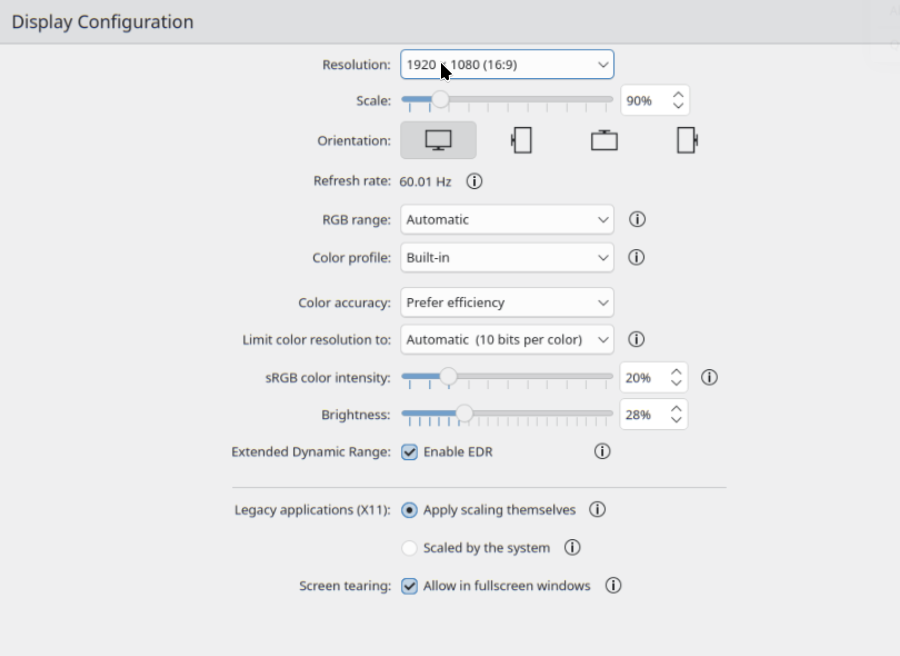
Could you please share a screenshot of your Plasma Display Configuration @ajaychat3?

You might try turning off Extended Dynamic Range (EDR)?

It has no effect. I tried both wayland and X11 but no effect.

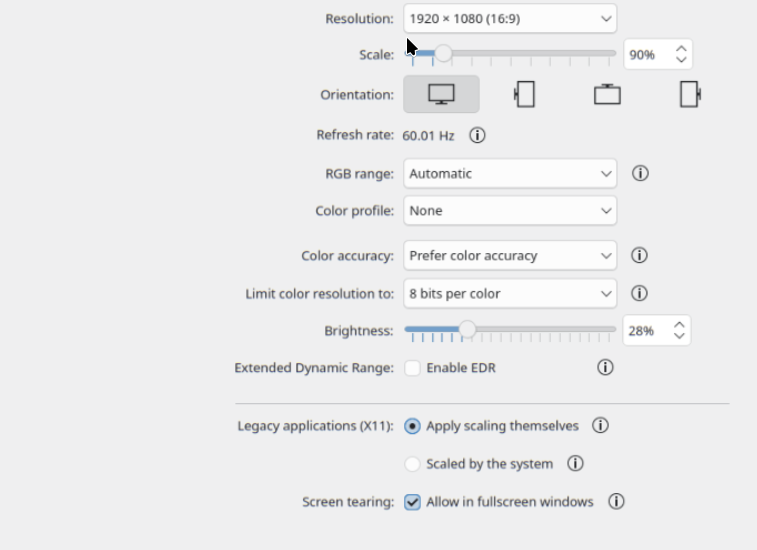
You might also adjust the Color profile option. Perhaps set it to None for now.

You might also try limiting your colour resolution to 8 bits per color, if you have that option. It’s possible 10 bits (per channel) might be beyond the range of your display.

I tried with color profile to None and color resolution to 8 and 6 bit. But no effect

I have been using these default setting for quite long and have not touched these unless a recent update made probably changes to it.

Just a thought, with all those changes in place, have you tried restarting the system?

It may not be necessary, but it’s actually suspicious that it’s not making any difference.

Just did a restart with these changes with no effect on colors

just to add that a few days back I accidentally deleted .config folder. Is this could be a reason although .config appears now

Try to set the color resolution to 16 bit if possible. And the color profile to built-in.

it was set as built-in with max of 10bit color before the above change

So I assume you can not set the limit color resolution to 16 bits using the drop down arrow ?

Yes there is no drop down option to set it to beyond 10bit with ‘color accuracy’ set to ‘prefer efficiency’. With ‘color accuracy’ set to ‘prefer color accuracy’ the max is 12 bit per color. I have tried all options so far

Since you deleted your config folder, my bet is it was one of your prior settings was different than the normal default. Just out of curiosity, have you tried upping the brightness or color intensity? 28%/20% seems pretty low to me, even for as laptop (though i know… trying to save battery) .

I agree with you that prior settings could be different. But increasing brightness and color intensity have no effect on color correction so I presume it is something else causing this. For me 28%/20% seems fine as otherwise it is too much brightness. Not intended for saving battery.

thanks

After Today’s’ system update, the colors correction has happened to a large extent. Do not know which package update caused this.

these are package updates for today

[2026-07-23T15:16:35+0530] [PACMAN] Running 'pacman -Syu'
[2026-07-23T15:16:35+0530] [PACMAN] synchronizing package lists
[2026-07-23T15:16:36+0530] [PACMAN] starting full system upgrade
[2026-07-23T15:17:30+0530] [ALPM] running 'traur.hook'...
[2026-07-23T15:17:30+0530] [ALPM] transaction started
[2026-07-23T15:17:30+0530] [ALPM] upgraded appstream (1.1.3-1 -> 1.1.4-2)
[2026-07-23T15:17:30+0530] [ALPM] upgraded appstream-qt (1.1.3-1 -> 1.1.4-2)
[2026-07-23T15:17:30+0530] [ALPM] upgraded bind (9.20.24-1 -> 9.20.26-1)
[2026-07-23T15:17:30+0530] [ALPM] upgraded cryptsetup (2.8.6-1 -> 2.8.7-1)
[2026-07-23T15:17:31+0530] [ALPM] upgraded firefox (152.0.6-1 -> 153.0-1)
[2026-07-23T15:17:31+0530] [ALPM] upgraded libe-book (0.1.3-20 -> 0.1.4-1)
[2026-07-23T15:17:31+0530] [ALPM] upgraded libmwaw (0.3.22-4 -> 0.3.23-1)
[2026-07-23T15:17:31+0530] [ALPM] upgraded libnm (1.56.1-2 -> 1.58.0-1)
[2026-07-23T15:17:32+0530] [ALPM] upgraded networkmanager (1.56.1-2 -> 1.58.0-1)
[2026-07-23T15:17:32+0530] [ALPM] upgraded thunderbird (152.0-1 -> 152.0.1-1)
[2026-07-23T15:17:32+0530] [ALPM] upgraded xfsprogs (7.0.1-1 -> 7.1.1-1)
[2026-07-23T15:17:33+0530] [ALPM] transaction completed


It’s a strange one. I can’t see anything in that list that would be related :thinking:

Have you booted from a LIVE Linux ISO to see if it isn’t the laptops LCD going borky?

I’ve seen LCD’s lose their vividness or brightness/contrast capabilities shortly before poof = no more LCD. OR it just works like that for years and years but hardware not software.

Have you done a reboot into your UEFI to see f the color issue is also affected there?
if:

it is = more likely a hardware issues

it is not = more likely a package update

plug it into an external display for the same reason to determine if it is hardware or package update
It is dual boot machine. So in Win11, the colors are perfect. The colors on linux login screen are also fine.