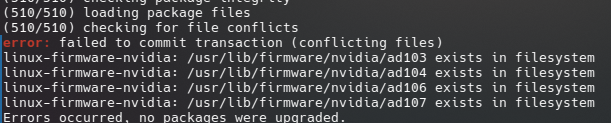
This has been a bit of an ongoing issue for about a month or two now, but I’ve been too busy with life to think of it much and didn’t realise how much time had passed. I was able to update everything that wasn’t from the AUR via pacman, so it wasn’t toooo big an issue, but obviously the AUR stuff gets updated as well and now stuff has been complaining about being out of date, and well… This happened today as well:
What can I do about this? Normally when I get the conflicting packages error it offers to boot one of them, but it has not done that here, which made me hesitant to just pick one and try and remove it, and I’m frankly too scared to touch anything with “nvidia” in the name without guidance lol
Now, the link above deals with the second half of your question but the first half here is simply a conflict. The output is truncated but which of these do you have installed and for what reason would another be getting pulled?
Thanks for letting me know, will do that in future!
So, I fixed the nodejs thing, turns out the nodejs-lts-jod was the dependency for balena etcher, After removing balena etcher, I was able to remove nodejs-lts-jod, and then it spent the next 25 minutes updating a frankly concerning amount of chromium mirrors. It has never done that before. I’m assuming electron is the issue.
I was mostly watching it just do that and eventually noticed my CPU at 80°C and climbing, and was gonna write here jokingly “hope those chromium mirrors don’t come back to haunt me”, and then my computer just full on froze, audio on a loop, completely unresponsive, still in jet engine mode. I long-pressed the power button to shut it off, I reckon it overheated.
I’m gonna give it a while to cool down and then turn it back on, and I hope to God it is okay.
Thanks!!! I’ll use one of those. Honestly noticed balena has been falling off, I think I was annoyed with it last I used it, so this list comes at a good timing!
I don’t think I’ll try yay -Syu for a while though until I figure out how to prevent the chromium mirror hell, my computer is fortunately fine, probably because only the AUR packages got updated and the main system was already up to date, but still bad experience. Issue is, I really think it’s electron, I can’t think of anything else on my PC that would use chromium, since my browser is a firefox fork. The only two programs I can think of that use electron are freetube and steam, freetube would probably be fine to boot, but I’m more hesitant with steam. Ugh
Thanks for the help either way, considering the two issues I’ve come here with are solved (even if a new one has spawned in their place haha)
While we’re here, I usually use X11, and I noticed I’m in a wayland session now (xppen driver stopped working and switching desktops doesn’t lag lol), and there is no more X11. This is a problem for me, mostly because of wayland’s previous issues with nvidia- especially seen in steam and fullscreen stuff.
Do you know if the Nvidia-Wayland stuff is fixed by now, and if it isn’t, is there any way I can return to X11?
Depending on the DE your using both Gnome and KDE are the only ones I’m aware of that come default for wayland now. X11 is still supported for now. There are other DE’s/WM’s that do no rely on wayland. Personally I use Openbox and XFCE
Thanks!!! Too bad, I was hoping the issues were resolved, but that would’ve been too much to expect from nvidia. I’ll do that and then kick electron off my computer and hope it fixes things
Huh, my browser doesn’t flicker either in fullscreen, curious. Freetube, Steam games and MPV Player stuff does. It stinks because this thing is meant to be a gaming PC, and Wayland is just better in X11 in so much, desktop stuff runs so much smoother. Oh well
@MyNameIsRichard ( @'ing to update both of you) I removed every electron version that didn’t cause a dependency conflict, and then updated again. it reinstalled electron36, and everything went through without a hitch. Not sure what all that was about.
Notably I did not update unityhub and instead deinstalled it, so for now I’m just gonna assume that it was either unityhub, electron32 or electron33.