I’m a bit frustrated because some videos are not played in my Firefox installation. As an example I’m not able to play product videos on German Amazon.
When I open the page with the product video I got the following error in Firefox console.
VIDEOJS: ERROR: (CODE:3 MEDIA_ERR_DECODE) The media playback was aborted due to a corruption problem or because the media used features your browser did not support.
Worked here (EOS/Cinnamon), and no ffmpeg-compat installed:
$ pacman -Qs ffmpeg
local/ffmpeg 2:7.1.1-2
    Complete solution to record, convert and stream audio and video
local/ffmpegthumbnailer 2.2.3-3
    Lightweight video thumbnailer that can be used by file managers
local/gst-libav 1.26.1-1
    Multimedia graph framework - libav plugin
$ pacman -Qs firefox
local/firefox 138.0.4-1
    Fast, Private & Safe Web Browser
local/firefox-i18n-de 138.0.4-1
    German language pack for Firefox
@DenalB, I use Firefox. The video from the Amazon link you provided plays fine for me. I’ve installed no Firefox-specific codecs.
EDIT: Though I do install ffmpeg and related for media creation/editing.
❯ pacman -Qs ffmpeg
local/ffmpeg 2:7.1.1-2
    Complete solution to record, convert and stream audio and video
local/ffmpeg4.4 4.4.5-5
    Complete solution to record, convert and stream audio and video
local/ffmpegthumbnailer 2.2.3-3
    Lightweight video thumbnailer that can be used by file managers
local/ffmpegthumbs 25.04.1-1 (kde-applications kde-multimedia)
    FFmpeg-based thumbnail creator for video files
local/gst-libav 1.26.1-1
    Multimedia graph framework - libav plugin
local/qt6-multimedia-ffmpeg 6.9.0-1
    FFMpeg backend for qt6-multimedia
❯
AMD CPU/GPU. Everything works fine with Arkenfox and ublockorigin
╰─❯  pacman -Qs ffmpeg
local/ffmpeg 2:7.1.1-2
    Complete solution to record, convert and stream audio and video
local/ffmpeg4.4 4.4.5-5
    Complete solution to record, convert and stream audio and video
local/ffmpegthumbnailer 2.2.3-3
    Lightweight video thumbnailer that can be used by file managers
local/ffmpegthumbs 25.04.1-1 (kde-applications kde-multimedia)
    FFmpeg-based thumbnail creator for video files
local/gst-libav 1.26.1-1
    Multimedia graph framework - libav plugin
local/qt6-multimedia-ffmpeg 6.9.0-1
    FFMpeg backend for qt6-multimedia
╰─❯  pacman -Qs firefox
local/firefox 138.0.4-1
    Fast, Private & Safe Web Browser
local/firefox-i18n-de 138.0.4-1
    German language pack for Firefox
Here is what ffmpeg packages are installed on my EOS Xfce.
··• pacman -Qs ffmpeg
local/ffmpeg 2:7.1.1-2
    Complete solution to record, convert and stream audio and video
local/ffmpeg4.4 4.4.5-5
    Complete solution to record, convert and stream audio and video
local/ffmpegthumbnailer 2.2.3-3
    Lightweight video thumbnailer that can be used by file managers
local/gst-libav 1.26.1-1
    Multimedia graph framework - libav plugin
And the Firefox packages.
··• pacman -Qs firefox
local/firefox 138.0.4-1
    Fast, Private & Safe Web Browser
local/firefox-i18n-de 138.0.4-1
    German language pack for Firefox
These are my changes.
// CSS-Anpassungen über "userChrome.css" ermöglichen
user_pref("toolkit.legacyUserProfileCustomizations.stylesheets", true); // Default = false

// Tabs immer im Hintergrund öffnen
user_pref("browser.tabs.loadDivertedInBackground", true); // Default = false

// Tabs per Doppelklick schließen
user_pref("browser.tabs.closeTabByDblclick", true); // Default = false

// Beim Schließen des letzten Tabs Firefox nicht beenden
user_pref("browser.tabs.closeWindowWithLastTab", false); // Default = true

// Intervall der Suche nach Updates für Add-ons auf 12h reduzieren
user_pref("extensions.update.interval", 43200); // Default = 86400

// PDFs beim Öffnen in den Temp-Ordner packen
user_pref("browser.download.start_downloads_in_tmp_dir", true); // Default = false

// Tastenkombination zum Beenden von Firefox deaktivieren
user_pref("browser.quitShortcut.disabled", true); // Default = false

// Übersetzungsfunktion deaktivieren
user_pref("browser.translations.enable", false); // Default = true

// Videos nicht in einer Sandbox abspielen
user_pref("media.rdd-ffmpeg.enabled", false); // Default = true
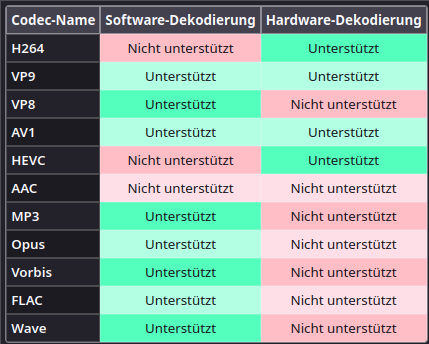
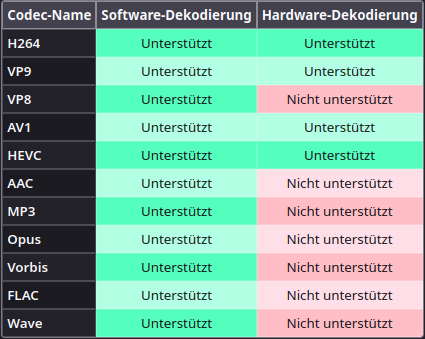
A few years ago, there was a bug in FF that would crash VAAPI, so media.rdd-ffmpeg.enabled was set to false. That bug, I think, has been fixed long ago. By enabling it, you effectively allow the system ffmpeg to do software decoding (as your changed table shows).
I believe even with Intel graphics this setting can now safely be enabled. (I’m typing from one such PC.)
For supported encodings, FF should use hardware decoding nevertheless. In your case, for H.264, VP9, AV1 and H.265 (HEVC).