Yes, I get this: (Still the 100%)
Battery 0: Full, 100%
Battery 0: design capacity 8948 mAh, last full capacity 8425 mAh = 94%
With BAT0 I just get 100
Yes, I get this: (Still the 100%)
Battery 0: Full, 100%
Battery 0: design capacity 8948 mAh, last full capacity 8425 mAh = 94%
With BAT0 I just get 100
Any kernel log acpi error messages during boot cycle?
dmesg | grep acpi
Humm… it seems yes. See the last line, “failed with error -12”
[ 0.040478] ACPI: LAPIC_NMI (acpi_id[0x01] high edge lint[0x1])
[ 0.040480] ACPI: LAPIC_NMI (acpi_id[0x02] high edge lint[0x1])
[ 0.040480] ACPI: LAPIC_NMI (acpi_id[0x03] high edge lint[0x1])
[ 0.040481] ACPI: LAPIC_NMI (acpi_id[0x04] high edge lint[0x1])
[ 0.040482] ACPI: LAPIC_NMI (acpi_id[0x05] high edge lint[0x1])
[ 0.040482] ACPI: LAPIC_NMI (acpi_id[0x06] high edge lint[0x1])
[ 0.040483] ACPI: LAPIC_NMI (acpi_id[0x07] high edge lint[0x1])
[ 0.040484] ACPI: LAPIC_NMI (acpi_id[0x08] high edge lint[0x1])
[ 0.139537] acpiphp: ACPI Hot Plug PCI Controller Driver version: 0.5
[ 0.269662] acpi PNP0A08:00: _OSC: OS supports [ExtendedConfig ASPM ClockPM Segments MSI EDR HPX-Type3]
[ 0.272025] acpi PNP0A08:00: _OSC: OS now controls [PCIeHotplug SHPCHotplug PME AER PCIeCapability LTR DPC]
[ 0.347241] clocksource: acpi_pm: mask: 0xffffff max_cycles: 0xffffff, max_idle_ns: 2085701024 ns
[ 1.682055] acpi PNP0C14:02: duplicate WMI GUID 05901221-D566-11D1-B2F0-00A0C9062910 (first instance was on PNP0C
14:01)
[ 1.682096] acpi PNP0C14:03: duplicate WMI GUID 05901221-D566-11D1-B2F0-00A0C9062910 (first instance was on PNP0C
14:01)
[ 1.688269] acpi PNP0C14:04: duplicate WMI GUID 05901221-D566-11D1-B2F0-00A0C9062910 (first instance was on PNP0C
14:01)
[ 1.693320] acpi PNP0C14:05: duplicate WMI GUID 05901221-D566-11D1-B2F0-00A0C9062910 (first instance was on PNP0C
14:01)
[ 1.842555] ucsi_acpi: probe of USBC000:00 failed with error -12
Have you read that?
May help avoid acpi errors, if you’re lucky 
Not sure they’re cause of battery state changes, but it’s possible
dmesg | grep -i acpi
Should give you more info in the output.
The battery charge information changes are handled by udev, which is part of systemd, you could try downgrading systemd to see if that changes anything?
This is not a plasma issue as sysfs has the wrong value.
Thanks Barry, the new dmesg parameters outputs this :
[ 0.000000] BIOS-e820: [mem 0x0000000070425000-0x0000000070425fff] ACPI NVS
[ 0.000000] BIOS-e820: [mem 0x0000000078987000-0x0000000078a03fff] ACPI data
[ 0.000000] BIOS-e820: [mem 0x0000000078a04000-0x0000000078ea2fff] ACPI NVS
[ 0.000000] efi: ACPI 2.0=0x789a0000 ACPI=0x789a0000 SMBIOS=0xf0000 SMBIOS 3.0=0xf0020 ESRT=0x7a735118 MEMATTR=0x
75ef0018
[ 0.007728] ACPI: Early table checksum verification disabled
[ 0.007731] ACPI: RSDP 0x00000000789A0000 000024 (v02 DELL )
[ 0.007734] ACPI: XSDT 0x00000000789A00B0 0000DC (v01 DELL CBX3 01072009 AMI 00010013)
[ 0.007739] ACPI: FACP 0x00000000789E00E0 000114 (v06 DELL CBX3 01072009 AMI 00010013)
[ 0.007743] ACPI: DSDT 0x00000000789A0218 03FEC3 (v02 DELL CBX3 01072009 INTL 20160527)
[ 0.007746] ACPI: FACS 0x0000000078EA1C00 000040
[ 0.007748] ACPI: APIC 0x00000000789E01F8 0000BC (v04 DELL CBX3 01072009 AMI 00010013)
[ 0.007750] ACPI: FPDT 0x00000000789E02B8 000044 (v01 DELL CBX3 01072009 AMI 00010013)
[ 0.007752] ACPI: FIDT 0x00000000789E0300 00009C (v01 DELL CBX3 01072009 AMI 00010013)
[ 0.007755] ACPI: MCFG 0x00000000789E03A0 00003C (v01 DELL CBX3 01072009 MSFT 00000097)
[ 0.007757] ACPI: SSDT 0x00000000789E03E0 001B26 (v02 CpuRef CpuSsdt 00003000 INTL 20160527)
[ 0.007759] ACPI: BOOT 0x00000000789E1F08 000028 (v01 DELL CBX3 01072009 AMI 00010013)
[ 0.007762] ACPI: SSDT 0x00000000789E1F30 001663 (v02 SaSsdt SaSsdt 00003000 INTL 20160527)
[ 0.007764] ACPI: HPET 0x00000000789E3598 000038 (v01 DELL\x CBX3 00000002 01000013)
[ 0.007766] ACPI: SSDT 0x00000000789E35D0 001A4C (v02 DELL\x CnlU_Rvp 00001000 INTL 20160527)
[ 0.007769] ACPI: SSDT 0x00000000789E5020 003132 (v02 INTEL xh_whld4 00000000 INTL 20160527)
[ 0.007771] ACPI: UEFI 0x00000000789E8158 000042 (v01 DELL\x CBX3 00000002 01000013)
[ 0.007774] ACPI: LPIT 0x00000000789E81A0 000094 (v01 DELL\x CBX3 00000002 01000013)
[ 0.007794] ACPI: SSDT 0x00000000789E8238 0027DE (v02 DELL\x PtidDevc 00001000 INTL 20160527)
[ 0.007796] ACPI: SSDT 0x00000000789EAA18 000AE4 (v02 DELL\x TbtTypeC 00000000 INTL 20160527)
[ 0.007798] ACPI: DBGP 0x00000000789EB500 000034 (v01 DELL\x CBX3 00000002 01000013)
[ 0.007800] ACPI: DBG2 0x00000000789EB538 000054 (v00 DELL\x CBX3 00000002 01000013)
[ 0.007803] ACPI: SSDT 0x00000000789EB590 0007C6 (v02 DELL\x UsbCTabl 00001000 INTL 20160527)
[ 0.007805] ACPI: SSDT 0x00000000789EBD58 006C05 (v02 DptfTa DptfTabl 00001000 INTL 20160527)
[ 0.007807] ACPI: DMAR 0x00000000789F2960 0000A8 (v01 INTEL EDK2 00000002 01000013)
[ 0.007810] ACPI: SSDT 0x00000000789F2A08 000144 (v02 Intel ADebTabl 00001000 INTL 20160527)
[ 0.007812] ACPI: NHLT 0x00000000789F2B50 00002D (v00 INTEL EDK2 00000002 01000013)
[ 0.007814] ACPI: BGRT 0x00000000789F2B80 000038 (v00 DELL CBX3 01072009 AMI 00010013)
[ 0.007822] ACPI: Local APIC address 0xfee00000
[ 0.040472] ACPI: PM-Timer IO Port: 0x1808
[ 0.040474] ACPI: Local APIC address 0xfee00000
[ 0.040478] ACPI: LAPIC_NMI (acpi_id[0x01] high edge lint[0x1])
[ 0.040480] ACPI: LAPIC_NMI (acpi_id[0x02] high edge lint[0x1])
[ 0.040480] ACPI: LAPIC_NMI (acpi_id[0x03] high edge lint[0x1])
[ 0.040481] ACPI: LAPIC_NMI (acpi_id[0x04] high edge lint[0x1])
[ 0.040482] ACPI: LAPIC_NMI (acpi_id[0x05] high edge lint[0x1])
[ 0.040482] ACPI: LAPIC_NMI (acpi_id[0x06] high edge lint[0x1])
[ 0.040483] ACPI: LAPIC_NMI (acpi_id[0x07] high edge lint[0x1])
[ 0.040484] ACPI: LAPIC_NMI (acpi_id[0x08] high edge lint[0x1])
[ 0.040537] ACPI: INT_SRC_OVR (bus 0 bus_irq 0 global_irq 2 dfl dfl)
[ 0.040538] ACPI: INT_SRC_OVR (bus 0 bus_irq 9 global_irq 9 high level)
[ 0.040540] ACPI: IRQ0 used by override.
[ 0.040541] ACPI: IRQ9 used by override.
[ 0.040542] Using ACPI (MADT) for SMP configuration information
[ 0.040543] ACPI: HPET id: 0x8086a201 base: 0xfed00000
[ 0.101601] ACPI: Core revision 20201113
[ 0.139283] PM: Registering ACPI NVS region [mem 0x70425000-0x70425fff] (4096 bytes)
[ 0.139283] PM: Registering ACPI NVS region [mem 0x78a04000-0x78ea2fff] (4845568 bytes)
[ 0.139537] ACPI: bus type PCI registered
[ 0.139537] acpiphp: ACPI Hot Plug PCI Controller Driver version: 0.5
[ 0.142062] ACPI: Added _OSI(Module Device)
[ 0.142063] ACPI: Added _OSI(Processor Device)
[ 0.142064] ACPI: Added _OSI(3.0 _SCP Extensions)
[ 0.142064] ACPI: Added _OSI(Processor Aggregator Device)
[ 0.142065] ACPI: Added _OSI(Linux-Dell-Video)
[ 0.142066] ACPI: Added _OSI(Linux-Lenovo-NV-HDMI-Audio)
[ 0.142067] ACPI: Added _OSI(Linux-HPI-Hybrid-Graphics)
[ 0.202311] ACPI: 10 ACPI AML tables successfully acquired and loaded
[ 0.207612] ACPI: [Firmware Bug]: BIOS OSI(Linux) query ignored
[ 0.213971] ACPI: Dynamic OEM Table Load:
[ 0.213976] ACPI: SSDT 0xFFFF9BBA0131C000 0000F4 (v02 PmRef Cpu0Psd 00003000 INTL 20160527)
[ 0.215026] ACPI: _SB.PR00: OSC native thermal LVT Acked
[ 0.215854] ACPI: Dynamic OEM Table Load:
[ 0.215858] ACPI: SSDT 0xFFFF9BBA01317800 0004FD (v02 PmRef Cpu0Ist 00003000 INTL 20160527)
[ 0.217064] ACPI: Dynamic OEM Table Load:
[ 0.217067] ACPI: SSDT 0xFFFF9BBA01319600 00011B (v02 PmRef Cpu0Hwp 00003000 INTL 20160527)
[ 0.218119] ACPI: Dynamic OEM Table Load:
[ 0.218123] ACPI: SSDT 0xFFFF9BBA01314800 000724 (v02 PmRef HwpLvt 00003000 INTL 20160527)
[ 0.219427] ACPI: Dynamic OEM Table Load:
[ 0.219432] ACPI: SSDT 0xFFFF9BBA01312800 0005FC (v02 PmRef ApIst 00003000 INTL 20160527)
[ 0.220636] ACPI: Dynamic OEM Table Load:
[ 0.220640] ACPI: SSDT 0xFFFF9BBA01323C00 000317 (v02 PmRef ApHwp 00003000 INTL 20160527)
[ 0.221999] ACPI: Dynamic OEM Table Load:
[ 0.221999] ACPI: SSDT 0xFFFF9BBA01328000 000AB0 (v02 PmRef ApPsd 00003000 INTL 20160527)
[ 0.226073] ACPI: EC: EC started
[ 0.226074] ACPI: EC: interrupt blocked
[ 0.238813] ACPI: EC: EC_CMD/EC_SC=0x934, EC_DATA=0x930
[ 0.238817] ACPI: _SB.PCI0.LPCB.ECDV: Boot DSDT EC used to handle transactions
[ 0.238819] ACPI: Interpreter enabled
[ 0.238859] ACPI: (supports S0 S3 S4 S5)
[ 0.238860] ACPI: Using IOAPIC for interrupt routing
[ 0.238903] PCI: Using host bridge windows from ACPI; if necessary, use “pci=nocrs” and report a bug
[ 0.239441] ACPI: Enabled 10 GPEs in block 00 to 7F
[ 0.250434] ACPI: Power Resource [BTPR] (off)
[ 0.251718] ACPI: Power Resource [USBC] (on)
[ 0.251860] ACPI: Power Resource [PAUD] (on)
[ 0.254569] ACPI: Power Resource [V0PR] (on)
[ 0.254722] ACPI: Power Resource [V1PR] (on)
[ 0.254869] ACPI: Power Resource [V2PR] (on)
[ 0.259569] ACPI: Power Resource [WRST] (on)
[ 0.269270] ACPI: Power Resource [PIN] (off)
[ 0.269656] ACPI: PCI Root Bridge [PCI0] (domain 0000 [bus 00-7e])
[ 0.269662] acpi PNP0A08:00: OSC: OS supports [ExtendedConfig ASPM ClockPM Segments MSI EDR HPX-Type3]
[ 0.272025] acpi PNP0A08:00: OSC: OS now controls [PCIeHotplug SHPCHotplug PME AER PCIeCapability LTR DPC]
[ 0.285292] ACPI: PCI Interrupt Link [LNKA] (IRQs 3 4 5 6 10 11 12 14 15) *0
[ 0.285401] ACPI: PCI Interrupt Link [LNKB] (IRQs 3 4 5 6 10 11 12 14 15) *1
[ 0.285479] ACPI: PCI Interrupt Link [LNKC] (IRQs 3 4 5 6 10 11 12 14 15) *0
[ 0.285556] ACPI: PCI Interrupt Link [LNKD] (IRQs 3 4 5 6 10 11 12 14 15) *0
[ 0.285633] ACPI: PCI Interrupt Link [LNKE] (IRQs 3 4 5 6 10 11 12 14 15) *0
[ 0.285709] ACPI: PCI Interrupt Link [LNKF] (IRQs 3 4 5 6 10 11 12 14 15) *0
[ 0.285786] ACPI: PCI Interrupt Link [LNKG] (IRQs 3 4 5 6 10 11 12 14 15) *0
[ 0.285864] ACPI: PCI Interrupt Link [LNKH] (IRQs 3 4 5 6 10 11 12 14 15) *0
[ 0.301640] ACPI: EC: interrupt unblocked
[ 0.301641] ACPI: EC: event unblocked
[ 0.301650] ACPI: EC: EC_CMD/EC_SC=0x934, EC_DATA=0x930
[ 0.301650] ACPI: EC: GPE=0x6e
[ 0.301651] ACPI: _SB.PCI0.LPCB.ECDV: Boot DSDT EC initialization complete
[ 0.301653] ACPI: _SB.PCI0.LPCB.ECDV: EC: Used to handle transactions and events
[ 0.301721] ACPI: bus type USB registered
[ 0.302686] PCI: Using ACPI for IRQ routing
[ 0.332485] pnp: PnP ACPI init
[ 0.332485] system 00:00: Plug and Play ACPI device, IDs PNP0c02 (active)
[ 0.332485] system 00:01: Plug and Play ACPI device, IDs PNP0c02 (active)
[ 0.332485] pnp 00:02: Plug and Play ACPI device, IDs PNP0b00 (active)
[ 0.332485] system 00:03: Plug and Play ACPI device, IDs INT3f0d PNP0c02 (active)
[ 0.332485] pnp 00:04: Plug and Play ACPI device, IDs PNP0303 (active)
[ 0.332485] pnp 00:05: Plug and Play ACPI device, IDs DLL08b9 PNP0f13 (active)
[ 0.332485] system 00:06: Plug and Play ACPI device, IDs PNP0c02 (active)
[ 0.332485] system 00:07: Plug and Play ACPI device, IDs PNP0c02 (active)
[ 0.332485] system 00:08: Plug and Play ACPI device, IDs PNP0c02 (active)
[ 0.336260] system 00:09: Plug and Play ACPI device, IDs PNP0c02 (active)
[ 0.342057] pnp: PnP ACPI: found 10 devices
[ 0.347241] clocksource: acpi_pm: mask: 0xffffff max_cycles: 0xffffff, max_idle_ns: 2085701024 ns
[ 0.413398] ACPI: AC Adapter [AC] (on-line)
[ 0.418734] ACPI: Lid Switch [LID0]
[ 0.422045] ACPI: Power Button [PBTN]
[ 0.422093] ACPI: Sleep Button [SBTN]
[ 0.424588] ACPI: Thermal Zone [THM] (25 C)
[ 0.527198] battery: ACPI: Battery Slot [BAT0] (battery present)
[ 1.682055] acpi PNP0C14:02: duplicate WMI GUID 05901221-D566-11D1-B2F0-00A0C9062910 (first instance was on PNP0C
14:01)
[ 1.682096] acpi PNP0C14:03: duplicate WMI GUID 05901221-D566-11D1-B2F0-00A0C9062910 (first instance was on PNP0C
14:01)
[ 1.688269] acpi PNP0C14:04: duplicate WMI GUID 05901221-D566-11D1-B2F0-00A0C9062910 (first instance was on PNP0C
14:01)
[ 1.693320] acpi PNP0C14:05: duplicate WMI GUID 05901221-D566-11D1-B2F0-00A0C9062910 (first instance was on PNP0C
14:01)
[ 1.842555] ucsi_acpi: probe of USBC000:00 failed with error -12
[ 3.502472] ACPI: Video Device [GFX0] (multi-head: yes rom: no post: no)
I will try to downgrade systemd later, if I can’t find a solution. Thanks for the tip.
It’s quite interesting. I remember I have a few months ago the acpi_osi=Linux parameter, but at the moment I don’t have it (Maybe I replaced my grub config in a moment by a pacnew version).
I need to go now, but I’ll test this this evening and will report if any change. Thanks.
So… a bit of more info:
I have play with the grub, adding acpi_osi=Linux but no change.
I also try acpi_rev_override=3 … same.
Now when I boot with acpi=off - disabling acpi totally, I have a slower boot - and Plasma takes forever to appear BUT there is a change: the battery this time is just not recognized by the system. In the systray the icon is “no battery”… even if the laptop runs on battery or if I connect it to AC power.

So… no, not yet the solution
Try something like:
acpi_osi='Windows 2017'
or
acpi_osi=! acpi_osi='Windows 2017'
btw i think
acpi=off
is always bad idea, except for debug 
@anon53396576 @otherbarry @keybreak … I found the answer !!  And the answer is… I AM STUPID
My Dell laptop is connected to a dock through a USB-C cable. I take from the dock the LAN connection, I connect a second screen and few external SSD drives, as an audio Jack. I never paid attention that when connected, my laptop ALSO get the AC power from the dock, even if I always plug also the AC power in the laptop itself.
So when I disconnect the AC power from the laptop, it shows the battery still charged and connected because the dock is still powering the laptop.
When I tried the USB live sooner (yesterday) all was working because the dock was not connected. Simple as this.
Now without AC and without the dock connected, the battery status is correct (in fact it always was correct).
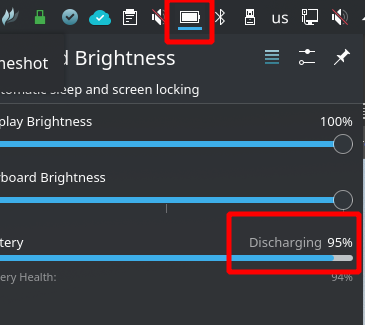
So, sorry for wasting your time but thanks for your tips and help. I have learn from them. Can’t check one of your post as a “Solution” but thanks to all of you.