These were my partitions

97.66 gb NTFS for endevourOS
19.53 gb FAT32 for the EFI system partition
I feel like this could work but idk what to tweek
It installed when i flagged the EFI and endevourOS partition as boot , sadly after rebooting into my ssd it still said “invalid partition!” I’m probably gonna give up on endevourOS if I can’t find a solution for this
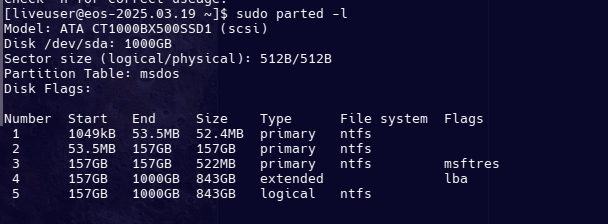
can you please report
sudo parted -l under GPT you can have more partitions.
I didn’t even know MBR had a partition limit thank you for bringing that to my attention
In Legacy Bios Mode you do not need EFI, and 19gb is way to big 2GB is recommended. But you are on MBR/legacy/Bios no need for EFI at all. Second… NTFS is not a supported filesystem to install Linux in general.
On legacy mode you only need any Linux compatible partition with extra per example market bit the boot flag.
Thanks for the reply I’ll be sure to keep that in mind and update you
see more with
I still can’t boot windows with this even though 3 primary partitions with an extended partition and a logical partition inside it should not be stopping the boot (I’m trying to access windows to backup my drive to convert it to GPT) , do I just need to get rid of another partition?
I checked my BIOS version and apparently it’s extremely outdated…whoops- , that might be why I’m running into so many problems 
The BIOS version is A01 btw
Usually you should not need to convert to gpt
we do not even know if your system supports uEFI.
Think it does support UEFI
Type: Laptop System: Dell product: Latitude E6330 v: 01
    serial: <superuser required> Chassis: type: 9 serial: <superuser required>
  Mobo: Dell model: 0NG17W v: A00 serial: <superuser required>
    uuid: <superuser required> UEFI: Dell v: A01 date: 04/25/2012
The first few attempts at installing endevourOS I had launched the installer from my usb from the UEFI option and not legacy mode , but it just showed a blackscreen when I tried to launch endevourOS after installation from UEFI so idk might just be a BIOS issue since the BIOS updates effect operating systems
I could try to flash update my BIOS with another usb but it’s risky since I’m jumping from A01 to A20
I could try running “bootrec /fixboot” from windows 10 on a USB that seems like it would fix it , or atleast give me access to windows on my ssd
Tried the “Boot existing OS” option when I boot from usb in legacy mode (this is on the usb that has endeavourOS) , I chose the partition that had windows on it , the error message reads : "Windows failed to start. A recent hardware or software change might be the cause. To fix the problem
If you do not have this disc , contact your system administrator or computer manufacturer for assistance
File : BOOT/BCD
Status : 0xc000000f
Info : The boot configuration for your PC is missing or contains errors"
Tried to boot into a windows 10 usb to troubleshoot it with that but windows couldn’t fix the issue , so I’ll just try to flash update my bios
Update : BIOS refuses to update…? , even when I type /forceit in DOS it just restarted without updating , I then got a bootable windows 10 usb and tried to check my C drive for errors , and from what I could tell when endeavourOS was trying to install itself it tried to write itself in my boot config file but because my BIOS is very outdated it just ended up not working , I think I’ll have to manually fix my boot file , I’ve already tried the “Repair startup” option on the windows 10 USB , but it just said “Windows couldn’t fix your issue” , then I tried from cmd in the usb these commands :
Most of these were responded with “missing operation” which leads me to believe that the boot file is just rendered unusable at the moment
If anyone else has any info or anything they would want me to try let me know
bcdboot C:\Windows /s C: /f BIOS if legacy install…