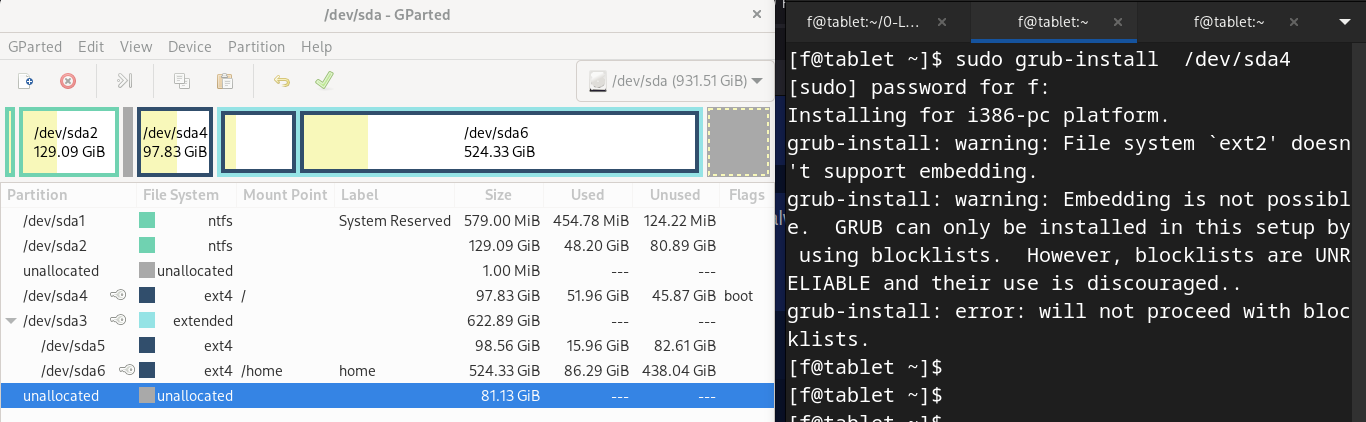
If you are referring to this:
It means “finish the command with whatever is specifically appropriate for your system”.
If you are referring to this:
It means “finish the command with whatever is specifically appropriate for your system”.
Okay Thank you!!
Edit: how did you find this out? It’s not in the man page.
Check out the ArchWiki page: https://wiki.archlinux.org/title/GRUB
If you have an x86 box with an ESP mounted at /boot/efi/ and you run the command from within the booted installation while the ESP is mounted, then sudo grub-install may be enough.
It is said that the --no-nvram option tells the grub-installer not to modify the motherboard’s NVRAM.
What will make it more secure to do the grub-install if the option is added.
Usually this is used for installs on mobile media to not add a boot entry for these devices to the motherboard NVRAM but on “re”-installing the grub-files into the system we do not need to rewrite the entry on the NVRAM.
NVRAM can get full or any non-working write to it can cause inconsistency…
(will this thread get the same as what-are-you-listening-to-right-now ? )
Do you mean almost 9000 posts long? 
Well, that thread is youtube for linux users… 
I got the update for grub one day next to my post and ran the recommended command, everything fine here, thanks
This is proof that something went wrong with handling the “grub incident” (as it is historically called  ), unfortunately.
IMHO, after calculating assessment, the whole confusion may only end if EnOS changes the official policy on grub (package) update to this:
When there is an update of the
grubpackage, no extra action is required (no re-installing bootloader, etc.).
If after reboot, the system hangs, troubleshoot as always, for example chroot and repair whatever is broken.
Seriously. 
In the case of EFI, however, the grub-install command is sufficient by default, as far as I know.
In many cases yes, if the install was made in the “default” way and hasn’t been changed since.
But having a way to add the system specific parameters to grub-install in a configuration file could help the maintenance after install.
This might be a dumb question:
How can I do this when running EndeavourOS as a guest in a virtualbox VM?
Also, is there a way to chroot into that same VM to repair an installation?
You can use the ISO file to boot the VM and then the repair is about the same operations as on real hardware.

 111 posts!

I never had any problem on 5 systems which 4 are dualboot Windows and one is Nvidia also. 
yes i do not start the post because of any issue… only to remind users on the fact that there could be an issue in some cases or in the case grub package updates… now ma not but in the future may yes and ion the past it… does cause an issue
So you’re saying you didn’t have problems with multiboot without taking the steps recommended in the forum thread?
I noticed grub 2:2.06.r440.g4de39a2af-1 is available this morning. Follow this thread and grub drama of the past few months, am I correct in assuming it is recommended to run the suggested commands again after this update?
sudo grub-install --no-nvram
sudo grub-mkconfig -o /boot/grub/grub.cfg
If you have a UEFI system, those are most likely the correct commands.
For a legacy system, it should be /dev/sda, not /dev/sda4. grub is installed to a disk, not a partition on a legacy system.