Asus Laptop - Drivers and Gaming Tools

Hi there!

As a newbie user of Arch Linux Distro like this one, I’m a little bit confused on how I can get infos about what to install for gaming. That’s why I come here for some help and advices. So, I hope you’ll be forgiving with my topic and questions :thumbsup:

I’ll try to give you the most informations to let you know why I’m confused.

I have a not so recent laptop computer for gaming. It’s a Asus TUF Gaming FX705DT, bought in 2019:

  • CPU: AMD Ryzen 5 3550H
  • RAM: 32GB (I changed the sticks)
  • GPU-1: AMD Radeon Vega 8 Graphics (integrated)
  • GPU-2: NVIDIA GeForce GTX 1650 (discrete)
  • SSD + NVMe

In CPU-X, CPU and GPUs are like this:

  • CPU: AMD Ryzen 5 3550H with Radeon Vega Mobile Gfx
  • GPU-1: Picasso/Raven 2 [Radeon Vega Series / Radeon Vega Mobile Series]
  • GPU-2: TU117M [GeForce GTX 1650 Mobile / Max-Q] (actual driver: 595xx (the default one, installed when upgrading))

As I’m from Windows 11, and because I’m tired of this system, I decided to switch to Linux for gaming. So, on my main computer, I’m on CachyOS and it works very well. But, with my Laptop, CachyOS seems not compatible (as said by some AI, ie. ChatGPT) and these AI offered me to switch to Pop!_OS or EndeavourOS

As I’m on CachyOS on the other computer, I decided to stay on Arch Linux system, so I installed EndeavourOS on this Laptop. But, there’s no option to install gaming tools/drivers like in CachyOS. I tried to search some informations to try on my own but it’s not as easy as I thought.

Why:

  • on CachyOS, for my laptop, I had to switch the default drivers to 580xx
  • for EndeavourOS, it seems not to be mandatory
  • on CachyOS, the games are not switching correctly between the 2 GPUs. No Man’s Sky runs on the VEGA, and I can’t switch to the NVIDIA GPU (even in game, or with some custom launch options). Nothing worked. That’s why AI invited me to switch to an another distro, less kernel aggressive (as BORE is).

So, today, I’m on EndeavourOS, but I don’t know what to install about drivers (CPU/GPUs). I tried to read and understand some topics I found:

There are too much informations. For me. And I’m lost :sweat_smile:


Next, Gaming Tools (Lutris / Heroic Games / Steam)

On CachyOS, there are automatic install button through CachyOS Hello, so it’s easy :laughing:

But, on EndeavourOS, what should I really have to install?
I’ve found lots of commands and differents tools and dependencies, and… I’m lost too, because I don’t know if all dependencies are mandatory


So, I’m asking the community for some help on what I have to install for gaming on this laptop.

Note that all your tips and advices will be kept on VSCodium. So I will be a little more autonomous :thumbsup:

I’m not afraid about modifying or creating files, etc. I’m just not a lot comfy enough with Linux on its own and some questions you may ask me to obtain informations or details. I’ll try to give you all what is needed if necessary.

I thank you a lot for your help and hope we will have a respectful discussion about my “Bottle in the ocean”! :smiley:

Best Regards,

V.

GTX 1650 should use what nvidia-open provides according to Nvidia (see this).

You could try command eos-hwtool --recommended as well.

Edit: see also the Arch wiki about ASUS laptops, they may need additional drivers and settings.

Hi @manuel,

Thanks a lot for you reply :slight_smile:

I tried your command eos-hwtool --recommended and I got this:

Device: NVIDIA Corporation  - TU117M [GeForce GTX 1650 Mobile / Max-Q] 
Profiles:
        nvidia_open
Device: Advanced Micro Devices, Inc. [AMD/ATI]  - Picasso/Raven 2 [Radeon Vega Series / Radeon Vega Mobile Series] 
Profiles:
        amd_amdgpu

Next, I took a look on the link you gave me. And this is about 75 nvidia GTX 1650 GPUs that are listed. So, I searched for Vendor ID with this command: lspci -nn | grep VGA and I obtained these 2 lines:

01:00.0 VGA compatible controller [0300]: NVIDIA Corporation TU117M [GeForce GTX 1650 Mobile / Max-Q] [10de:1f91] (rev a1)
05:00.0 VGA compatible controller [0300]: Advanced Micro Devices, Inc. [AMD/ATI] Picasso/Raven 2 [Radeon Vega Series / Radeon Vega Mobile Series] [1002:15d8] (rev c2)

Then I searched for the VendorID 1f91:

NVIDIA GeForce GTX 1650	1F91	J
NVIDIA GeForce GTX 1650 with Max-Q Design	1F91 103C 863E	J
NVIDIA GeForce GTX 1650 with Max-Q Design	1F91 103C 86E7	J
NVIDIA GeForce GTX 1650 with Max-Q Design	1F91 103C 86E8	J
NVIDIA GeForce GTX 1650 with Max-Q Design	1F91 1043 12CF	J
NVIDIA GeForce GTX 1650 with Max-Q Design	1F91 1043 156F	J
NVIDIA GeForce GTX 1650 with Max-Q Design	1F91 1414 0032	J
NVIDIA GeForce GTX 1650 with Max-Q Design	1F91 144D C822	J
NVIDIA GeForce GTX 1650 with Max-Q Design	1F91 1462 127E	J
NVIDIA GeForce GTX 1650 with Max-Q Design	1F91 1462 1281	J
NVIDIA GeForce GTX 1650 with Max-Q Design	1F91 1462 1284	J
NVIDIA GeForce GTX 1650 with Max-Q Design	1F91 1462 1285	J
NVIDIA GeForce GTX 1650 with Max-Q Design	1F91 1462 129C	J
NVIDIA GeForce GTX 1650 with Max-Q Design	1F91 17AA 229F	J
NVIDIA GeForce GTX 1650 with Max-Q Design	1F91 17AA 3802	J
NVIDIA GeForce GTX 1650 with Max-Q Design	1F91 17AA 3806	J
NVIDIA GeForce GTX 1650 with Max-Q Design	1F91 17AA 3F1A	J
NVIDIA GeForce GTX 1650 with Max-Q Design	1F91 1A58 1001	J

My model seems not listed as 10de ModelID is not in the list.

So, if I resume, my Laptop is not compatible with none of “Gaming” Linux distro? Or just Arch-based ones? Am I stuck to keep this computer running W10/11? :cry:

Or maybe I’m misunderstanding the informations I found! :smiley:

Thanks for all :thumbsup:

Regards,

V.

10de is the vendor id, meaning NVIDIA.
1f91 is the device id for your card. This information means nvidia-open is the recommended driver package for the card, not nvidia-580xx-dkms.

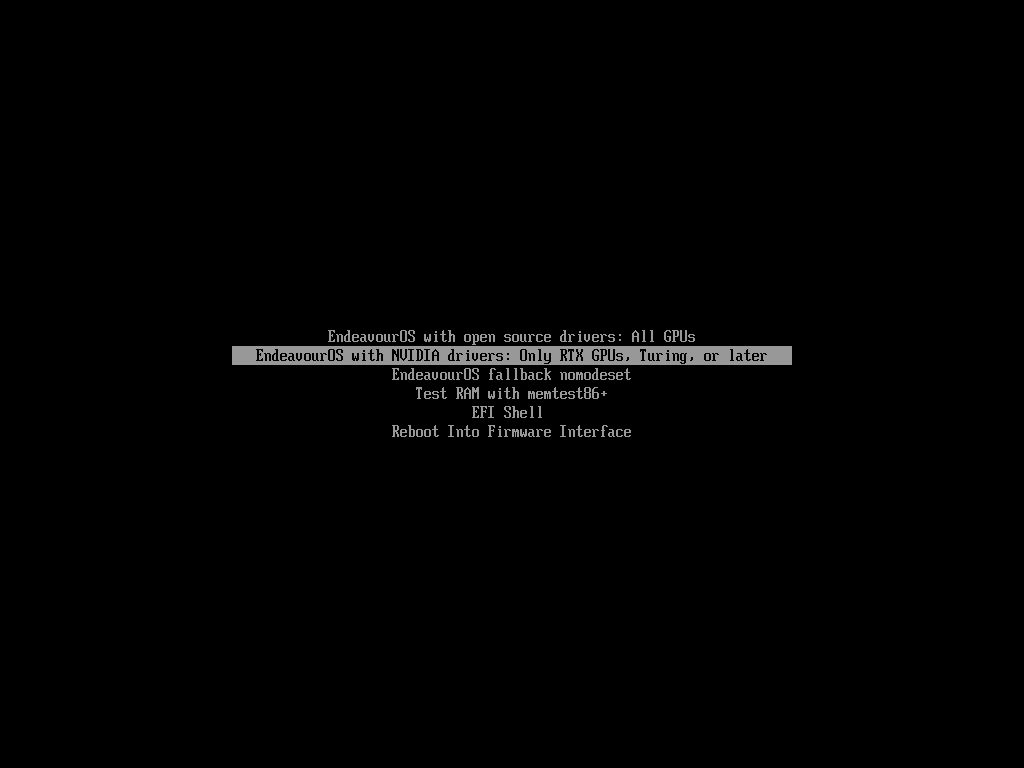
During the initial install, when booting up the Live ISO, the first menu prompted you to specify whether or not you were using an NVIDIA GPU (Turing or later):

If you selected the NVIDIA option, and completed the install, it would have set up the nvidia-open drivers for you on the resulting installation.

During the installation, you would have had the choice to install the Intel or AMD microcode packages (optional, but usually recommended).

Then for gaming, for Steam:

yay -Syu steam

You’ll also need the 32bit version of nvidia-utils (Vulkan support) which is often needed by Steam games:

yay -Syu lib32-nvidia-utils

That should have you up and running for (Steam) games. Other things are now optional, like custom versions of Proton, or Porton helpers, or other launchers like Lutris, etc.

Hi @Bink !

Yep, this is the option I selected to install EndeavourOS on my laptop. So, if I understand you, I’m all good, and it comforts me in the choice I made during the installation. Thanks so much.

However, about the microcode, I don’t remember the installer asked me to choose between AMD or Intel, sorry :confused:

Maybe there’s a command to check and fix?

So now, for Lutris, Heroic and Steam, I just have to install lib32-nvidia-utils, then steam/lutric/heroic only. No specific dependencies needed. So simple huh huh

Ok, so, I’ll try, and give a feedback soon :wink:

That’s cool, and thanks again :thumbsup:

Regards,

V.

There’s a step-by-step guide for Arch-based distros on Asus gaming laptops over here.

I followed their guide, but I only installed the asusctl and ROG-control-center (for the battery charge limit). The control panel lets you switch between graphics chips and other functions.

There are additional steps for the discrete graphics card drivers.

You can check if you have the microcode installed with:

yay -Q amd-ucode

To install it (if it’s not installed):

yay -Syu amd-ucode

I’m using Lutris for some things, and it’s pretty straight forward. I guess how you set it up, depends on how you plan to use it, as it serves a number of functions.

I’ve not used Heroic.