@UncleSpellbinder , it looks like they’ve updated to the headphone icon with the wave for Audacity 4.
I will use this for YAMIS.
@UncleSpellbinder , it looks like they’ve updated to the headphone icon with the wave for Audacity 4.
I will use this for YAMIS.
The easiest way to update is to check out the git repository into the icon folder and set up an automatic pull job. Always up to date.
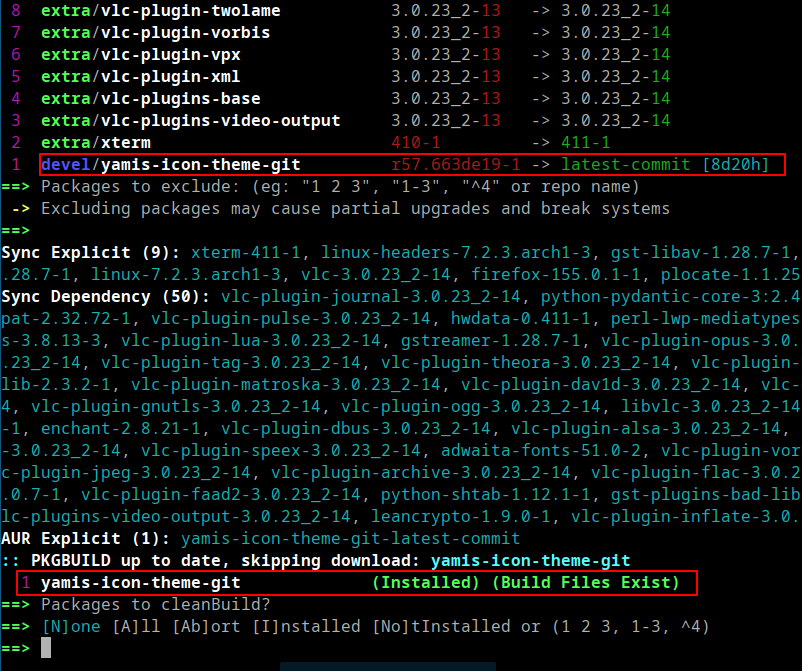
@swh , it looks like checking or updating the YAMIS AUR package requires the yay --devel option since it’s a VCS/development (-git) package.
yay -Qua --devel

yay -Syu --devel
Thanks to Gemini, I learned something new today! 
@dirn, nice, good to know 
On my system, the output of yay --devel looks like this
 yay -Qua --devel
cantata-git 3.5.0.r0.g3ab7cf0-1 -> latest-commit [202d11h]
linecast 2.3.2-1 -> 2.3.3-1 [11h50m]
As you can see, these are the only two packages I use from the AUR, which is VCS/development git-based.
My usual procedure for updating your YAMIS icons is typically as follows:
I only did this step once. So that your icons on the computer.
git clone https://bitbucket.org/dirn-typo/yet-another-monochrome-icon-set/src/main/
Klone nach 'main'...
Empfange Objekte: 100% (6637/6637), 4.67 MiB | 10.35 MiB/s, fertig.
Löse Unterschiede auf: 100% (4143/4143), fertig.
Then I’ll go to your main folder and update with a simple git pull
▌▌ …/main main 11:34
❯ git pull
Bereits aktuell.
Then copy into the icon direction. Ready. Works. Simple 
EDIT: But there’s something that really bothers me. dirn@virtualbox?? Are you on a Windows host? 
Oh you use git clone. That works too.
Lol! That is my EOS LXQT on VM. For testing purpose. Host is EOS KDE 
Yeah i just tried it once. Works great
Gemmi is ok but you have to know what you are looking for and have some understanding of it, if I followed it blindly I would have a game that would freeze every few seconds. Tbh it has been more helpful with it’s advise as not to do.
That’s true.
Btw, my main usage of gemini, copilot and co is to improve my english wording. If suddenly my reply sounds too AI or perfect grammar it means that it’s an AI enhanced
Right now I’m using none. You guys obviously will notice the difference 
Well it ain’t needed then,you probably better at English than me lol
Latest update is out! Enjoy! 
    - added
        - apps/Cisco_Packet_Tracer_9.0.1
        - apps/GameConqueror
        - apps/RuneLite
        - apps/ScanTailor
        - apps/appimagekit-chiaki
        - apps/appimagekit-drawpile
        - apps/appimagekit-rpcs3
        - apps/audacity4portable
        - apps/ausweisapp
        - apps/azahar
        - apps/chiaki
        - apps/clash
        - apps/com.github._4lex4.ScanTailor-Advanced
        - apps/com.mtkennerly.ludusavi
        - apps/com.orama_interactive.Pixelorama
        - apps/com.parsecgaming.parsec
        - apps/com.steamgriddb.SGDBoop
        - apps/com.yubico.yubioath
        - apps/de.bund.ausweisapp.ausweisapp2
        - apps/dev.goats.xivlauncher
        - apps/dev.twilitrealm.dusk
        - apps/drawpile
        - apps/dusk
        - apps/dusklight
        - apps/f3d
        - apps/feishin
        - apps/flycast
        - apps/imhex
        - apps/io.github.f3d_app.f3d
        - apps/io.github.streetpea.Chiaki4deck
        - apps/io.github.vikdevelop.SaveDesktop
        - apps/me.amankhanna.opendeck
        - apps/net.drawpile.drawpile
        - apps/net.rpcs3.RPCS3
        - apps/net.runelite.RuneLite
        - apps/net.werwolv.ImHex
        - apps/nifskope
        - apps/org.azahar_emu.Azahar
        - apps/org.easyrpg.player
        - apps/org.flycast.Flycast
        - apps/org.niftools.NifSkope
        - apps/org.ryujinx.Ryujinx
        - apps/org.scantailor.ScanTailor
        - apps/org.zdoom.UZDoom
        - apps/packettracer
        - apps/parsec
        - apps/parsecd
        - apps/pixelorama
        - apps/re.chiaki.Chiaki
        - apps/rpcs3
        - apps/runelite-launcher
        - apps/runelite
        - apps/ryujinx
        - apps/scantailor-advanced
        - apps/scantailor
        - apps/uzdoom
        - apps/yubikey-neo-manager
        - apps/yubikey-personalization-gui
        - apps/yubikey-piv-manager
        - apps/yubioath
        - mimetypes/application-x-audacity
    - updated
        - apps/systemsettings
        - preferences/preferences-system
Thank you GOAT of Icons 
After Plasma rolled out all its updates this week, you followed right behind
You’re welcome mate
Hello,
I got a new one:
Waywallen, Icon=org.waywallen.waywallen
Thx in advance.
Hey folks, regarding the ProtonVPN tray icons, I’m removing the three previously mentioned icons in the upcoming release since they shouldn’t be used exclusively for ProtonVPN. I suggest using Plasma Panel Colorizer to map them instead.
Here are the current ProtonVPN tray icons to use:
Yeah, that’s what I’d do, too. Just like with my Tuta Tray icon. So users who don’t want a panel colorizer just won’t have a monochrome system tray?
Technically yes, but customization is left to the user via Plasma Panel Colorizer or custom symlinks. This ensures I don’t force a generic state (like state-connected) to map solely to ProtonVPN, which is intentional from the icon theme’s standpoint.
Edit:
Reverse-engineering tray icons for uninstalled apps is a hassle, and embedded icons complicate things further. A faster approach is to check other icon themes that already include them, though the easiest method of all is simply using Plasma Panel Colorizer.
Ok I see. Thank you!
Since Panel Colorizer really offers so many options for adjusting your settings to match the panel, I think that’s the right choice.
Can I make a request for missing icons?
Plezy
ClamUI (io.github.linx_systems.ClamUI)
Syncthing-tray (io.github.martchus.syncthingtray)
Thanks for an awesome icon set!
Sure! I will add these into the upcoming release.