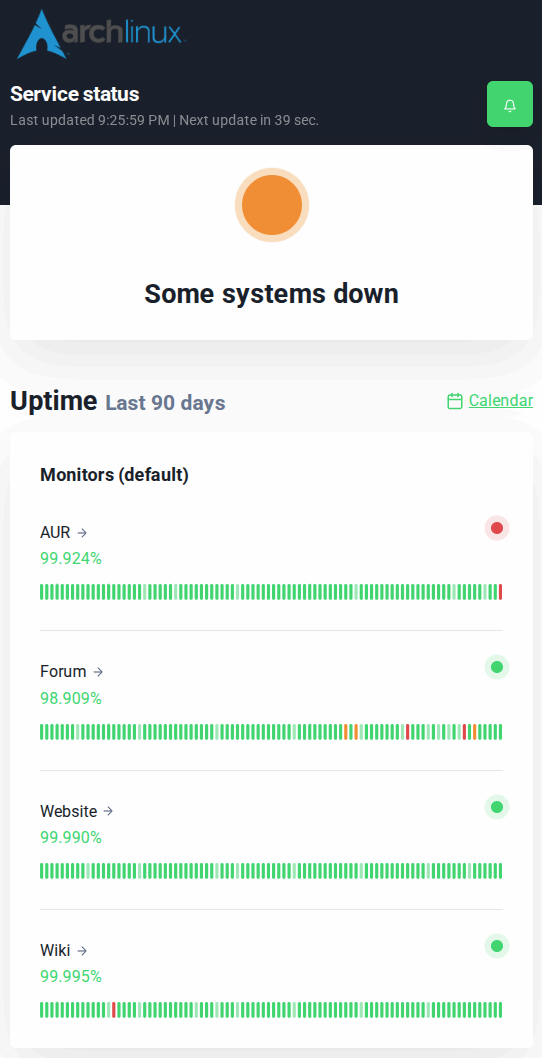
Hey all. I just wanted to check to see if yay was down for anyone else right now. Currently I’m getting the following when searching a package on yay:
[byte@cain ~]$ yay -Ss test
 -> Error during AUR search: 1 error occurred:
        * request failed: Get "https://aur.archlinux.org/rpc?arg=test&by=name-desc&type=search&v=5": EOF
I tried a full upgrade and got a very similar response to this. I was able to reach the website just fine but maybe I’m misunderstanding the issue.
Thank’s all for the feedback.
AUR seems to be down at the moment.
─❯ yay
[sudo] password for wombat:
:: Synchronizing package databases...
 endeavouros is up to date
 core                                            124.5 KiB   484 KiB/s 00:00 [-------------------------------------------] 100%
 extra                                             8.2 MiB  19.6 MiB/s 00:00 [-------------------------------------------] 100%
 multilib                                        128.0 KiB   490 KiB/s 00:00 [-------------------------------------------] 100%
 cidercollective is up to date
 chaotic-aur                                     653.0 KiB  1223 KiB/s 00:01 [-------------------------------------------] 100%
:: Searching AUR for updates...
:: Searching databases for updates...
 -> 1 error occurred:
	* request failed: Get "https://aur.archlinux.org/rpc?arg%5B%5D=darkly&arg%5B%5D=fooyin&arg%5B%5D=freetube-bin&arg%5B%5D=furmark&arg%5B%5D=geekbench&arg%5B%5D=gpu-viewer&arg%5B%5D=klassy&arg%5B%5D=lib32-gst-plugins-base-libs&arg%5B%5D=lib32-gstreamer&arg%5B%5D=librewolf-bin&arg%5B%5D=libvgm-git&arg%5B%5D=megasync&arg%5B%5D=plasma6-applets-appgrid&arg%5B%5D=qtutilities&arg%5B%5D=sysmontask&arg%5B%5D=tageditor&arg%5B%5D=tagparser&arg%5B%5D=traur&arg%5B%5D=upscayl-bin&type=info&v=5": EOF
─❯
The AUR is down currently. In the interim, you can still update the system’s native packages in two ways:
sudo pacman -Syu
eos-update
Both commands will skip AUR packages and update from core/extra repos.
You’re a legend. I was trying to look for a package and when I saw it didn’t work I was like “Ah, I might be waiting a minute.”
Glad to know it’s not just a me issue though! I’m going to put this in my back pocket in case I ever need to update packages when it’s down.