it ends:Mar 11 07:42:34 endeavour systemd-timesyncd[584]: Contacted time server 209.177.158.85:123 (2.arch.pool.ntp.org).
Mar 11 07:42:34 endeavour systemd-timesyncd[584]: Initial clock synchronization to Wed 2026-03-11 07:42:34.559065 MST.
Mar 11 15:41:30 endeavour systemd[1]: Stopping Network Time Synchronization…
Mar 11 15:41:30 endeavour systemd[1]: systemd-timesyncd.service: Deactivated successfully.
Mar 11 15:41:30 endeavour systemd[1]: Stopped Network Time Synchronization.
Mar 11 15:41:33 endeavour systemd[1]: Starting Network Time Synchronization…
Mar 11 15:41:33 endeavour systemd[1]: Started Network Time Synchronization.
Mar 11 15:41:43 endeavour systemd-timesyncd[29835]: Timed out waiting for reply from 23.186.168.124:123 (0.arch.pool.ntp.org).
Mar 11 15:41:43 endeavour systemd-timesyncd[29835]: Contacted time server 142.202.190.19:123 (0.arch.pool.ntp.org).
Mar 11 15:41:43 endeavour systemd-timesyncd[29835]: Initial clock synchronization to Wed 2026-03-11 15:41:43.532789 MST.
Mar 11 15:43:13 endeavour systemd[1]: Stopping Network Time Synchronization…
Mar 11 15:43:13 endeavour systemd[1]: systemd-timesyncd.service: Deactivated successfully.
Mar 11 15:43:13 endeavour systemd[1]: Stopped Network Time Synchronization.
Mar 11 15:43:19 endeavour systemd[1]: Starting Network Time Synchronization…
Mar 11 15:43:19 endeavour systemd[1]: Started Network Time Synchronization.
Mar 11 15:43:29 endeavour systemd-timesyncd[34497]: Timed out waiting for reply from 23.186.168.124:123 (0.arch.pool.ntp.org).
Mar 11 15:43:29 endeavour systemd-timesyncd[34497]: Contacted time server 142.202.190.19:123 (0.arch.pool.ntp.org).
Mar 11 15:43:29 endeavour systemd-timesyncd[34497]: Initial clock synchronization to Wed 2026-03-11 15:43:29.531526 MST.
lines 15-50/50 (END)
It begins:
Mar 11 07:42:04 endeavour systemd-timesyncd[584]: Network configuration changed, trying to establish connection.
Mar 11 07:42:04 endeavour systemd-timesyncd[584]: Network configuration changed, trying to establish connection.
Mar 11 07:42:34 endeavour systemd-timesyncd[584]: Contacted time server 209.177.158.85:123 (2.arch.pool.ntp.org).
Mar 11 07:42:34 endeavour systemd-timesyncd[584]: Initial clock synchronization to Wed 2026-03-11 07:42:34.559065 MST.
Mar 11 15:41:30 endeavour systemd[1]: Stopping Network Time Synchronization…
Mar 11 15:41:30 endeavour systemd[1]: systemd-timesyncd.service: Deactivated successfully.
Perhaps your date and time are out of sync at the firmware level? It is my understanding that your BIOS/UEFI is supposed to report universal time and then your OS uses your timezone to determine local time.
]$ timedatectl status
Local time: Wed 2026-03-11 17:08:28 MST
Universal time: Thu 2026-03-12 00:08:28 UTC
RTC time: Thu 2026-03-12 00:08:28
Time zone: America[privacy edit]
System clock synchronized: yes
NTP service: active
RTC in local TZ: no
this was always copacetic
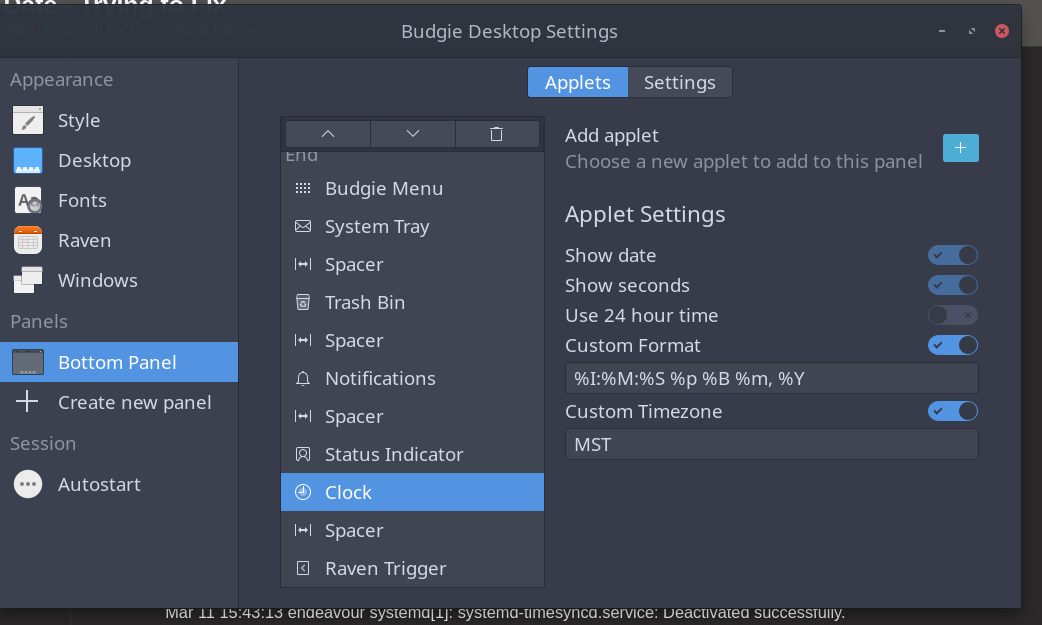
Yes that would be the case if I hadn’t taken it upon myself to bungle the custom time/date over-rides in Budgie settings. Which I did.
Discourse thinks I have missing time–they stripped my Regular status.
I don’t freaking remember leaving…I’m here every day…sometimes read a lot and don’t post or read a little and massively post…same pattern as I’ve joined. had a about 3-4 days where I waited to reinstall Endeavour while a new (used) SSD came in the mail…but I was still here…
Maybe I went the route of Bearenstein/parallel universe. this would not surprise me at all.
Yeah I’ve had my “Regular” status revoked in the past despite practically living here
It became noticeable when I went to fix a typo in someone’s topic title, or put it in a more appropriate category (which are things I actually very rarely do), and suddenly realised I couldn’t
I think the catch is, in order to hold it, you need to be engaged, not just present. Topics read, likes given, likes received (which requires posts), etc.
I would have thought you’d be among the most engaged though, so that’s a mystery
just had a Eureka moment….many Regulars coulda nosedived (got stripped) after Two Prominent Threads were removed. Those 2 increased my time here for sure.
Rick I got that from a thread here that was dedicated–I believe–to self-created menu art/icons or something similar. We have a lot art threads I can’t remember the exact one. Will see if I can find it later.