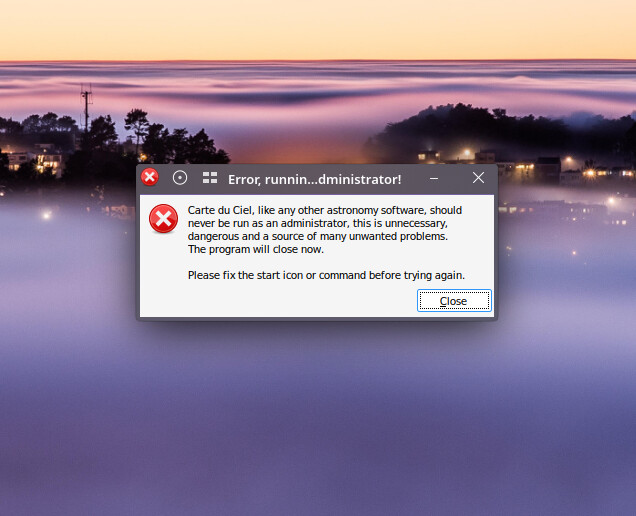
I have ‘Skychart’ version 4.3-beta-4991 installed and working on my system. It was downloaded from AUR and uses Lazarus to compile the program. It works.
I wanted to use ‘Wine’ to install and run a version from Sourceforge.net. It is Skychart version 4.3-5027-windows-X64.exe.
I download the file and ran it with wine to install it. It installed it properly in so far as I know and added a desktop icon for activation of the program.
When I activate the desktop Icon I get a message indicating that running the program in ‘adminstrator’ mode is not a good idea. Fix the start icon or command before trying again.
I’m not aware that the program is starting in ‘Adminstrator mode’. . . any idea’s on how to fix this and get it running with Wine on my computer? I have the latest version of wine and other packages needed to run windows programs on this computer. I have 4 other ‘Windows’ programs that work fine.
What are the contents of the shortcut that you clicked on that produced this message? .desktop files are text files so they are human readable.
Furthermore, when you installed the program with wine. Did you do it via the gui or did you run wine in the terminal. If you did the terminal then did you run sudo wine if so, you shouldn’t have done that.
I ran the wine program from within Dolphin. It runs (wine) when you have an .exe file to open. It installed the program files and created a desktop icon. When you click on the desktop icon file the message appears foremost. (About not running the program in adminstarator mode.) Activating the Desktop icon with the mouse prompts the message above. If you look at the contents of the Desktop Icon file it shows no mention of an adminstrator installation.
I think (but I’m not completey sure) that Wine runs Windows programs in administrator mode by default. Have a look here for a possible way round it. I don’t really use Wine manually, so I don’t know how useful this is.
I am not certain on my facts, but I think runnng Wine as administrator is a terrible idea.
You could be right and I could be wrong, but that’s what my gut tells me.
Since we’re not running Wine under Windows, I don’t see that has anything to do with anything…
Ok, since I don’t actually know what I’m talking about for sure, I’ll shut up now ;0
For the OP, I typically do not directly run Wine, but run under a game helper utility like lutris, heroic, etc, which hides all the nasty details.
This is a “known” issue, because wine does not implement full token elevation. There was a workaround in previous versions that you could do something like wine runas /0xnormalusersomething your.exe and it would work. It was buggy as hell so it was removed (there is no runas executable anymore).
But, there is a workaround. You can set windows version to Windows XP in your wineprefix and it should work.
I would advise you to create a new wineprefix for this, you would not want to “polute” your main prefix with XP as the default. (Per application settings never worked for me, but have not tried it recently)