Don’t how to check this…

Don’t how to check this…
Run a couple of pings.
ping 8.8.8.8
ping google.com
If the first one works but the second one doesn’t, it’s a dns issue.
Well, it’s seems you’ve got something here…
ping google.com
ping: google.com: Échec temporaire dans la résolution du nom
(Sry my system is in french, but it says that it fails to resolve the name)
ping 8.8.8.8
PING 8.8.8.8 (8.8.8.8) 56(84) octets de données.
64 octets de 8.8.8.8 : icmp_seq=1 ttl=116 temps=211 ms
64 octets de 8.8.8.8 : icmp_seq=2 ttl=116 temps=30.4 ms
64 octets de 8.8.8.8 : icmp_seq=3 ttl=116 temps=57.7 ms
64 octets de 8.8.8.8 : icmp_seq=4 ttl=116 temps=56.3 ms
^C
--- statistiques ping 8.8.8.8 ---
4 paquets transmis, 4 reçus, 0% packet loss, time 3003ms
rtt min/avg/max/mdev = 30.392/88.939/211.335/71.497 ms
It seems to work.
So do you have an idea of the DNS issue’s solving step?
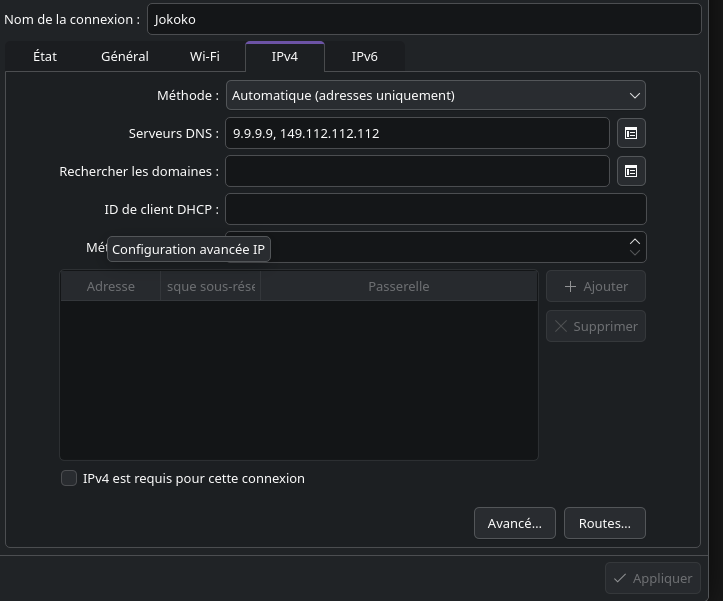
You could try Quad9 and change the settings under network manager> tab ipv4 and ipv6, and change the method settings to automatic (only addresses), with the given numbers on the website.
After applying this numbers disconnect and connect again.
Yeah this is what I was going to suggest
Unfortunately, I don’t know enough about mobile tethering to be of any more use. Sorry.
You need to apply this specifically to wifi connection you using for phone.
Also 8.8.8.8 or 1.1.1.1
No need in bizzare something dns for testing.
Sry, didn’t understood what you mean.
You have your normal wifi connection, and you should have a connection set up for your phone tethering. Apply the DNS settings on the phone one. You could also apply it to your normal one.
@Nyam quad9 is a very popular DNS service.
uhm, I guess i might have done it the wrong way, but creating a new network with my phone’s SSID and wifi password, in “access point” mode, with the Quad9 IPs in IPV4 and IPV6 simply ends up failing to even connect to the wifi.
Also switching my already known Wifi to “access point” instead of “infrastructure” doesn’t make it work any better.
Also a behavior I’ve notice and may help :
Once modifyed the WIFI option to use Quad9 DNS, it duplicate the networks, one with the modified DNS config, and one with the previous no DNS config. None of them work.
You do not create new networks. You edit already axisted. All wifi connections you ever autorised is saved. Same as on android and other stuff.
Uh. Lets think how to undone everything 
I first tried to edit the network (and this is what I discribed up there, about the network duplication), and then tried to to create a new one via the plus button, as I thought @MyNameIsRichard suggested me.
I thought we were close to solve this issue…
Maybe I missed something in your explanations !?