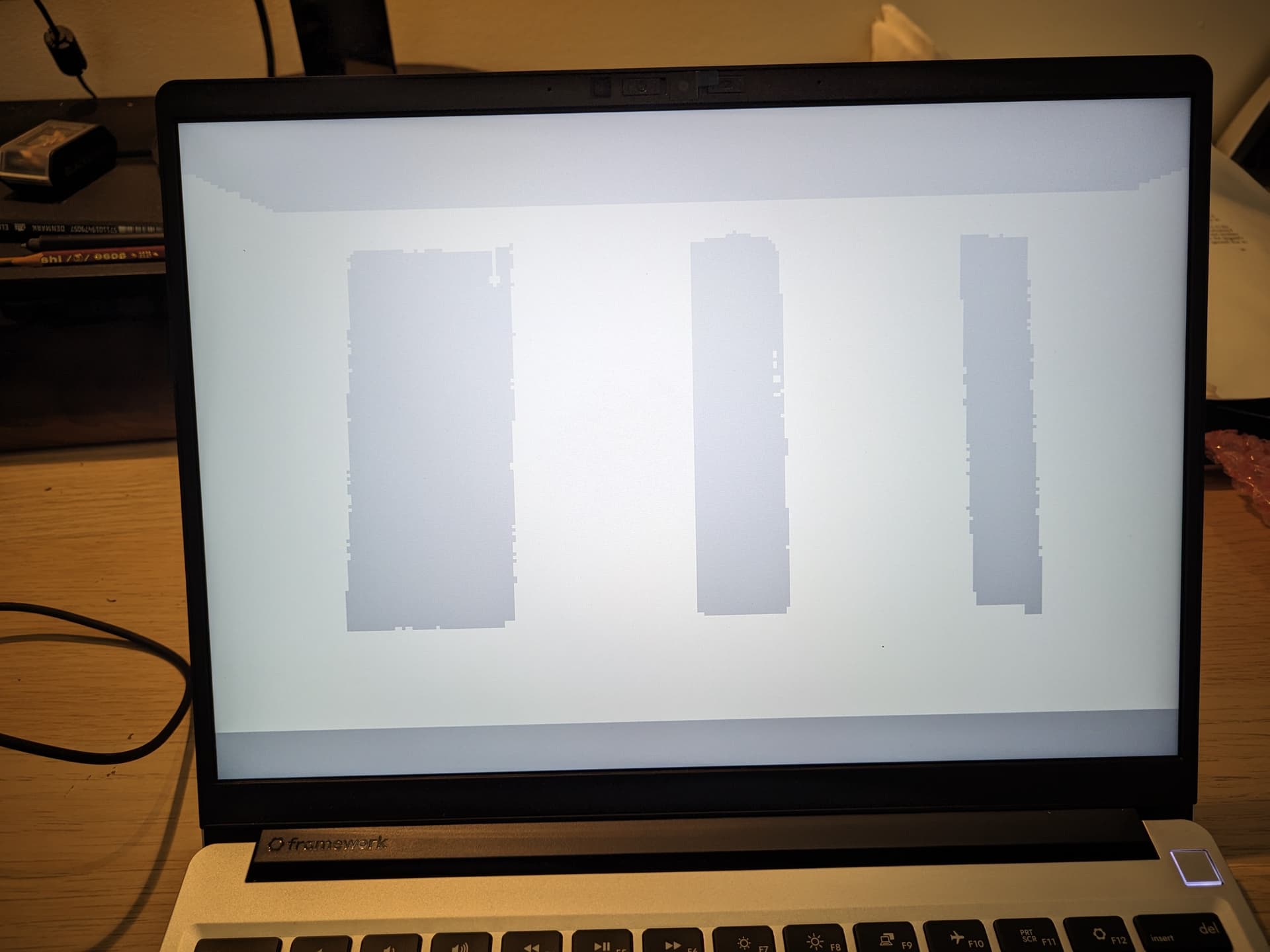
Hi all,
Fresh EOS install on Frame.work 13, AMD 7040. Full specs:
System:
  Host: avantbored Kernel: 6.6.7-arch1-1 arch: x86_64 bits: 64 Desktop: GNOME
    v: 45.2 Distro: EndeavourOS
Machine:
  Type: Laptop System: Framework product: Laptop 13 (AMD Ryzen 7040Series)
    v: A7 serial: <superuser required>
  Mobo: Framework model: FRANMDCP07 v: A7 serial: <superuser required>
    UEFI: INSYDE v: 03.03 date: 10/17/2023
Battery:
  ID-1: BAT1 charge: 39.5 Wh (64.0%) condition: 61.7/60.7 Wh (101.7%)
    volts: 15.7 min: 15.5
CPU:
  Info: 8-core model: AMD Ryzen 7 7840U w/ Radeon 780M Graphics bits: 64
    type: MT MCP cache: L2: 8 MiB
  Speed (MHz): avg: 1080 min/max: 400/5289:6076:5918:5132:5760:5605:5447
    cores: 1: 2718 2: 400 3: 2113 4: 400 5: 1732 6: 400 7: 400 8: 400 9: 1866
    10: 1879 11: 1600 12: 400 13: 400 14: 400 15: 1776 16: 400
Graphics:
  Device-1: AMD Phoenix1 driver: amdgpu v: kernel
  Device-2: Realtek Laptop Camera driver: uvcvideo type: USB
  Display: wayland server: X.Org v: 23.2.3 with: Xwayland v: 23.2.3
    compositor: gnome-shell driver: gpu: amdgpu resolution: 2256x1504~60Hz
  API: EGL v: 1.5 drivers: radeonsi,swrast
    platforms: wayland,x11,surfaceless,device
  API: OpenGL v: 4.6 compat-v: 4.5 vendor: amd mesa v: 23.2.1-arch1.2
    renderer: AMD Radeon Graphics (gfx1103_r1 LLVM 16.0.6 DRM 3.54
    6.6.7-arch1-1)
Audio:
  Device-1: AMD Rembrandt Radeon High Definition Audio driver: snd_hda_intel
  Device-2: AMD ACP/ACP3X/ACP6x Audio Coprocessor driver: snd_pci_ps
  Device-3: AMD Family 17h/19h HD Audio driver: snd_hda_intel
  Device-4: ESS S3 Pro DAC & AMP driver: hid-generic,snd-usb-audio,usbhid
    type: USB
  API: ALSA v: k6.6.7-arch1-1 status: kernel-api
  Server-1: PipeWire v: 1.0.0 status: active
Network:
  Device-1: MEDIATEK MT7922 802.11ax PCI Express Wireless Network Adapter
    driver: mt7921e
  IF: wlan0 state: up mac: 14:ac:60:29:82:b3
  IF-ID-1: us-lax-wg-102 state: unknown speed: N/A duplex: N/A mac: N/A
Bluetooth:
  Device-1: MediaTek Wireless_Device driver: btusb type: USB
  Report: btmgmt ID: hci0 state: up address: 14:AC:60:29:82:B4 bt-v: 5.2
Drives:
  Local Storage: total: 3.19 TiB used: 382.82 GiB (11.7%)
  ID-1: /dev/nvme0n1 vendor: Smart Modular Tech. model: SHGP31-2000GM
    size: 1.82 TiB
  ID-2: /dev/sda model: FRMW 1TB Card size: 931.51 GiB type: USB
  ID-3: /dev/sdb vendor: Samsung model: MZALQ512HALU-000L1 size: 476.94 GiB
    type: USB
Partition:
  ID-1: / size: 57.43 GiB used: 19.6 GiB (34.1%) fs: ext4 dev: /dev/nvme0n1p6
  ID-2: /boot/efi size: 96 MiB used: 26.5 MiB (27.6%) fs: vfat
    dev: /dev/nvme0n1p1
Swap:
  Alert: No swap data was found.
Sensors:
  System Temperatures: cpu: N/A mobo: N/A
  Fan Speeds (rpm): N/A
Info:
  Processes: 415 Uptime: 13h 13m Memory: total: 64 GiB available: 62 GiB
  used: 7.43 GiB (12.0%) Shell: Bash inxi: 3.3.31
My problem: Videos render fine when in a floating window, but flicker beneath a fully white screen when in full screen mode.
Moving the cursor returns the video, but once the GUI controls disappear, the screen flickers again.
I have tried to take a screenshot of it, but using the GNOME tool actually returns the image.
I have reproduced the problem in Gnome Videos, MPV, and VLC.
Phone picture provided.