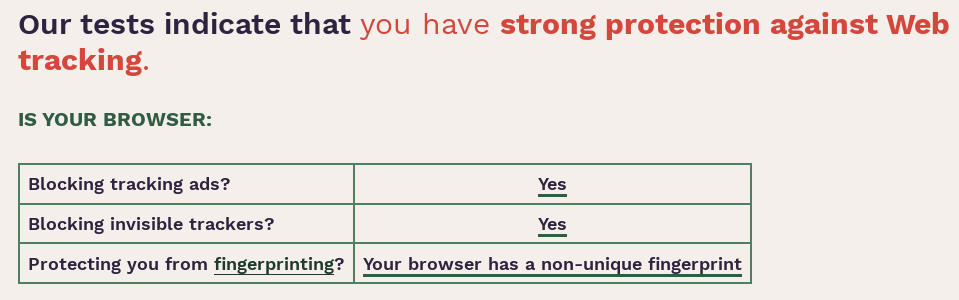
Does Brave does a better job than Tor when it comes to privacy?
Test at https://coveryourtracks.eff.org/
Brave - Private Window with Tor (default settings):
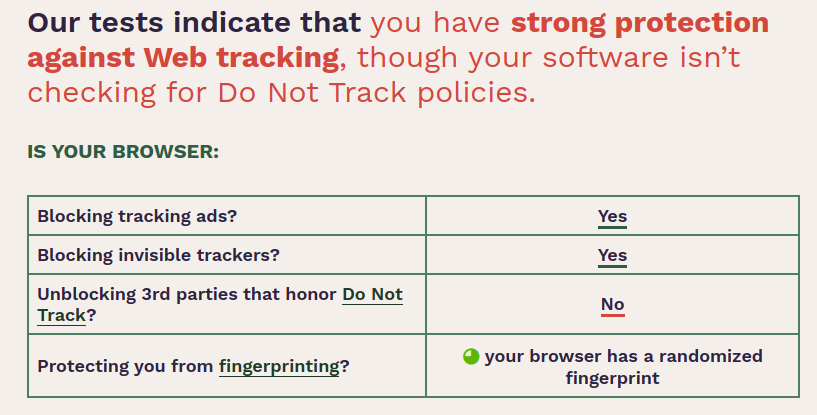
Tor (default settings):
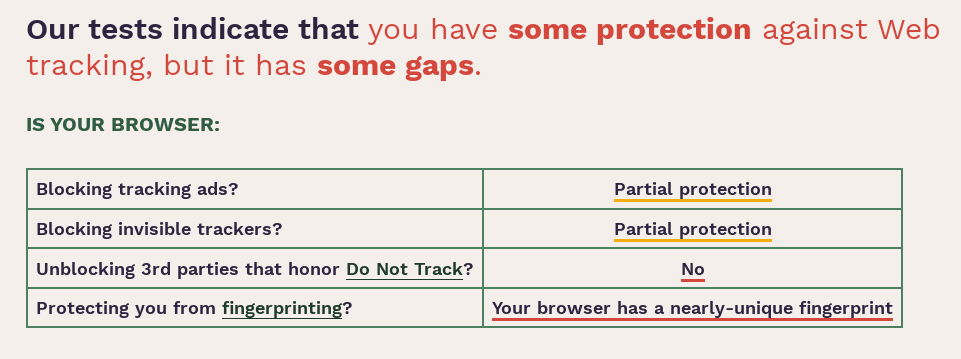

Does Brave does a better job than Tor when it comes to privacy?
Test at https://coveryourtracks.eff.org/
Brave - Private Window with Tor (default settings):
Tor (default settings):
No. Because those tests are only a part of the privacy equation.
Did you resize your tor browser? If you didn’t, Tor should be very difficult to fingerprint.
Resizing or in this case maximizing shouldn’t have had any effects on the fingerprinting. At least I thought so. See:
https://support.torproject.org/tbb/maximized-torbrowser-window/#maximized-torbrowser-window
However in reality, it seems that it does have some interesting effects.
Tor - default window size
Given that your results are totally different I might consider finding another testing tool 
The first one was from Tor-maximized that I (wrongly ?) assumed, based on the info from the link in my previous post, shouldn’t have affected the fingerprinting.
The second one is from Tor -default-window-size. So the testing tool being the same, could the conclusion be to use Tor only as is, that is no maximizing the window. Although I find the negative impact of maximizing on the tracking protection somewhat odd.
That is what I was referring to. We could certainly debate the effectiveness in Window size on fingerprinting but it seems unlikely it impacts tracker blocking
Mine is same in both cases (normal untouched / maximized), like your first screenshot with partial-protection
I think it’s super easy to detect that someone uses TOR, so that’s probably the reason
That’s best option at least for now, coz other so-called “boxes” are very young yet, this feature is not long used, so it have to take some time to normalize across some screens and be as common as just default TOR window, but i think in few years there will be no difference probably
Fennec is probably what you want to use. It’s the sensible Firefox for mobile, essentially. If you want a more “classic” Firefox Mobile experience, there’s IceCat Mobile. IceCat Mobile is a direct branch of Firefox’s mobile browser maintained by the GNU project with all the non-free stuff removed and nothing more, similar to their desktop brother based on the ESR release.
IceCat hasnt been updated in almost an year…though…
I went back to Firefox ESR with user.js and 3 add-ons. NoScript, uBlock Origin and HTTPS Everywhere. Easy to keep up to date with everything. All other browsers are a little behind all the time with security!
Took a while before I got an updated ungoogled-chromium unfortunately. I guess that’s the downside.
This page is pretty good for checking out what’s visible in the browser:
The page is scary to read  it knows so much!
I tired this out and it works well for me. One thing to note though, make sure to set it to use only desktop options (if you are on a desktop pc). I had it set to use “all” and after a day or so I started getting pages load the mobile version. Took me a few minutes to figure out why, but it’s easy enough to change.
I must be doing something right as pretty much the only thing it got correct was the date and time. 
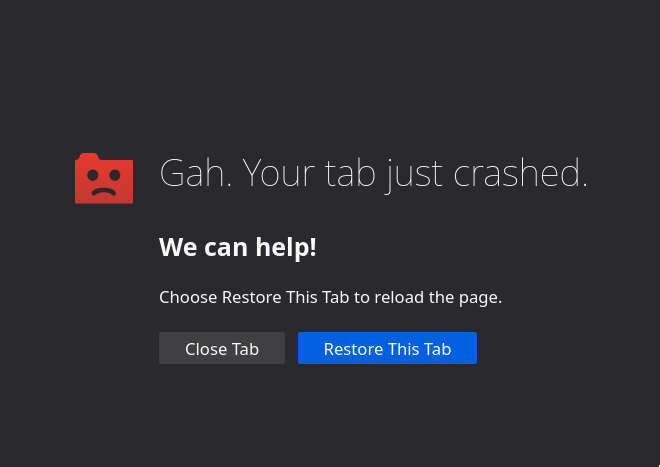
just crash here … 
This has always been issue with many 3rd party browsers. It is disturbing how far behind some of them lag with security updates.
What crashed?
your link… + @pebcak link ( they both crash tap )
Do you mean deviceinfo?
Okay! It did it on ungoogled-chromium when I wanted it loaded everything it could see about the browser. Otherwise, everything goes well on the web page.
Guess your browser is super good at defending itself with crashing when it feels exposed