this is something in my update which is an AUR package update. not sure why I have this. Was deprecated from our own repo last Feb. Is there a way to see how I dragged this in thru the AUR?
graci!
this is something in my update which is an AUR package update. not sure why I have this. Was deprecated from our own repo last Feb. Is there a way to see how I dragged this in thru the AUR?
graci!
Can you show the output?
Edit: Are you asking why you have reiserfsprogs?
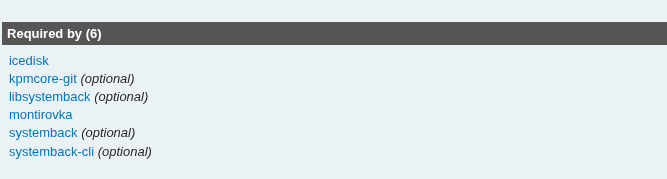
If you take a look at: https://aur.archlinux.org/packages/reiserfsprogs you will see which AUR packages require resp. optionally require reiserfsprogs.
Unless you have installed one of these packages which may has “pulled in” or you optionally installed reiser… then it must be the leftover of some standard packagelist install from the past.
Just remove it with pacman and you will be fine.
the updtae just kind of loops like this but was successful:
libtool: warning: ‘../reiserfscore/libreiserfscore.la’ has not been installed in ‘/usr/lib’
libtool: install: /usr/bin/install -c .libs/reiserfsck /home/dv/.cache/yay/reiserfsprogs/pkg/reiserfsprogs/usr/bin/reiserfsck
make install-exec-hook
make[3]: Entering directory ‘/home/dv/.cache/yay/reiserfsprogs/src/reiserfsprogs-3.6.27/fsck’
ln -s reiserfsck /home/dv/.cache/yay/reiserfsprogs/pkg/reiserfsprogs/usr/bin/fsck.reiserfs
/usr/bin/install -c -m 755 -d /home/dv/.cache/yay/reiserfsprogs/pkg/reiserfsprogs/usr/share/man/man8
ln -s reiserfsck.8 /home/dv/.cache/yay/reiserfsprogs/pkg/reiserfsprogs/usr/share/man/man8/fsck.reiserfs.8
make[3]: Leaving directory ‘/home/dv/.cache/yay/reiserfsprogs/src/reiserfsprogs-3.6.27/fsck’
/usr/bin/mkdir -p ‘/home/dv/.cache/yay/reiserfsprogs/pkg/reiserfsprogs/usr/share/man/man8’
/usr/bin/install -c -m 644 reiserfsck.8 ‘/home/dv/.cache/yay/reiserfsprogs/pkg/reiserfsprogs/usr/share/man/man8’
make[2]: Leaving directory ‘/home/dv/.cache/yay/reiserfsprogs/src/reiserfsprogs-3.6.27/fsck’
make[1]: Leaving directory ‘/home/dv/.cache/yay/reiserfsprogs/src/reiserfsprogs-3.6.27/fsck’
Making install in debugreiserfs
make[1]: Entering directory ‘/home/dv/.cache/yay/reiserfsprogs/src/reiserfsprogs-3.6.27/debugreiserfs’
make[2]: Entering directory ‘/home/dv/.cache/yay/reiserfsprogs/src/reiserfsprogs-3.6.27/debugreiserfs’
/usr/bin/mkdir -p ‘/home/dv/.cache/yay/reiserfsprogs/pkg/reiserfsprogs/usr/bin’
/bin/sh ../libtool --mode=install /usr/bin/install -c debugreiserfs ‘/home/dv/.cache/yay/reiserfsprogs/pkg/reiserfsprogs/usr/bin’
libtool: warning: ‘../reiserfscore/libreiserfscore.la’ has not been installed in ‘/usr/lib’
$ yay -Si reiserfsprogs
Repository : aur
Name : reiserfsprogs
Version : 3.6.27-6
Description : Reiserfs utilities
URL : https://www.kernel.org/
Licenses : GPL-2.0-only
Groups : None
Provides : None
Depends On : e2fsprogs glibc util-linux-libs
Optional Deps : None
Make Deps : None
Check Deps : None
Conflicts With : None
Replaces : None
AUR URL : https://aur.archlinux.org/packages/reiserfsprogs
First Submitted : Sun 09 Feb 2025 05:27:19 AM MST
Keywords : None
Last Modified : Thu 11 Dec 2025 01:49:38 PM MST
Maintainer : micwoj92
Popularity : 1.879712
Votes : 26
Out-of-date : No
pretty religious (monthly) with the -Qtdq but youre prpbably right
I don’t recognize any of those packages. Mmm.
As @cactux said it’s probably some left over package cache from something.
The reiserfsprogs must have been part of a standard install of EOS at some point thus explicitly installed and not as a dependency of another package not currently installed on the system leaving some orphans behind. Therefore your command won’t “capture” it.
You might be right? I vaguely recall seeing it in the past but I’ve reinstalled many times with testing on my bare metal machines.
I don’t recognize any of those packages. Mmm.
Maybe. Arch removed it in Feb. from /extra. My install’s 2 years old so an AUR package as standard install is interesting.
It must have been installed while still part of the Arch’s repo before it dropped to AUR.
Not installed from AUR as part of the standard install.
Remove it with sudo pacman -Rs
$ yay -Rs reiserfsprogs
[sudo] password for dv:
checking dependencies…

Package (1)    Old Version  Net Change

reiserfsprogs  3.6.27-6      -0.59 MiB

Total Removed Size:  0.59 MiB

:: Do you want to remove these packages? [Y/n] y
:: Processing package changes…
(1/1) removing reiserfsprogs                       [----------------------] 100%
:: Running post-transaction hooks…
(1/1) Arming ConditionNeedsUpdate…
gone now, thanks to both. @cactux think you are correct. any odd journey for that package to take but I’ve not seen everything 
did not see the edit til now. Yes, I am.
Isn’t that the file system that was long abandoned then deprecated because the dev has been in prison for murder? 
The installer used to install it because it was needed by the installer.
It should be safe to remove it.
Finally remembered it was here i last recalled it.