First of all, apologies if this isn’t the right category — admins, please feel free to move it if needed.
Recently, I’ve been reading about how NVMe drives can sometimes fail without much warning, which got me thinking about health monitoring. What are the best tools or methods to keep an eye on NVMe drive health?
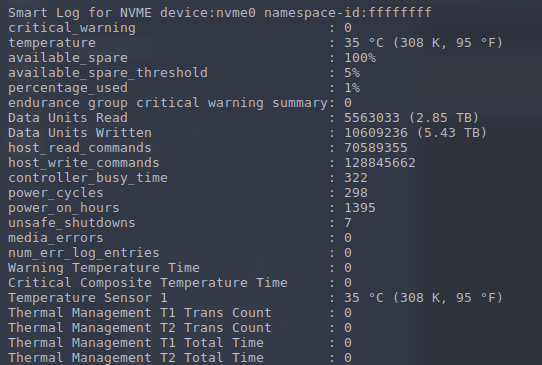
I came across a tool called nvme-cli and installed it — it lets me view the current state of my drive. Is this the right tool for monitoring NVMe health, or are there other (perhaps better) tools you’d recommend?
Also, if any early warning signs or bad symptoms show up, is there any way to fix or mitigate them?
This might help…
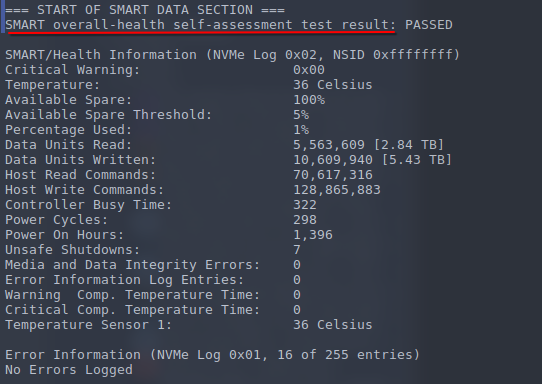
I use smartctl
It’s a tool for checking SMART data on all kinds of drives.
Install smartmontools If you don’t have it.
Check drive health: Use smartctl to get a general health status. You may need to find the device name with lsblk first. sudo smartctl -a /dev/nvme0n1 (replace /dev/nvme0n1 with your device name).
Look for the “SMART overall-health self-assessment test result” or a similar line to see if it reports “PASSED”.
I am far from knowledgeable in this field but if by error you mean a failure at hardware level, I doubt that there will be any fix for it. I may be wrong though.
Errors at filesystem/software level might be fixable. Depending on the filesystem there are some tools to be used to check the health and fix some issues.
If you get filesystem errors often, that may also be indicative of hardware failure.
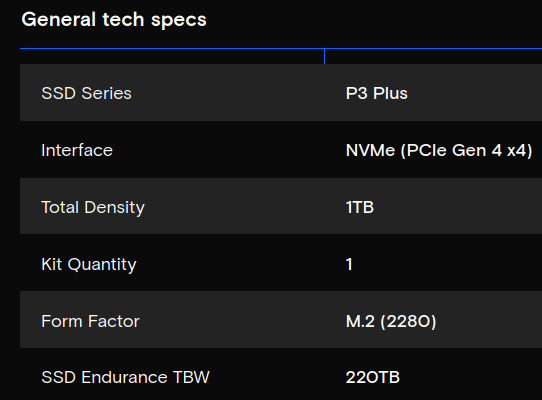
The number of units written on your disk seems to indicate that it is still in its “infancy”.
That would be very dependent on what the “Error” is.
Physical Level damage is probably zero for the Average person and Will cost a bit money for those willing to try and get data back.
Filessystem damage is quite common and fortunately easily fixed with proper disk checkers.
Get the Western Digital Black. I’ve beat the shit out of my nvme drives and never had an issue. Lots of wiping out, reinstalls, bad shutdowns … you name it. Different file sysytems etc etc.