I heard MangoWC combines features of Hyprland and Niro. My opinion is that the way Niri does things is hard to combine with how a normal window manager does things. So I would find it more logical to use how Hyprland does things or how Niri does things. So not planning to try MangoWC, how is that in your experience?
I have to give it a try when I’ll have some time, mangowc+noctalia-shell+vicinae might fit my needs.
It’s really good, the only issue is I have had to turn off hardware acceleration in chrome-based browsers, otherwise I get visual break-ups.
How do you divide your workflow between normal tiling and scrolling with MangoWC?
Generally tile every tag (except tag 3 - scroller) and use my script or hotkey to swap when needed.
# tags rule
tagrule=id:1,layout_name:tile
tagrule=id:2,layout_name:tile
tagrule=id:3,layout_name:scroller
tagrule=id:4,layout_name:tile
tagrule=id:5,layout_name:tile
tagrule=id:6,layout_name:tile
tagrule=id:7,layout_name:tile
tagrule=id:8,layout_name:tile
tagrule=id:9,layout_name:tile
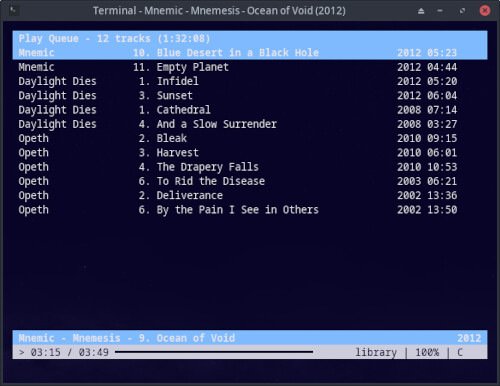
Cmus is very easy to use after a quick look at a cheat sheet for the basic commands. I need to update my tags though. These are just the albums I actually ripped myself, the rest of my music is from youtube.  I think music playing will duties will be passed on to my standing workstation now I don’t need a mouse. I need to look at the remote app.

Install via your package manager or simply try AppImage.
This was on my list of apps to replace my rofi menus, looks nice, i’ll probably give this a try.
Tera - A terminal Radio player
- Tera uses MPV to stream but the interface is all managed via terminal window.
- 50,000+ radio stations available
- List management
- Easy usage
- Github project page holds more information on the project and features.
This package is now orphaned and a very old version of the software, I have currently done the manual install shown on the github page.
This image for example shows a list of stations after searching for Japan in the language. But you can search by country code, State, and there is an advanced search.


This is just an example of the interface of tera, at the top the application starts with the main menu where you can search, play from a list you created, create lists, etc.


This is what Tera looks like when playing a specific radio.
The very bottom shows the information of the radio station such as country it’s based in, codec, bitrate and then the very bottom shows you song being played as well as how much of it was downloaded in the cache to play.

Not sure if this has been mentioned, but similar to Dolphin, Nemo has a kind of selection mode that you can access by pressing CTRL+S. It is search-/query-based using patterns.
It seems to use wildcards, maybe even simplified Regex? I found it when trying to save a file in another app, but Nemo popped over it and took focus. Neat feature.
For example: PoseRef*_01*.webp
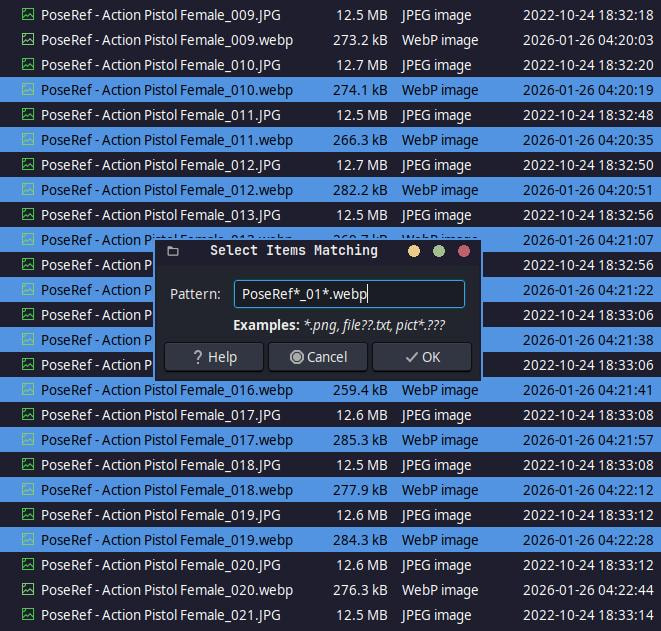
Did a little experimenting with it and found that pressing CTRL+SHIFT+I inverts the selection. I really love that Nemo is a little Dolphin in disguise. 


PS: WEBP is awesome! These files are 12+ MB per image, but with my little script, I’ve reduced them down to 200+ KB while still retaining high quality files that are 4000x6000 px on average.
EDIT: In case anyone is interested, other scripts can be found here: Scripts!
FINAL EDIT: I just reduced 5.3 GB down to 130.4 MB by using WEBP instead of JPG.

you can do this in Thunar as well.
Nice. Not a Thunar fan, but it’s good to know all the same.
Can it also invert the selections like I added just now above?
yes it does. I think those are old standards that have been around awhile. I still use them on occasions.
Oh, didn’t know that. Make sense.
Wonder if they removed it from Nautilus. They nuked that file manager into the ground.
That is very possible. They really killed nautilus when they switched from Gnome 2. Oh the Good ole days.
Every time Gnome 2 mentioned, my avatar glows. So many old memories 
With an image optimizer, optipng, I could get a file size reduction of my wallpapers between 5 and 35%.
Do you mean 65-95% file size reduction or 5-35%?
5-35% (file size 65-95% of the originals), which I think is not bad without re-encoding the images.
Yeah, it is good, but that variance is significant.
The conversions I’ve been doing vary from 90-98% file size reduction. I did get one or two that were 99.xx%, but those are rare. That said, For these particular images, I am using the following:
convert "$file" -auto-orient -quality 80 -define webp:lossless=false -define webp:method=4 "$output_file"
I’ve tested lossless conversions to WEBP on the same files, and they almost always turn out larger in file size. There were a few miraculously exceptional ones that would reduce from 12+ MB to 1+ MB, and my only guess is that it had something to do with those individual files.
Changing the lossy quality to 100 usually results in 72-78% reduction. But because these files don’t need to be in high definition, I’m fine with losing a little quality.