Thanks @manuel, I begin to read the bash functions, your explanation are clear to use it, but I have a lot to read and test about bash to know how to pass a value on a PKGBULD file to modify the pkgver value at the latest !
I’m cleaning my HardDrive cause after the exam, I have folders and files everywhere, it’s a mess !
I need to save space and rethink all this…after it I will try to see if I’m able to get this Calamares update at the latest throw Welcome’s Personal Commands it would be a good exercice for me…
I need to understand how to detect when each step are done in the good order ?
1- Modify file PKGBUILD with your code UP
2- Place PKGBUILD file into /home/liveuser/Documents/
3- Create the file pkg.tar.xz
4/ Copy file pkg.tar.gz into /var/cache/pkgfile/
5/ Install it
I remember when I did long time ago some actionscript, it does kind of listenner to detect when a step is done maybe it exists something similar that gives you a bolean finish false or true ?
Increasingly, one of my favorite apps has become the Welcome app. Simple but great. I have not seen a similar solution in other distributions I know of, although there may be a welcome app in them. It is a good thing that the user can customize it himself. I will analyze the tutorial in more detail later, now I just looked at it briefly. Would that be that certain yad? https://www.thelinuxrain.com/articles/multiple-item-data-entry-with-yad
Assuming you already have the correct PKGBUILD in folder /home/liveuser/Documents, then something like this might be what you would like to do. You can write this into a file, for example update_package.bash:
#!/bin/bash

DIE() {
    echo "Error: $1" >&2
    exit 1
}

Main()
{
    # User gives the new pkgver value as a parameter:
    local new_pkgver="$1"
    local name

    # Go to the proper folder:
    cd ~/Documents || DIE "cannot go to folder $HOME/Documents !"

    # Check there is a value:
    test -n "$new_pkgver" || DIE "please give new pkgver !"

    # Check PKGBUILD file exists:
    test -r PKGBUILD || DIE "sorry, PKGBUILD does not exist !"

    # Replace PKGBUILD's pkgver with the new value:
    sed -i PKGBUILD -e "s|^pkgver=.*$|pkgver=$new_pkgver|"

    # Find the name of the package from the PKGBUILD:
    name="$(grep "^pkgname=" PKGBUILD | cut -d '|' -f 2 | tr -d '"' | tr -d "'")"

    # Create a package:
    makepkg -cfs || DIE "makepkg failed !"

    # Install package with pacman:
    sudo pacman -U ${name}-*.pkg.tar.*
}

Main "$@"
Thanks @manuel, I need to know if the own_command on the Welcome from latest ISO after update in testing on VBox is supposed to work as the Welcome installed on baremetal ?
But there have been a report by @ricklinux on Cinnamon that some graphics features may not work properly. There was a Cinnamon setting to work around it, probably Rick remembers what it was.
I just tested it on VBox - latest ISO with a basic welcome-own-cmds.conf that works on my baremetal EOS XFCE and it didn’t work ? Did I have to modify something to make it work on VBox ?
It could be the LIVE USER permission ?
To test Calamares I need to be in this environment as a user would be.
In case you test it on Vbox or VMware, let me know if I’m doing something wrong or if you got the same.
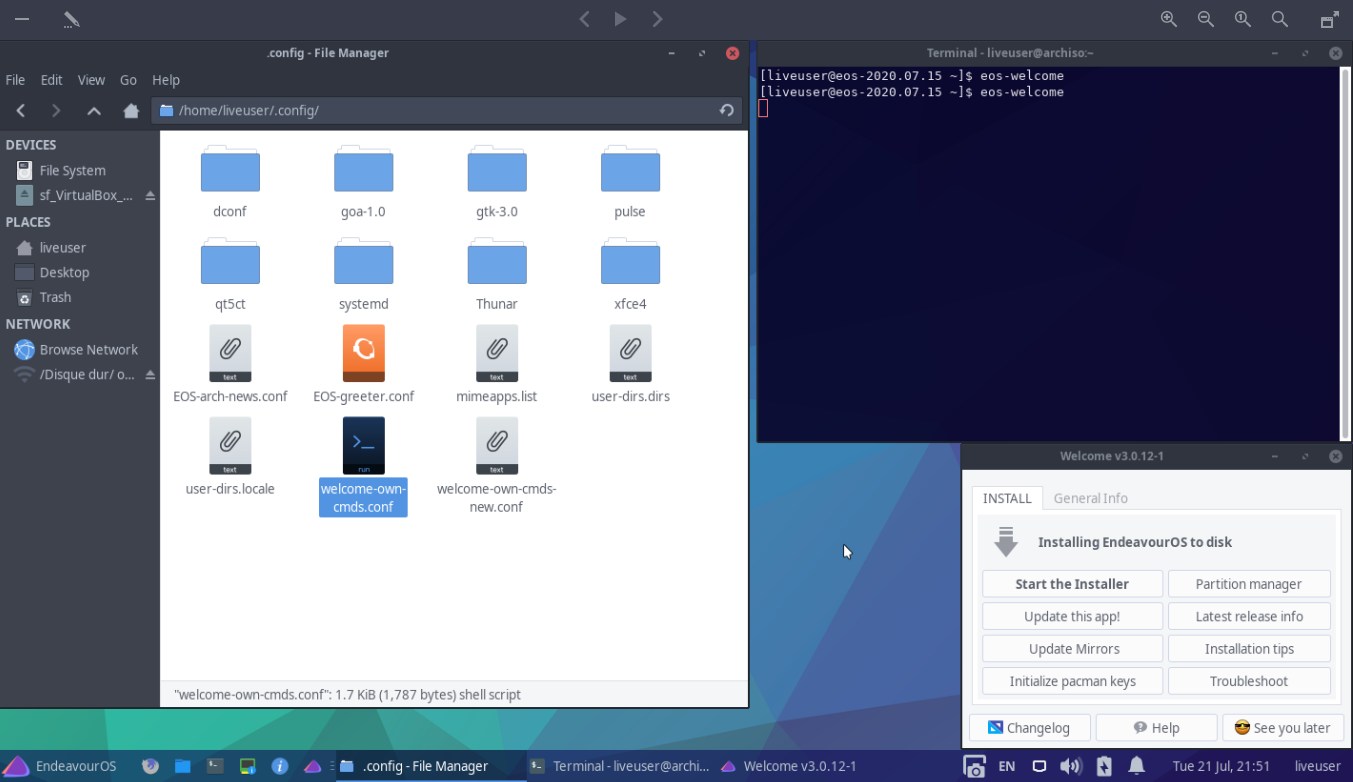
In the LIve ISO environment on VBox then I placed my welcome-own-cmds.conf file into /home/liveuser/.config/ and when I launched eos-welcome nothing added on the TAB.
I would like to add an Update Calamares button on this Welcome, is it wrong way to do?
Right.
Personal Commands currently work only on an installed system, not with the installer.
Sorry, I probably should have noticed that already before. Just got confused about the Vbox.
But if you need it on the installer, I try to make it work there too. May take a while though…
In fact, I don’t have choice to test Calamares in this environment on the same condition as user would do just before install.
Take your time, is not urgent at all, I was curious to test your new command, I could do it manualy as before. I added some code on the last one you gave me cause the PKGBUILD file comes from our repo, so I need to download it before to modify it…
I could test it on baremetal for now, I will change the paths…