Hi there,
I have an issue that could be best described as windows having flashing transparency with jagged edges.
This happens since install and I thought it’d be just the kernel or something else that would get fixed later. But since my install was in January I thought, I’d bring it up here.
It’s really hard to properly explain, so please have a look at these pictures (ignore the black bars, I redacted my name there):
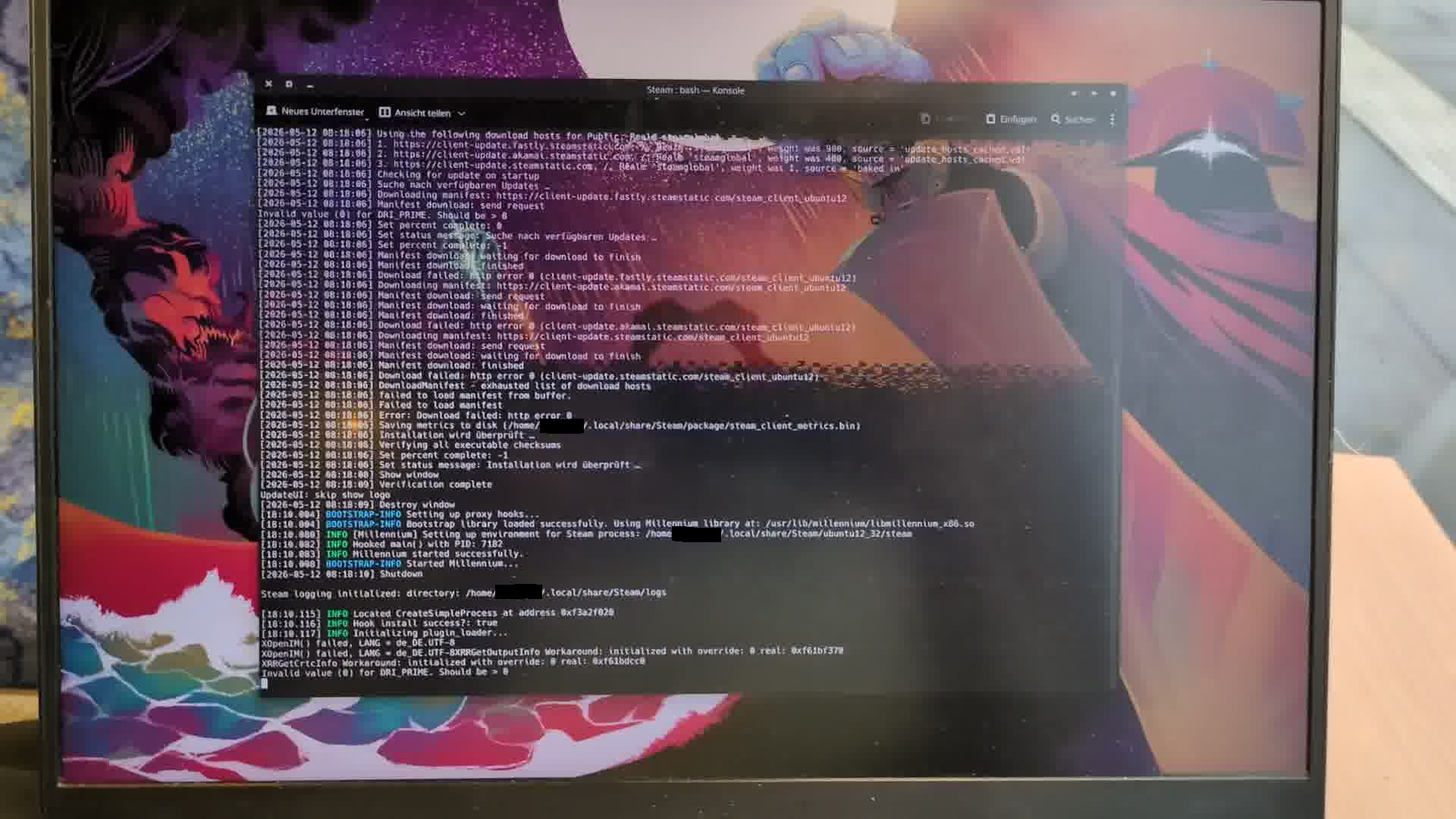
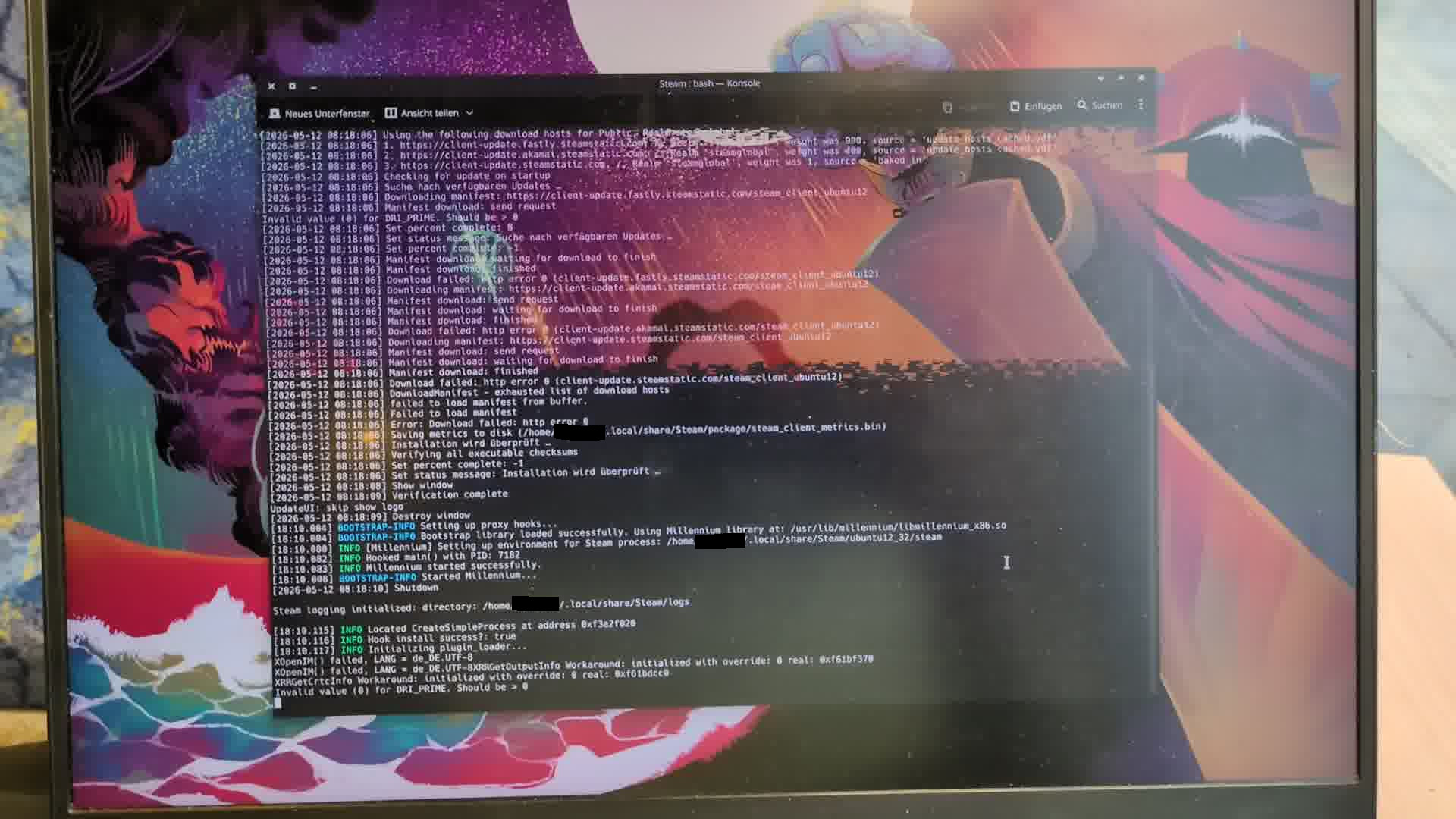
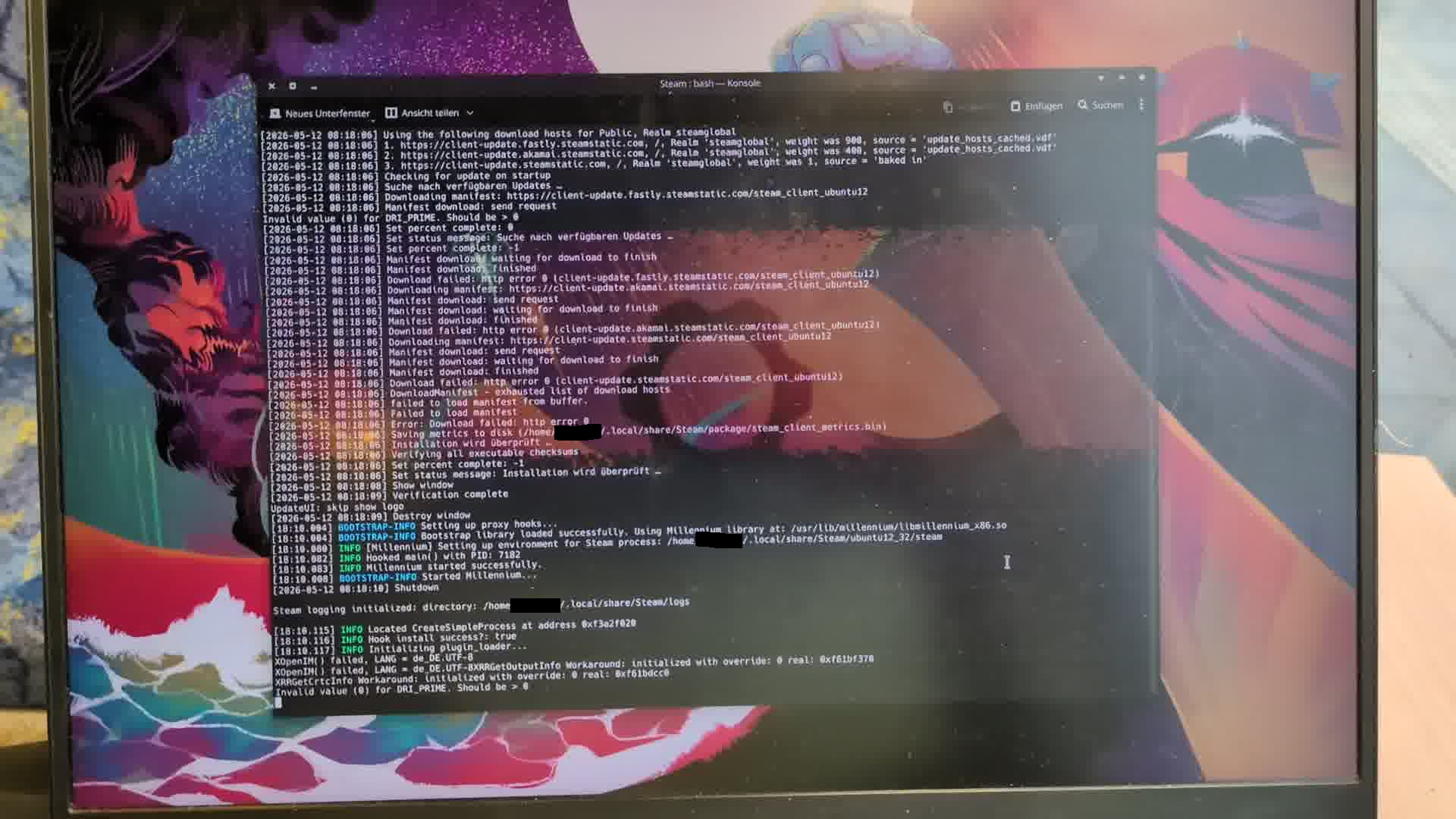

I noticed it in these programs so far:
- Steam
- Discord
- Konsole
- Dolphin
- Telegram Desktop
These are my system details:
My system
Operating System: EndeavourOS
KDE Plasma Version: 6.6.5
KDE Frameworks Version: 6.26.0
Qt Version: 6.11.1
Kernel Version: 6.18.32-2-custom-lts (64-bit)*
Graphics Platform: Wayland
Processors: 16 × AMD Ryzen 7 7840HS w/ Radeon 780M Graphics
Memory: 32 GiB of RAM (30.7 GiB usable)
Graphics Processor 1: AMD Radeon 780M Graphics
Graphics Processor 2: AMD Radeon RX 7700S
Manufacturer: Framework
Product Name: Laptop 16 (AMD Ryzen 7040 Series)
*The issue occurs with the latest mainline, zen and lts kernels. I’m using a custom kernel right now, but it’s not connected to the issue occurring or not.
LANG=C sudo inxi -Faz
System:
  Kernel: 6.18.32-2-custom-lts arch: x86_64 bits: 64 compiler: gcc v: 16.1.1
    clocksource: tsc avail: hpet,acpi_pm
    parameters: initrd=\23506df189f647839e4c8823e4a93651\6.18.32-2-custom-lts\initrd
    nvme_load=YES nowatchdog rw root=/dev/mapper/stolloss-root quiet splash
    amdgpu.dcdebugmask=0x40000
    systemd.machine_id=23506df189f647839e4c8823e4a93651
  Desktop: KDE Plasma v: 6.6.5 tk: Qt v: N/A wm: kwin_wayland dm: SDDM
    Distro: EndeavourOS base: Arch Linux
Machine:
  Type: Laptop System: Framework product: Laptop 16 (AMD Ryzen 7040 Series)
    v: AG serial: <filter> Chassis: type: 10 v: AG serial: <filter>
  Mobo: Framework model: FRANMZCP07 v: A7 serial: <filter>
    part-nu: FRAGACCP0G uuid: ca8c534c-2ce7-ee11-9e4a-229330400224
    Firmware: UEFI vendor: INSYDE v: 04.04 date: 03/23/2026
Battery:
  ID-1: BAT1 charge: 78 Wh (99.9%) condition: 78/85 Wh (91.8%) volts: 17.53
    min: 15.48 model: NVT FRANDBA type: Li-ion serial: <filter> charging:
    status: not charging cycles: 211
CPU:
  Info: model: AMD Ryzen 7 7840HS w/ Radeon 780M Graphics socket: FP8 bits: 64
    type: MT MCP arch: Zen 4 gen: 4 level: v4 note: check built: 2022+
    process: TSMC n5 (5nm) family: 0x19 (25) model-id: 0x74 (116) stepping: 1
    microcode: 0xA70410A
  Topology: cpus: 1x dies: 1 clusters: 1 cores: 8 threads: 16 tpc: 2
    smt: enabled cache: L1: 512 KiB desc: d-8x32 KiB; i-8x32 KiB L2: 8 MiB
    desc: 8x1024 KiB L3: 16 MiB desc: 1x16 MiB
  Speed (MHz): avg: 3215 min/max: 419/5138 boost: enabled
    base/boost: 3800/5125 scaling: driver: amd-pstate-epp governor: performance
    volts: 1.2 V ext-clock: 100 MHz cores: 1: 3215 2: 3215 3: 3215 4: 3215
    5: 3215 6: 3215 7: 3215 8: 3215 9: 3215 10: 3215 11: 3215 12: 3215
    13: 3215 14: 3215 15: 3215 16: 3215 bogomips: 121429
  Flags-basic: avx avx2 ht lm nx pae sse sse2 sse3 sse4_1 sse4_2 sse4a
    ssse3 svm
  Vulnerabilities:
  Type: gather_data_sampling status: Not affected
  Type: ghostwrite status: Not affected
  Type: indirect_target_selection status: Not affected
  Type: itlb_multihit status: Not affected
  Type: l1tf status: Not affected
  Type: mds status: Not affected
  Type: meltdown status: Not affected
  Type: mmio_stale_data status: Not affected
  Type: old_microcode status: Not affected
  Type: reg_file_data_sampling status: Not affected
  Type: retbleed status: Not affected
  Type: spec_rstack_overflow mitigation: Safe RET
  Type: spec_store_bypass mitigation: Speculative Store Bypass disabled via
    prctl
  Type: spectre_v1 mitigation: usercopy/swapgs barriers and __user pointer
    sanitization
  Type: spectre_v2 mitigation: Enhanced / Automatic IBRS; IBPB:
    conditional; STIBP: always-on; PBRSB-eIBRS: Not affected; BHI: Not
    affected
  Type: srbds status: Not affected
  Type: tsa mitigation: Clear CPU buffers
  Type: tsx_async_abort status: Not affected
  Type: vmscape mitigation: IBPB before exit to userspace
Graphics:
  Device-1: Advanced Micro Devices [AMD/ATI] Navi 33 [Radeon RX 7600/7600
    XT/7600M XT/7600S/7700S / PRO W7600] vendor: Framework driver: amdgpu
    v: kernel arch: RDNA-3 code: Navi-3x process: TSMC n6 (6nm) built: 2023+
    pcie: gen: 4 speed: 16 GT/s lanes: 8 ports: active: none
    empty: DP-1,Writeback-1,eDP-1 bus-ID: 03:00.0 chip-ID: 1002:7480
    class-ID: 0300
  Device-2: Advanced Micro Devices [AMD/ATI] Phoenix1 vendor: Framework
    driver: amdgpu v: kernel arch: RDNA-3 code: Phoenix process: TSMC n4 (4nm)
    built: 2023+ pcie: gen: 4 speed: 16 GT/s lanes: 16 ports: active: eDP-2
    empty: DP-2, DP-3, DP-4, DP-5, DP-6, DP-7, DP-8, DP-9, Writeback-2
    bus-ID: c5:00.0 chip-ID: 1002:15bf class-ID: 0300 temp: 51.0 C
  Display: unspecified server: X.Org v: 24.1.11 with: Xwayland v: 24.1.11
    compositor: kwin_wayland driver: X: loaded: amdgpu
    unloaded: modesetting,radeon alternate: fbdev,vesa dri: radeonsi
    gpu: amdgpu display-ID: :1 screens: 1
  Screen-1: 0 s-res: 2560x1600 s-dpi: 96 s-size: 677x423mm (26.65x16.65")
    s-diag: 798mm (31.43")
  Monitor-1: eDP-2 model: BOE Display 0x0bc9 built: 2022 res:
    mode: 2560x1600 hz: 165 scale: 100% (1) dpi: 188 gamma: 1.2
    size: 345x215mm (13.58x8.46") diag: 407mm (16") ratio: 16:10 modes:
    max: 2560x1600 min: 640x480
  API: EGL v: 1.5 hw: drv: amd radeonsi platforms: device: 0 drv: radeonsi
    device: 1 drv: radeonsi device: 2 drv: swrast gbm: drv: radeonsi
    surfaceless: drv: radeonsi x11: drv: radeonsi inactive: wayland
  API: OpenGL v: 4.6 vendor: amd mesa v: 26.1.1-arch1.2 glx-v: 1.4
    direct-render: yes renderer: AMD Radeon 780M Graphics (radeonsi phoenix ACO
    DRM 3.64 6.18.32-2-custom-lts) device-ID: 1002:15bf memory: 500 MiB
    unified: yes
  API: Vulkan v: 1.4.350 layers: 8 device: 0 type: integrated-gpu name: AMD
    Radeon 780M Graphics (RADV PHOENIX) driver: mesa radv v: 26.1.1-arch1.2
    device-ID: 1002:15bf surfaces: N/A device: 1 type: discrete-gpu name: AMD
    Radeon RX 7700S (RADV NAVI33) driver: mesa radv v: 26.1.1-arch1.2
    device-ID: 1002:7480 surfaces: N/A
  Info: Tools: api: clinfo, eglinfo, glxinfo, vulkaninfo
    de: kscreen-console,kscreen-doctor gpu: amdgpu_top,lact wl: wayland-info
    x11: xdpyinfo, xprop, xrandr
Audio:
  Device-1: Advanced Micro Devices [AMD/ATI] Navi 31 HDMI/DP Audio
    vendor: Framework driver: snd_hda_intel v: kernel pcie: gen: 4
    speed: 16 GT/s lanes: 8 bus-ID: 03:00.1 chip-ID: 1002:ab30 class-ID: 0403
  Device-2: Advanced Micro Devices [AMD/ATI] Radeon High Definition Audio
    vendor: Framework driver: snd_hda_intel v: kernel pcie: gen: 4
    speed: 16 GT/s lanes: 16 bus-ID: c5:00.1 chip-ID: 1002:1640 class-ID: 0403
  Device-3: Advanced Micro Devices [AMD] Audio Coprocessor vendor: Framework
    driver: snd_pci_ps v: kernel pcie: gen: 4 speed: 16 GT/s lanes: 16
    bus-ID: c5:00.5 chip-ID: 1022:15e2 class-ID: 0480
  Device-4: Advanced Micro Devices [AMD] Ryzen HD Audio vendor: Framework
    driver: snd_hda_intel v: kernel pcie: gen: 4 speed: 16 GT/s lanes: 16
    bus-ID: c5:00.6 chip-ID: 1022:15e3 class-ID: 0403
  Device-5: C-Media Anua Mic CM 900 driver: hid-generic,snd-usb-audio,usbhid
    type: USB rev: 1.1 speed: 12 Mb/s lanes: 1 mode: 1.1 bus-ID: 1-1.1.2:12
    chip-ID: 0d8c:0134 class-ID: 0300
  API: ALSA v: k6.18.32-2-custom-lts status: kernel-api
    tools: alsactl,alsamixer,amixer
  Server-1: sndiod v: N/A status: off tools: aucat,midicat,sndioctl
  Server-2: PipeWire v: 1.6.5 status: n/a (root, process) with:
    1: pipewire-pulse status: active 2: wireplumber status: active
    3: pipewire-alsa type: plugin 4: pw-jack type: plugin
    tools: pactl,pw-cat,pw-cli,wpctl
Network:
  Device-1: MEDIATEK MT7922 802.11ax PCI Express Wireless Network Adapter
    driver: mt7921e v: kernel pcie: gen: 2 speed: 5 GT/s lanes: 1
    bus-ID: 05:00.0 chip-ID: 14c3:0616 class-ID: 0280
  IF: wlan0 state: up mac: <filter>
  Device-2: Realtek USB 10/100/1G/2.5G LAN driver: r8152 type: USB rev: 2.1
    speed: 480 Mb/s lanes: 1 mode: 2.0 bus-ID: 7-1:2 chip-ID: 0bda:8156
    class-ID: 0000 serial: <filter>
  IF: enp199s0f4u1 state: up speed: 100 Mbps duplex: full mac: <filter>
  Info: services: NetworkManager, smbd, systemd-timesyncd, wpa_supplicant
Bluetooth:
  Device-1: MediaTek Wireless_Device driver: btusb v: 0.8 type: USB rev: 2.1
    speed: 480 Mb/s lanes: 1 mode: 2.0 bus-ID: 1-5:6 chip-ID: 0e8d:e616
    class-ID: e001 serial: <filter>
  Report: btmgmt ID: hci0 rfk-id: 0 state: up address: <filter> bt-v: 5.3
    lmp-v: 12 status: discoverable: no pairing: no class-ID: 7c010c
Drives:
  Local Storage: total: 3.64 TiB used: 2.05 TiB (56.2%)
  ID-1: /dev/nvme0n1 maj-min: 259:4 vendor: Western Digital
    model: WD BLACK SN770M 2TB size: 1.82 TiB block-size: physical: 512 B
    logical: 512 B speed: 63.2 Gb/s lanes: 4 tech: SSD serial: <filter>
    fw-rev: 731100WD temp: 41.9 C scheme: GPT
  SMART: yes health: PASSED on: 48d 11h cycles: 2,952
    read-units: 145,050,456 [74.2 TB] written-units: 129,016,759 [66.0 TB]
  ID-2: /dev/nvme1n1 maj-min: 259:0 vendor: Western Digital
    model: WD Blue SN580 2TB size: 1.82 TiB block-size: physical: 512 B
    logical: 512 B speed: 63.2 Gb/s lanes: 4 tech: SSD serial: <filter>
    fw-rev: 281010WD temp: 40.9 C scheme: GPT
  SMART: yes health: PASSED on: 37d 14h cycles: 5,561
    read-units: 124,705,523 [63.8 TB] written-units: 97,488,956 [49.9 TB]
Partition:
  ID-1: / raw-size: 240.98 GiB size: 236.14 GiB (97.99%)
    used: 106.61 GiB (45.1%) fs: ext4 block-size: 4096 B dev: /dev/dm-0
    maj-min: 253:0 mapped: stolloss-root
  ID-2: /home raw-size: 1.57 TiB size: 1.55 TiB (98.36%)
    used: 1.41 TiB (91.3%) fs: ext4 block-size: 4096 B dev: /dev/dm-2
    maj-min: 253:2 mapped: stolloss-home
Swap:
  Kernel: swappiness: 60 (default) cache-pressure: 100 (default) zswap: yes
    compressor: zstd max-pool: 20%
  ID-1: swap-1 type: file size: 64 GiB used: 5.19 GiB (8.1%) priority: -2
    file: /swapfile
Sensors:
  System Temperatures: cpu: 57.5 C mobo: N/A
  Fan Speeds (rpm): N/A
  GPU: device: amdgpu temp: 52.0 C watts: 26.12 device: amdgpu temp: 37.0 C
    mem: 40.0 C fan: 0 watts: 17.00
Info:
  Memory: total: 32 GiB note: est. available: 30.65 GiB
    used: 11.35 GiB (37.0%)
  Processes: 513 Power: uptime: 1d 4h 35m states: freeze,mem,disk
    suspend: s2idle wakeups: 4 hibernate: platform avail: shutdown, reboot,
    suspend, test_resume image: 12.2 GiB services: org_kde_powerdevil,
    power-profiles-daemon, upowerd Init: systemd v: 260 default: graphical
    tool: systemctl
  Packages: 2016 pm: pacman pkgs: 1998 libs: 441 tools: yay pm: flatpak
    pkgs: 18 Compilers: clang: 22.1.5 gcc: 16.1.1 Shell: Sudo (sudo) v: 1.9.17p2
    default: Bash v: 5.3.9 running-in: yakuake inxi: 3.3.40


