Im very new to linux and this website so forgive me if i sound stupid. I also did search for this problem which coming from an old windows user seems very basic. Simply i just want to choose where an application is installed on my computer. Now mind you im not using the konsole to install this but im using discover. Im not against using the console to do this but really i just simply dont know how. If anyone could help me with this i would be grateful. Thank you.
Discover should NEVER be used to install programs/applications from Arch repos or the AUR. Discover can be configured for Flatpak apps, however. EndeavourOS is a “terminal centric” linux distro.
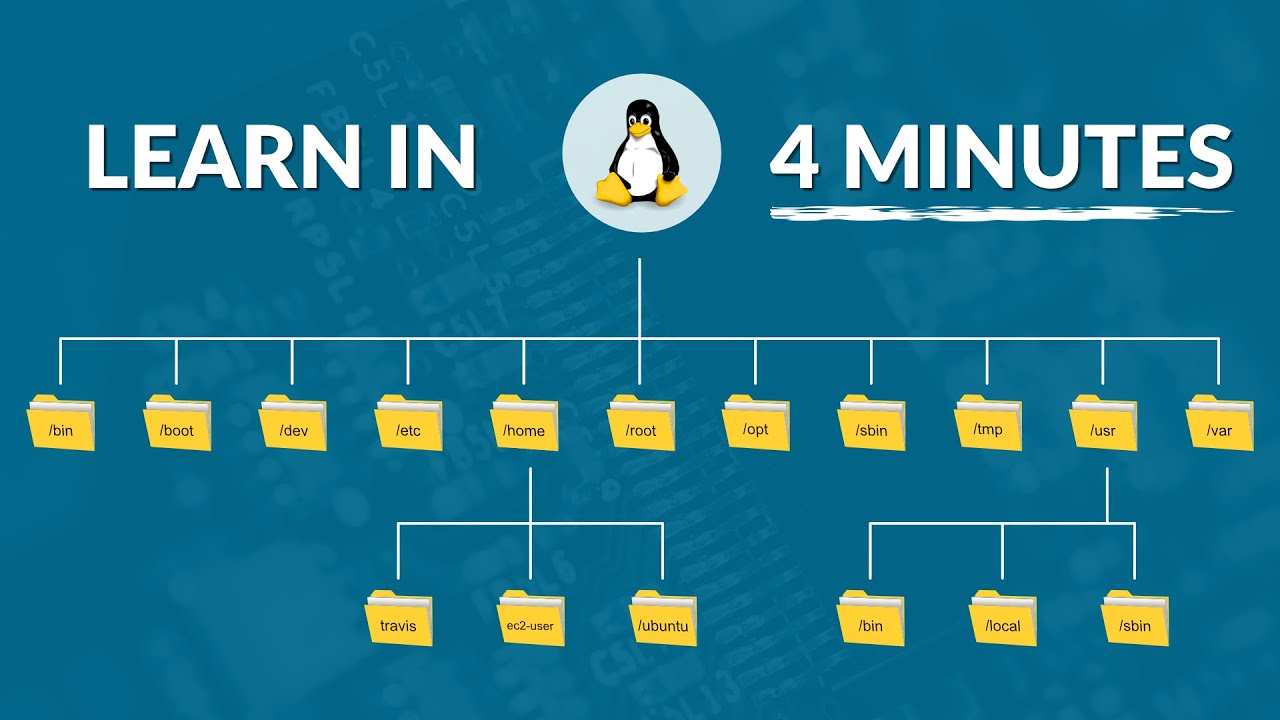
Coming from Windows this might be a little hard to understand but you generally don’t choose a different location to install software. Instead you change your filesystem layout to put the files where you want them.
Let me explain.
In Windows, your partitions become drive letters. C:, D:, E:, etc.
In Linux you have a single tree that starts with /. Every partition gets mounted under / and that is totally in your control. So you have a partition you want to store something specific, you can mount it in your filesystem at the place where that data is stored.
Another thing to consider is that applications are usually fairly small because the application data is not stored with the application in most cases.
If you can describe what disks/partitions you have and how you want to use them, we can probably help you come up with a way to accomplish that
Interesting. I should probably lay out my problem which is that I’m out of space on my main drive where everything is stored. I have 2 other drives with terabytes of storage but i cant install things to it. I’m thinking my solution might just be buying a new main drive that’s much larger in storage space.
My main drive is 250 GB because its the drive that came with my laptop. Then i have an SSD that’s 1 TB and then an external drive that is 12 TB. Id like to install something to my 1 TB SSD.
Most of the space usually isn’t used by the applications you install. It is used by your data which is stored under/home.
Inside /home, you will find all your application data and config.
There are better solutions but if you want a quick and easy solution, it would be to mount your 1TB SSD to /home and use your 250GB to hold your root and applications.
Thank you very much. Ill give this a try. Thanks to @dalto as well. Ill update here if i have any more questions on the topic but thanks for the great support.

 )
)