this was the only solution i found to playing the DVD.
Installing vlc and vlc-plugins-all basically results in the same results as installing only did vlc did before the split.
Before the split, there was no options. You were required to have all the stuff. Since the split, we have options. If you want all the stuff, install those two packages and it is just as before. If you want less stuff you can install only what you need. Before we had no options, now we have options.
4 Likes
Thank you for that clarification.
1 Like
I’m not sure wheter or not I like the split. I get having options now. But I just had a VLC update and now a million plugins get updated. Aside from that, folks who used VLC because “it just works” now need to investigate which plugins they need to make it “just work.”
In my case, I simply installed vlc-plugins-all because I didn’t want to examine each plugin to determine if I needed it or not.
VLC looks like this now…
❯ pacman -Qi vlc
Name            : vlc
Version         : 3.0.21-27
Description     : Free and open source cross-platform multimedia player and framework
Architecture    : x86_64
URL             : https://www.videolan.org/vlc/
Licenses        : GPL-2.0-or-later  LGPL-2.1-or-later
Groups          : None
Provides        : None
Depends On      : bash  hicolor-icon-theme  vlc-gui-qt=3.0.21
Optional Deps   : vlc-gui-ncurses: for ncurses TUI [installed]
                  vlc-gui-skins2: for Skins2 GUI [installed]
                  vlc-plugins-all: for all plugins [installed]
                  vlc-plugins-extra: for extra plugins [installed]
                  vlc-plugins-visualization: for visualization plugins [installed]
                  vlc-plugin-aalib: for ASCII art video output support [installed]
                  vlc-plugin-aom: for AOM AV1 codec support [installed]
                  vlc-plugin-aribb24: for ARIB STD-24 codec and demux support [installed]
                  vlc-plugin-aribb25: for ARIB STD-25 stream filter support [installed]
                  vlc-plugin-ass: for SSA/ASS subtitle codec support [installed]
                  vlc-plugin-avahi: for mDNS/DNS-SD services discovery support [installed]
                  vlc-plugin-bluray: for Blu-ray access support [installed]
                  vlc-plugin-caca: for color ASCII art video output support [installed]
                  vlc-plugin-cddb: for CDDB access support [installed]
                  vlc-plugin-chromecast: for Chromecast stream out support [installed]
                  vlc-plugin-dca: for DTS Coherent Acoustics codec support [installed]
                  vlc-plugin-dvb: for DVB access, mux and demux support [installed]
                  vlc-plugin-dvd: for DVD access support [installed]
                  vlc-plugin-ffmpeg: for FFMPEG based access, codec, demux, packetizer, VDPAU, video chroma and video filter support [installed]
                  vlc-plugin-firewire: for FireWire device access support [installed]
                  vlc-plugin-fluidsynth: for FluidSynth codec support [installed]
                  vlc-plugin-freetype: for subtitle and on screen display text rendering support [installed]
                  vlc-plugin-gme: for Game Music Emulation demux support [installed]
                  vlc-plugin-gstreamer: for GStreamer codec support [installed]
                  vlc-plugin-jack: for JACK access and audio output support [installed]
                  vlc-plugin-kate: for kate karaoke codec support [installed]
                  vlc-plugin-kwallet: for kwallet keystore support [installed]
                  vlc-plugin-libsecret: for libsecret keystore support [installed]
                  vlc-plugin-lirc: for infrared remote control support [installed]
                  vlc-plugin-live555: for RTP/RTSP stream access support [installed]
                  vlc-plugin-mad: for MPEG Audio Decoder audio filter support [installed]
                  vlc-plugin-matroska: for Matroska demux support [installed]
                  vlc-plugin-mdns: for mDNS services discovery support [installed]
                  vlc-plugin-modplug: for MOD demux support [installed]
                  vlc-plugin-mpeg2: for MPEG2 codec support [installed]
                  vlc-plugin-mtp: for MTP device access and discovery support [installed]
                  vlc-plugin-musepack: for MusePack demux support [installed]
                  vlc-plugin-nfs: for NFS access support [installed]
                  vlc-plugin-notify: for notification support [installed]
                  vlc-plugin-quicksync: for Intel QuickSync H264/H262 codec support [installed]
                  vlc-plugin-samplerate: for samplerate audio filter support [installed]
                  vlc-plugin-sdl: for SDL codec support [installed]
                  vlc-plugin-sftp: for SFTP access support [installed]
                  vlc-plugin-smb: for SMB access support [installed]
                  vlc-plugin-soxr: for SoX Resampler audio filter support [installed]
                  vlc-plugin-srt: for SRT subtitle file support [installed]
                  vlc-plugin-svg: for SVG codec and text renderer support [installed]
                  vlc-plugin-udev: for ALSA services discovery support using udev [installed]
                  vlc-plugin-upnp: for UPnP services discovery support [installed]
                  vlc-plugin-x264: for H264/AVC encoding support [installed]
                  vlc-plugin-x265: for H265/HEVC encoding support [installed]
                  vlc-plugin-zvbi: for VBI access (also over V4L2) and codec support [installed]
Required By     : None
Optional For    : None
Conflicts With  : vlc-plugin
Replaces        : vlc-plugin
Installed Size  : 40.06 MiB
Packager        : David Runge <dvzrv@archlinux.org>
Build Date      : Wed 23 Jul 2025 03:35:16 PM CDT
Install Date    : Wed 23 Jul 2025 11:48:22 PM CDT
Install Reason  : Explicitly installed
Install Script  : No
Validated By    : Signature
❯
1 Like
just like linux firmware i didnt like split packages..
monolithic is the way for newbie
whats next.. systemd split 
1 Like
Imho Arch-packagers went a little bit over board with the plugins, esp. since many of the extra plugins are only a few kB, and could easily be lumped into a single 10 MB package. Oh well.
1 Like
Agreed a simple plugin for simple task vlc-plugin-dvd should be all one needs for a dvd to play. This plugin should have all components to make a dvd work.
yep. It worked before. I hate the idea of adding xxMB to get it to rework. Maybe a library got deprecated or something?
Just like with the firmware before ..
Yes there are now a few dozen vlc-plugin-* packages.
You can pick and choose what to use.
But if you install vlc-plugins-all it will be the same ‘weight’ as when you had the single large vlc package installed previously.
6 Likes
It can’t, because providing a way to decrypt DVD content can be illegal depending on the country laws, that’s why it’s optional.
Optional Deps : libdvdcss: for decoding encrypted DVDs
1 Like
I did. I moved on from VLC.
I stand corrected re: xxMB.
Now this makes sense or at least an interesting aspect.
Another stupid thing 
It would appear that vlc-plugins-all must install kde wallet. I never had that on my system before and when I went to get on brave this comes up. Ironically I don’t get this for zen.
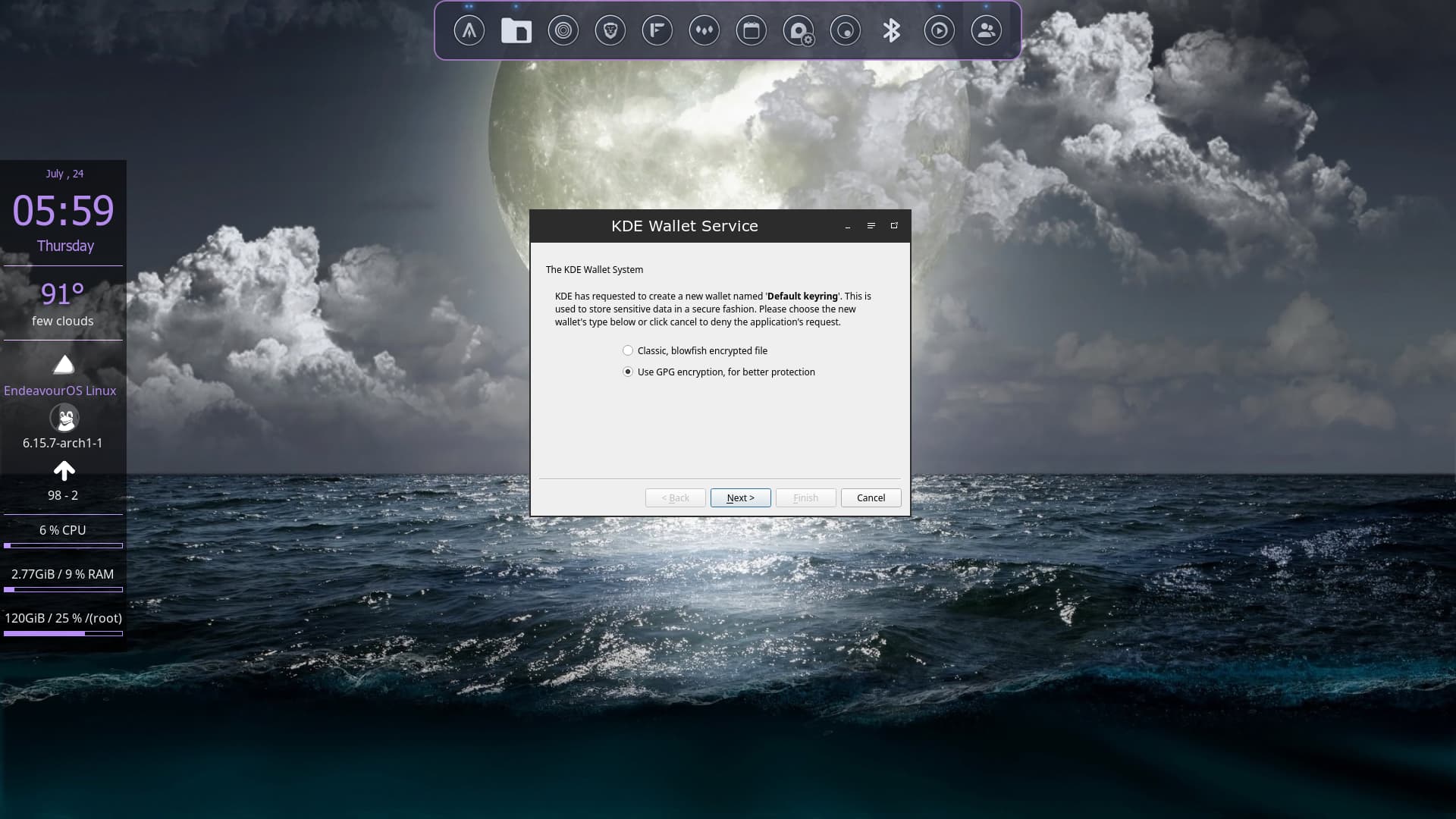
appears to be another reason to just ditch VLC IMHO.
You can check your logs to see exactly where/when/why kwallet was installed.
( /var/log/pacman.log )
Though it would be odd to be missing it if you are on Plasma.
As it is required by kio, plasma-nm, plasma-workspace and others.
I"m on openbox not Plasma
That is because firefox-based browsers contain their own secrets encryption while chromium-based browsers use the system secrets manager.
1 Like
OK - so what do the logs say?
( You could grep kwallet /var/log/pacman.log but you will likely actually need to see the few lines before to get the context. )
1 Like
I’ll do it after I finish my dinner and movie I’m in the middle of. just paused to get a drink and well I have to come here and check things out real quick lol I wanted to check the local weather and on Brave it seems to be more accurate than on Firefox and its derivatives.
thefrog@thepad:~/.local/mnt/thepad/tmp/videos🖝 grep "kwallet" /var/log/pacman.log
[2025-07-24T09:13:10-0400] [ALPM] installed kwallet (6.16.0-1)
[2025-07-24T09:13:10-0400] [ALPM] installed vlc-plugin-kwallet (3.0.21-26)
by the looks of it I would say its a dependency of vlc-plugin-kwallet
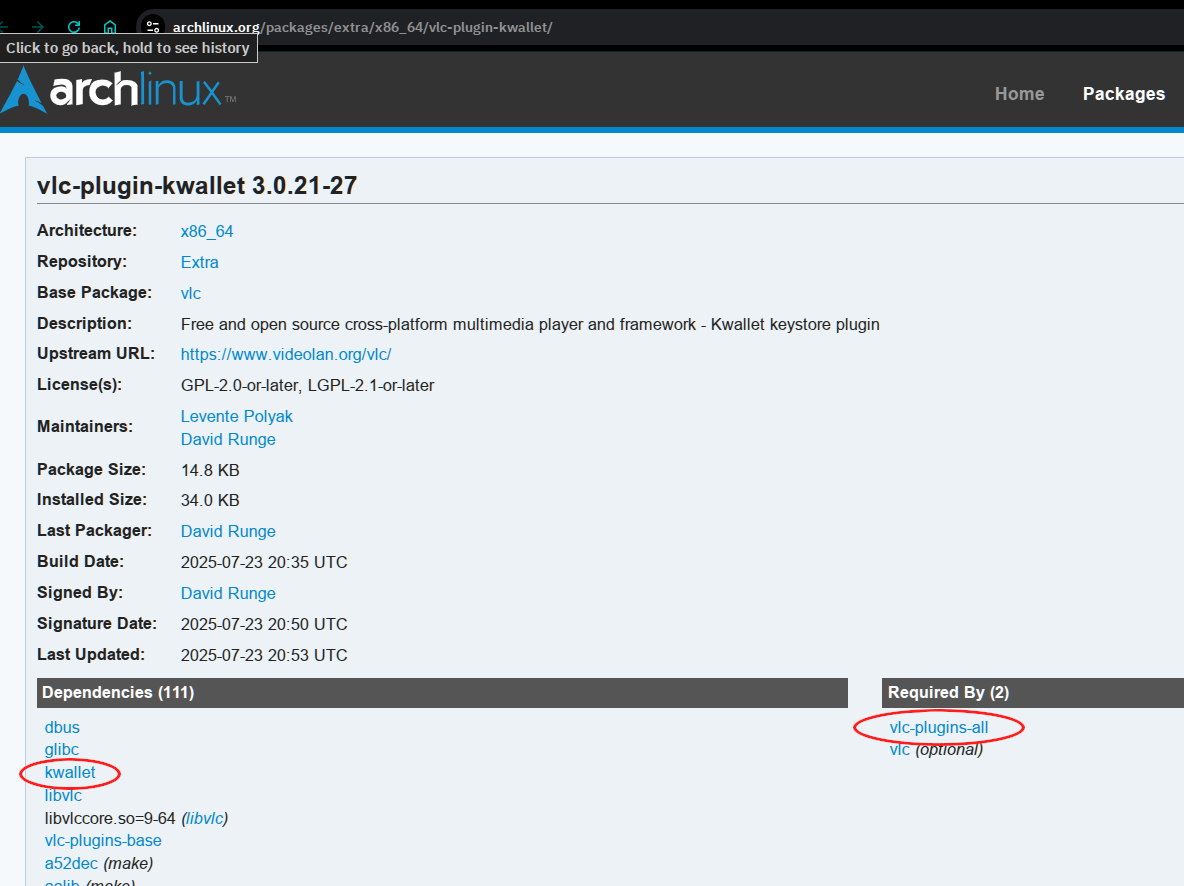
Ha. I did not notice that among the plugin packages somehow. 
$ pacman -Si vlc | grep -i wallet
                  vlc-plugin-kwallet: for kwallet keystore support
I guess that might be a reason to avoid vlc-plugins-all on non-plasma environments.
2 Likes