Calamares doesn’t have support for configuring a mirror. It isn’t that sophisticated.
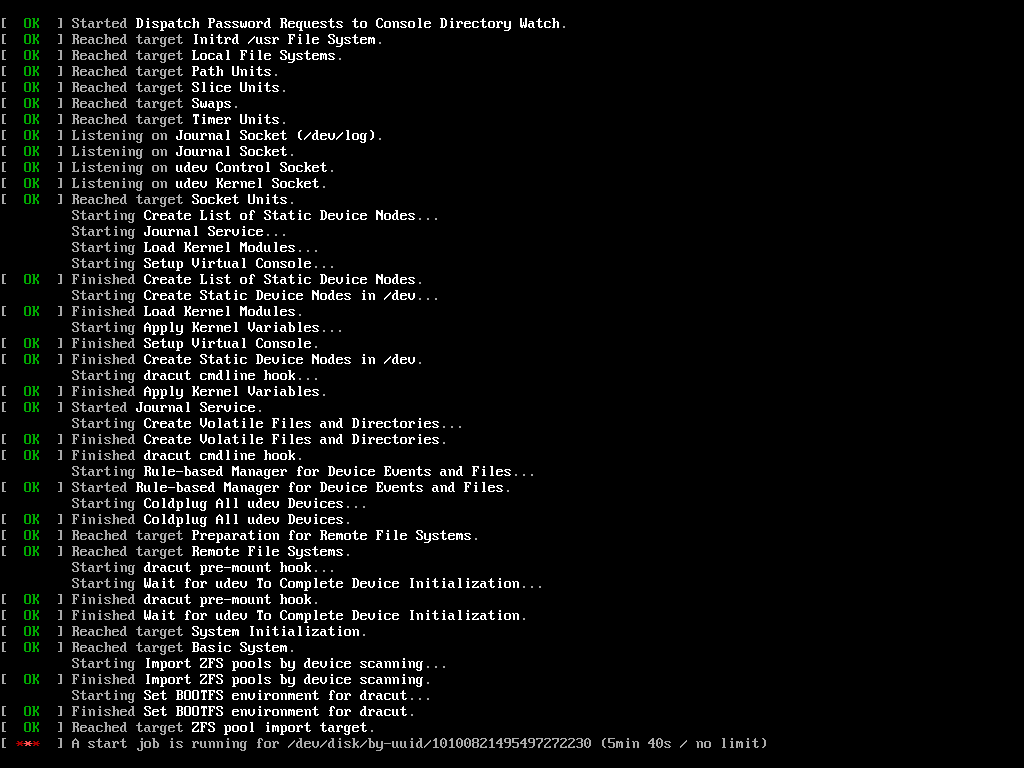
Okay, I tried it on one drive, but after the restart, I am getting:
[FAILED] Failed to start Import ZFS pools by device scanning.
Seesystemctl status zfs-import-scan.servicefor details.
I got further, but it seems to be stuck at this point indefinitely. Initially, it threw a warning and hung so I went into the live ISO and forced the import with -f, then exported it so it wouldn’t require the -f param to import on the next boot. I’m still stuck at this point. It looks like the UUID it’s referencing is the ID of the storage pool, not any particular disk.
These instructions were originally written for Artemis. I haven’t testing them since Cassini was released.
Is this something that is going to get worked on in the near future? I could just run on ext4 for now. I would look into it myself, but I don’t even know where to start looking.
I do intend to get it working at some point but I don’t have a firm timetable.
I have been adding more zfs support upstream with calamares itself as well.
Alright. Let me know if there is anything I can do to help or try out. I wouldn’t mind doing some testing or experimentation.
Just did a EOS NoDesktop ZFS install, partly widening my view of desktop linux, and partly sick of snap on Ubuntu. Thanks for the hints.
Post install, couple of minor issues:
-
pool/ROOT/eos/tmphad some left over files from the install, which cause warnings on boot, things likeuser_commands.bash hotfix-end.bashetc, which aren’t any use at all when/tmp tmpfsmounts over the top./var/tmpis probably a better location, but see also point 2 below. -
I created datasets for
.../eos/varunmounted, and.../eos/var/libmounted, so.../eoshad avar/lib/systemddirectory which was similarly causing a warning. Maybe this is related to mounting the datasets too late at while installing? -
I had to boot into another ZFS install to get at the datasets to clean up pool/ROOT/eos/{tmp,var/lib}/*
Bigger issues were in modules/zfs.conf.
-
If
datasetOptions=""then dataset creation failed with the empty argument, since I added the options I wanted to thepoolOptionsso they would be inherited like normal. -
ZFS normally operates by inheriting attributes like
mountpoint,atimeetc, so I should be able to just setdsName:and where inherit is desired thenmountpoint:is not required. Similarly withcanMount:onis the default, and should be able to be omitted unless I require something different. -
These issues meant I had to post process the pool to inherit the options that should have just been inherited. Since I picked
atime=offonly fordatasetOptions, I only had to post process that, except formountpoint. -
mountpointis a bigger issue because it can’t be fixed from a running system, I had to boot into another ZFS system, import the pool thenzfs inherit mountpointas appropriate.
You probably already know format in services-systemd.conf has changed, so had to adapt.
I was happy that the zfs-dkms build went fine on the ISO, unlike Manjaro which required a non ZFS install, install linux61-zfs and then build the pool & datasets with my existing pool/ds scripts, and then backstrap etc.
Better clues for LTS linux with ZFS would be good, I haven’t chased that down as yet for EOS, but I think I saw them somewhere.
systemd-boot was interesting to get my head around, something different from grub is good for a change, although I’ve seen proxmox use it too.
While going thru this process I had some ideas for ZFS boot environments, so will be hacking the dracut zfs module to test that out.
Since I just completed an install, I thought I would try mirroring, just to see if it would break like yours did? I didn’t expect it to break, and it didn’t.
I just mirrored using zpool attach pool olddevice newdevice, and waited for zpool status to show synced, and rebooted, and it rebooted.
# zpool status
  pool: eospool
 state: ONLINE
  scan: resilvered 3.43G in 00:00:04 with 0 errors on Sat Jul  1 14:31:40 2023
config:

	NAME           STATE     READ WRITE CKSUM
	eospool        ONLINE       0     0     0
	  mirror-0     ONLINE       0     0     0
	    eospool-a  ONLINE       0     0     0
	    eospool-b  ONLINE       0     0     0

errors: No known data errors
#
I don’t have zfs-import enabled, since I don’t have any other pools I want imported.
# ls /etc/systemd/system/zfs.target.wants/
zfs-mount.service  zfs-zed.service
#
I do have another pool on the data, it is my fallback ZFS install which I zfs send | zfs recv from the original install. I have both these set with different hostids from zgenhostid and then dracut --force so they don’t try import each others pools, and mount each others datasets on top of their own since I have a sub root structure that I’m hoping boot environments will help. If you need to change hostid, then you usually have export and reimport the pool so it saves the hostid in the pool, and you also want this to match up with the hostid saved in the initrd from dracut.
# zfs get -H canmount,mountpoint -r -t filesystem eospool/ROOT |sort -b -k2,2 -k1,1|column -t
eospool/ROOT                canmount    off         local
eospool/ROOT/eos            canmount    noauto      local
eospool/ROOT/eos/etc        canmount    on          local
eospool/ROOT/eos/usr        canmount    off         local
eospool/ROOT/eos/usr/local  canmount    on          local
eospool/ROOT/eos/var        canmount    off         local
eospool/ROOT/eos/var/cache  canmount    on          local
eospool/ROOT/eos/var/lib    canmount    on          local
eospool/ROOT/eos/var/log    canmount    on          local
eospool/ROOT/eos/var/tmp    canmount    on          local
eospool/ROOT                mountpoint  none        local
eospool/ROOT/eos            mountpoint  /           local
eospool/ROOT/eos/etc        mountpoint  /etc        inherited  from  eospool/ROOT/eos
eospool/ROOT/eos/usr        mountpoint  /usr        inherited  from  eospool/ROOT/eos
eospool/ROOT/eos/usr/local  mountpoint  /usr/local  inherited  from  eospool/ROOT/eos
eospool/ROOT/eos/var        mountpoint  /var        inherited  from  eospool/ROOT/eos
eospool/ROOT/eos/var/cache  mountpoint  /var/cache  inherited  from  eospool/ROOT/eos
eospool/ROOT/eos/var/lib    mountpoint  /var/lib    inherited  from  eospool/ROOT/eos
eospool/ROOT/eos/var/log    mountpoint  /var/log    inherited  from  eospool/ROOT/eos
eospool/ROOT/eos/var/tmp    mountpoint  /var/tmp    inherited  from  eospool/ROOT/eos
Hope it helps, but I didn’t really do anything special re the mirroring?
Further to this I created a testimport pool, and rebooted, still without zfs-import*.service and it imported fine, I assume in the initrd since the hostid of the initrd matches the newly created pool
As such I have not idea why you are locked waiting for a UUID that looks like a ZFS VDEV member id. Certainly when I look in /dev/disk/by-uuid I see matching UUIDs to VDEV members.
You are correct in that /dev/disk/by-uuid contains the UUID/pool_guid of the storage pool, and it symlinks to a VDEV member device.
I still don’t see why your boot locked up.
You might be interested to know that I blocked on the zpool import looking for /dev/disk/by-uuid.
I had just done pacman -Syu and also pacman -Syu zfs-linux-lts and I got and updated linux dkms kernel and initrd build, and then zfs-linux-lts wanted zfs-dkms removed when I installed it.
I tried booting both kernel/initrd pairs, and they both blocked. I had also removed the mirror from eospool by this stage, since the machine is a VM with storage on a zfs pool anyway, so not required for redundancy. So we can conclude that the import failure was unrelated to mirror state.
Thanks for posting. Here are a few notes from me:
- The instructions were written for an older version of the ISO. They almost definitely won’t work for Cassini.
- The support for zfs in Calamares(the installer we use) is fairly simplistic. It isn’t intended for someone who wants a highly-specific setup
- The reason some of those options are set explicitly is to make it easier for distro maintainers who aren’t familiar with zfs to configure and to make it harder for the install to fail
- Setting
datasetOptions=""causing failures is definitely an upstream bug. That shouldn’t even be a string to being with. I will need to fix that upstream.
Adding the archzfs repo and the associated kernel repos will make your life much easier and safer if you are using zfs on root. It will block kernels from getting updated until the matching zfs modules are available.
I eventually got zfs-linux-lts installed, however same UUID issue as previously described. I noticed the cmdline on the loaded entry had two root= entries when I was adding rd.break=pre-mount, so removed the second, root=UUID=, and it booted OK. Eventually backtracked and found that post initial install /proc/kernel/cmdline had root=eospool/ROOT/eos root=UUID= so the second empty root=UUID= string was getting detected by dracut/systemd and stalling the boot mount phase.
After I removed that root=UUID= string from the loader .conf file, it booted without issues, and after removing from /etc/kernel/cmdline the loader .conf was correctly updated by, I think, kernel-install, when I ran pacman -Syu. I haven’t figured out the correct invocation for kernel-install for manual install as yet.
I explicitly am looking for a ZFS binary module enabled kernel distro. Having been thru the hassle of Ubuntu DKMS build failures leading to boot failures in the past, I don’t want to go back there again.
Not sure if the UUID= was an artifact of me screwing up the install instructions, however 2 instanaces. Maybe related to ZPOOL_*VDEV* environment variable I forgot somewhere?
You can simply run reinstall-kernels and it will call kernel-install for each kernel on your system.
To run it manually for a single kernel it is kernel-install add <kernel version> </path/to/vmlinuz>
The repos I mentioned above provide kernels and matching non-dkms modules. If you want distros with kernels with zfs support built into the kernel I know cachyos has zfs kernels.
Thanks for the hints, still learning my way around arch etal.
Pre-built modules matching the kernel are perfectly adequate for my purposes. Don’t need them linked into the kernel, and would prefer not to have them linked into the kernel.
Never the less, I had been planning to have a look at cachyos, but looks more experimental that I want, certainly I’m not into chasing down the last increment of performance by experimenting with different schedulers, possibly bleeding edge.
You can put these two above your other repos:
[zfs-linux-lts]
Server = http://kernels.archzfs.com/$repo/

[zfs-linux]
Server = http://kernels.archzfs.com/$repo/
and these below all the offical repos.
[archzfs]
# Origin Server - France
Server = http://archzfs.com/$repo/x86_64
# Mirror - Germany
Server = https://mirror.biocrafting.net/archlinux/archzfs/$repo/x86_64
# Mirror - India
#Server = https://mirror.in.themindsmaze.com/archzfs/$repo/x86_64
# Mirror - US
Server = https://zxcvfdsa.com/archzfs/$repo/$arch
I have been using this setup for years and never had any breakage.
Yes, thanks, I had already pulled that out from the forum, and gthub, however found the initial 2 were slow for me, .au, so I duplicated the server lines from [archzfs] for the mirrors adding them to [zfs-*], and last time I ran pacman, I think it helped, but not 100% sure has yet, I think I was mostly done downloading, then killed the pacman, updated pacman.conf with the extra mirrors for zfs* and then reran pacman, and it finished quickly, rather than 300kB/s. Will see next time zfs-linux-lts get released I guess, although maybe I could install zfs-linux which I guess is more recent.
Now I can get back to what I wanted to be doing I guess, which is trying to get “deep”/non-single-dataset boot environments to work, so they integrate into my selective backup arrangements.
Thanks, works for Cassini Nova as well (you just need to merge targets: section of services-systemd.conf to the units section: and add suffix “.target” to the names).
But I don’t know how to specify another pool options. If I want to have separate pool for /boot (I want to use GRUB and as I read GRUB does not recognize all ZFS features), how would I specify its options? zfs.conf is just for the root pool.
Except for the list of datasets, those settings are used for all pools.
Calamares doesn’t support this. The zfs support that was added to Caslamares was built to create feature parity with the btrfs support in Calamares. The btrfs support in Calamares is fairly primitive in nature.
You would probably need to set that up after installation.
Check out the openzfs “zfs on root” pages, there are lots of examples for lots of different linux, although the arch one redirects to arch. If you want to use grub, as an interim create a 2GB partition for ext4 /boot. After install you can use the openzfs and arch instructions to build bpool and experiment with another partition as bpool, or even using a USB disk as temporary bpool. When you are happy can remove ext4 /boot, and mirror your temporary bpool over the top of the ext4 space. I’m thinking of doing that myself, as systemd boot doesn’t have rollback capability or checksum data integrity or not enough for me to like.