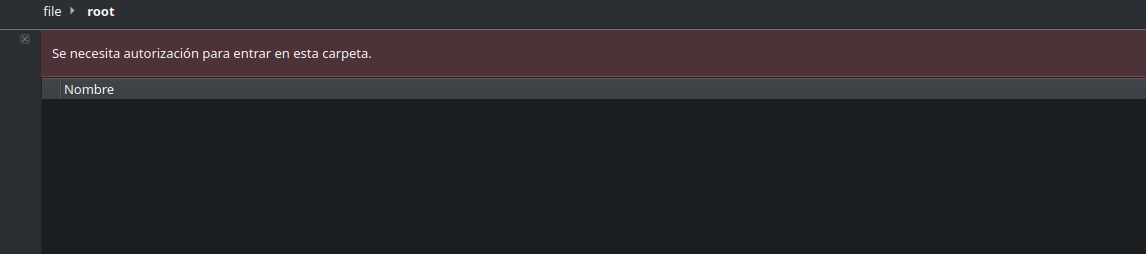
Unable to open root folder

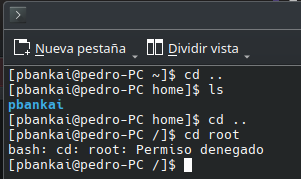
HI, my account ( admin and unique account in the system) is unable to open the root folder even after trying to open it as an administrator, is there any way to fix this?
for context when opening with admin access


I am trying to get into that because I want to edit some files for my AWS CLI installation

Should be accessible with the terminal.

ran as admin

a time ago I had an incident where I have to rebuild my session because I delete my bootable for the endevour partition I am thinking it might be related

In a terminal these characters are important:
$ is user
# is root

so:

~ ❱ su                                                                                                                                 16:47:27
Password: 
[root@xircon-legion xircon]# cd /
[root@xircon-legion /]# cd root
[root@xircon-legion ~]# 
1 Like

Try su within the terminal

1 Like

Hello,

anyway, I can reach /root as β€œnormal” user:

╭─[photor@Picard:~]
╰─>$ cd /root
╭─[photor@Picard:/root]
╰─>$ cd
╭─[photor@Picard:~]
╰─>$ 

That is because, user β€œphotor” (me as normal user) is allowded to enter /root-directory:

╭─[photor@Picard:~]
╰─>$ ls -la /root
insgesamt 2344
drwxr-xr-x 21 root root    4096  9. Nov 15:46 ./
drwxr-xr-x 18 root root    4096  8. Apr 2024  ../
[...]

See permissions: β€œdwrxr-xr-x” - last β€œr-x” ist important; so everybody is to allow to visit /root. Maybe you check this. (And maybe, it can be discussed, if this is a good idea)
Ciao,
Photor

2 Likes

Try running the following commands:

sudo -i
cd /root

additional remark:

  • my system is a laptop with only me as user. I would never do this on a multi-user machine!
  • intension of my post: the reason for the not allowed to cd into /root is most likely the permission of the directory.
  • I have no idea, what is the default after fresh EOS installation (and what is the default on Arch)

So: this is NOT an advice to do so!!! :wink:

Ciao,
Photor

This topic was automatically closed 2 days after the last reply. New replies are no longer allowed.