Great idea, but unfortunately my experience was that the system ran fine in the live environment, but, after install, froze a few seconds after booting in, every time, as I’ve detailed at the top of the thread. I’d tested on the RX560 Asus Tuf first, where that install booted fine, but the Ryzen 7/RX5700XT main PC doesn’t seem to like something … runs fine on purely ATI driver in my case (Anarchy). I don’t think jiibus will know except via installing.
Unless you install it and work through what ever the issue is then you won’t know. This card is working on Manjaro and others.
Sorry, I’d explained about health, plus have said that card works fine with ATI driver, and provided whatever feedback I could. I also requested on a suggestions thread about having the option to choose graphics driver during install, which would immediately solve the issue. And I’ve seen some posts/reviews where there are some issues possibly with the installer, and eOS, regarding my card, so it is not just my card, as it works fine on Anarchy. The latest thing I’ve seen that could be part of the problem is that there may be an issue about calamares itself, and partitioning. That’s unfortunate to have to point that out, but overall I need to stay on Anarchy at this point.
If there can be some assistance with the installer giving options, that would be awesome, but I cannot at this point go into nuking my install and doing a lot of complex and more technical learning and investigation. As I explained, not good health at this time.
No i understand. You explained your situation before. I didn’t mean to imply anything. Sorry if it came across that way. I’m just pointing out that it it is one of those pieces of hardware that is newer and in order to figure it out it will need to be installed and the issues worked through if it has any. All hardware is different even though it may be the same card. Different vendor and other hardware is different maybe also. Again i wish you the best and i hope you get well soon.
Thanks @ricklinux  I appreciate your post, and thank you very much for good wishes. Have a great week.
So, good news! I happen to have an extra SSD in my PC that I use purely for VM storage, so I moved all the data over to my /home and installed EOS onto said drive.
Install took pretty long, ~20 min, but I booted into KDE without the issues @anon96036739 described. I have two 1440p monitors, Ryzen 3700x and Red Devil 5700XT. I did figure out quickly that installing the amdgpu-pro et al. drivers was a bad idea as after I did that and rebooted, SDDM failed to launch. Removing them resolved everything.
But I am a bit confused about the need for the AMDPGU-Pro drivers if apparently Mesa handles all that. The Arch Wiki article about it is a bit muddy to me about situations where one would pick AMDGPU-Pro over Mesa. I am quite new to using an AMD GPU, so there’s tons I don’t understand about the nuances of using them in Linux.
It is my understanding that the amdgpu-pro should not be used for newer cards.
Did you install inxi?
What is the output of inxi -FGz
Or
lspci -k
Edit:
AMDGPU-PRO is AMD’s open source AMDGPU driver with a proprietary overlay. What this means is that AMD’s “proprietary” driver will be based on its open source driver!
AMDGPU is AMD’s open source graphics driver for the latest AMD Radeon graphics cards. It is a compliment to the open source Radeon driver, which works with graphics cards not supported by AMDGPU. AMDGPU is under intense development in coordination with the larger open source community. AMDGPU supports a growing number of cards, but will not be available for pre-GCN (Graphics Core Next) architecture cards. This means that as development progresses, some select cards as far back as HD 7000 cards will be supported. No HD 6000 or prior cards will be supported.
Support for AMDGPU-PRO begins experimentally with Ubuntu 16.04 – which, incidentally, does not support fglrx – and is fully supported starting with 16.10.
The AMDGPU-Pro Driver is compatible with the following AMD products.
AMD Product Family Compatibility
Radeon™ RX 480 Graphics AMD Radeon™ R9 M270X Graphics
Radeon™ RX 470 Graphics AMD Radeon™ R9 360 Graphics
Radeon™ RX 460 Graphics AMD Radeon™ R9 290X Graphics
AMD Radeon™ R9 Fury X Graphics AMD Radeon™ R9 290 Graphics
AMD Radeon™ R9 Fury Graphics AMD Radeon™ R9 285 Graphics
AMD Radeon™ R9 Nano Graphics AMD Radeon™ R9 M485X
AMD Radeon™ R9 390X Graphics AMD Radeon™ R7 M465
AMD Radeon™ R9 390 Graphics AMD Radeon™ R7 M460
AMD Radeon™ R9 380X Graphics AMD Radeon™ R7 M445
AMD Radeon™ R9 380 Graphics AMD Radeon™ R7 M440
AMD Radeon™ R9 M395X Graphics AMD Radeon™ R7 260X Graphics
AMD Radeon™ R9 M385 Graphics AMD Radeon™ R7 260 Graphics
AMD Radeon™ R9 M380 Graphics
I’m currently back in my Manjaro install, and as I have so much online account protection in the form of absurdly long generated passwords, a password manager, and 2fa soft-tokens, it would be quite the endeavor (pun not intended) to get that here lol.
I can give you the inxi from this install if it would be helpful.
Sure that would be okay. I just wanted to see. Like i say it is my understanding that the amdgpu-pro vulkan should be used for specific games. I think the amdgpu actually gives better testing than the proprietary drivers.
Alrighty, here you go:
inxi -FGz
System:    Host: polak-deelucks Kernel: 5.7.9-1-MANJARO x86_64 bits: 64 Desktop: KDE Plasma 5.19.3 Distro: Manjaro Linux
Machine:   Type: Desktop System: Micro-Star product: MS-7C35 v: 1.0 serial: <filter>
Mobo: Micro-Star model: MEG X570 ACE (MS-7C35) v: 1.0 serial: <filter> UEFI: American Megatrends v: 1.80
date: 01/16/2020
CPU:       Topology: 8-Core model: AMD Ryzen 7 3700X bits: 64 type: MT MCP L2 cache: 4096 KiB
Speed: 4149 MHz min/max: 2200/4150 MHz Core speeds (MHz): 1: 4149 2: 4150 3: 4150 4: 4150 5: 4150 6: 4150 7: 4150
8: 4150 9: 4149 10: 4150 11: 4148 12: 4149 13: 4150 14: 4150 15: 4150 16: 4149
Graphics:  Device-1: Advanced Micro Devices [AMD/ATI] Navi 10 [Radeon RX 5600 OEM/5600 XT / 5700/5700 XT] driver: amdgpu
v: kernel
Display: x11 server: X.Org 1.20.8 driver: amdgpu FAILED: ati unloaded: modesetting,radeon tty: N/A
OpenGL: renderer: AMD Radeon RX 5700 XT (NAVI10 DRM 3.37.0 5.7.9-1-MANJARO LLVM 10.0.0) v: 4.6 Mesa 20.1.3
Audio:     Device-1: Advanced Micro Devices [AMD/ATI] Navi 10 HDMI Audio driver: snd_hda_intel
Device-2: Advanced Micro Devices [AMD] Starship/Matisse HD Audio driver: snd_hda_intel
Device-3: Razer USA Razer USB Audio Controller type: USB driver: hid-generic,snd-usb-audio,usbhid
Sound Server: ALSA v: k5.7.9-1-MANJARO
Network:   Device-1: Intel I211 Gigabit Network driver: igb
IF: enp38s0 state: up speed: 1000 Mbps duplex: full mac: <filter>
Device-2: Realtek RTL8125 2.5GbE driver: r8169
IF: enp39s0 state: down mac: <filter>
IF-ID-1: br-081770f00fe6 state: up speed: 10000 Mbps duplex: unknown mac: <filter>
IF-ID-2: br-1ab228b87c63 state: up speed: 10000 Mbps duplex: unknown mac: <filter>
IF-ID-3: docker0 state: up speed: 10000 Mbps duplex: unknown mac: <filter>
IF-ID-4: veth3c2d1b1 state: up speed: 10000 Mbps duplex: full mac: <filter>
IF-ID-5: veth5bc8ba2 state: up speed: 10000 Mbps duplex: full mac: <filter>
IF-ID-6: veth9dc0761 state: up speed: 10000 Mbps duplex: full mac: <filter>
IF-ID-7: vethcbd186b state: up speed: 10000 Mbps duplex: full mac: <filter>
IF-ID-8: vethf0bc296 state: up speed: 10000 Mbps duplex: full mac: <filter>
Drives:    Local Storage: total: 8.45 TiB used: 2.63 TiB (31.2%)
ID-1: /dev/nvme0n1 vendor: Samsung model: SSD 970 EVO 1TB size: 931.51 GiB
ID-2: /dev/sda vendor: Samsung model: SSD 840 EVO 500GB size: 465.76 GiB
ID-3: /dev/sdb vendor: Western Digital model: WD30EZRZ-00GXCB0 size: 2.73 TiB
ID-4: /dev/sdc vendor: Seagate model: ST4000DM004-2CV104 size: 3.64 TiB
ID-5: /dev/sdd vendor: Western Digital model: WDS500G2B0A-00SM50 size: 465.76 GiB
ID-6: /dev/sde type: USB vendor: Samsung model: Flash Drive size: 29.88 GiB
ID-7: /dev/sdf type: USB vendor: Samsung model: Flash Drive FIT size: 239.02 GiB
Partition: ID-1: / size: 66.79 GiB used: 25.93 GiB (38.8%) fs: ext4 dev: /dev/nvme0n1p2
ID-2: /home size: 848.11 GiB used: 188.82 GiB (22.3%) fs: ext4 dev: /dev/nvme0n1p3
Sensors:   System Temperatures: cpu: 48.9 C mobo: N/A gpu: amdgpu temp: 42 C
Fan Speeds (RPM): N/A gpu: amdgpu fan: 0
Info:      Processes: 418 Uptime: 31m Memory: 31.38 GiB used: 4.81 GiB (15.3%) Shell: zsh inxi: 3.0.37
Yes it’s using amdgpu.
Edit: Yes the Arch wiki is very muddy when it comes to understanding this. I tend to look elsewhere for more information. It is my understanding that amdgpu-pro can be used but for some specific games.
Edit: On the Arch wiki this best explains and shows both amdgpu and amdgpu-pro and it says.
Note: Users of graphic cards other than Radeon Pro are advised to use the amdgpu graphics stack.
Arch Wiki:
https://wiki.archlinux.org/index.php/AMDGPU#Selecting_the_right_driver
Here is lots of info on amdgpu and amdgpu pro
These cards are also supported by amdgpu
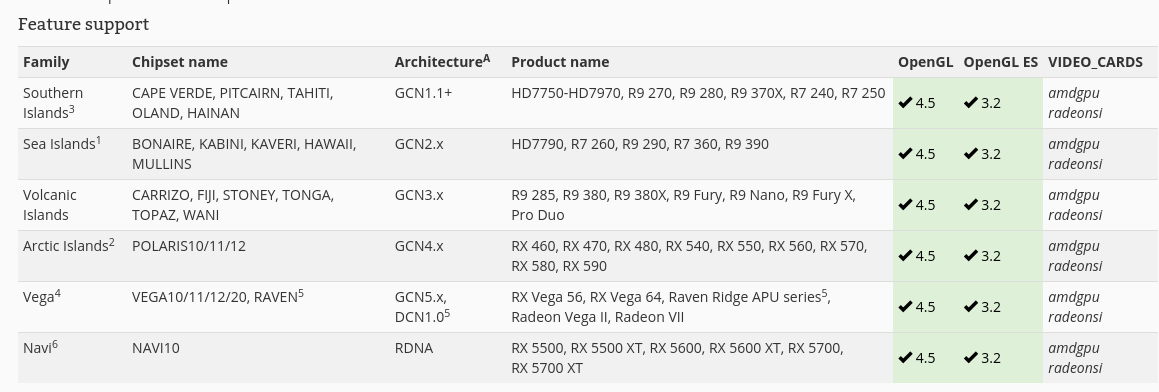
20 minutes for the install is about average as everything is downloaded.
@Evident4146
Just wondering how you are making out with the install on the spare drive?
Great, actually. I then went ahead and also did an install with LUKS & BTRFS following the forum guide and it worked a treat. So I’m going to use that for my new permanent install.
That’s awesome. I just tried the Luks & Btrfs install also.
To get back to the initial issue, I can now report that eOS installs on the main PC, yay. 

Through a saga of Anarchy/Mate (and xfce) install broken, but tried a few times [‘failed to install packages to new root’], then used latest eOS iso for offline xfce install … worked perfectly but, despite trying hard to like xfce, just couldn’t, so went for the online Mate install that had issues with originally. This time I looked into the top folder (base) on the installer and found that anything that could have caused an issue was in that folder! … not sure if it’s been adapted for the latest iso, but I know that when I saw that folder on the previous install I took it that this was Arch’s base-devel stuff only … thus intel, gvfs-google, ethernet blacklisting driver, nvidia, firefox, allsorts went in, some of which baulked the install. No issue with graphics at all now! Great to be running Mate again, and, using wine-staging, latest linux kernel, and normal mesa, rx5700xt is very happy.
EDIT: some screen tearing on one game, but it could just be that game … installed Zen kernel and mesa-aco incase … definite other improvements, but still some screen tearing for that game. Won’t know fully until try other games.
When you use the online installer the base package doesn’t get touched. It is already selected. Then you select MATE or another desktop to install. Everything should install that is required and work.
Tbh, when the online install didn’t work, I hadn’t touched that section. This time it was a real revelation, lol, to see how many packages I could deselect, and the online install worked, plus saw that packages I’d deselected weren’t on my system. I install tkpacman and check what’s on the system e.g. I did this install twice and, in the first install, found that I was needing to remove bits of eOS theming as e.g. I couldn’t sort the grub or lxdm pictures I usually add, and latest arch news would pop up during a game … so the 2nd time, I deselected eOS theming etc in the base folder, and that was a really useful option to have.
Great to be able to select things. My only wishlist regarding manually selecting, for whenever possible/time, would be larger text/checkboxes (hard to select), and a brief sentence saying what each package does.
Just to add, even though I’ve posted a bug report on Anarchy’s gitlab, I could well be an eOS convert, as, with the ability to choose installer options, and some wizardry eOS does really well about reboots (not waiting 1.30m or 2m for shutdowns), system is running really well.
I picked up on your mention of small check boxes - I suspect this is a resolution issue. The live sesssion that the installer runs in includes the XFCE settings tools - which means it is easy to go to settings/Display and select a resolution that is easier to read.
I am on a 3840x2160 screen, but I find that setting it to 1920x1080 for the install simplifies issues like that! 