Touchscreen not working

Hello everyone! I can hardly remember the last time I used the touchscreen. It was pobably 6-8 months ago, but was working flawlessly. In the settings says “No touchscreens found”. I have tryed couple of Arch and Debian distros from LiveISO, and also installed couple with VirtualBox, but still no touch cappability of the screen. Switching LTS to zen doesnt help. So, my question is is there way to check the drivers enzo, or probably there is hardware problem? Thanx in advance!

Cheers!

Maby related to this:? :thinking:

Thanx mate, but this doesnt help ;(. In settings →keyboard→virtual keyboard→plasma keyboard doesnt change the things. Thanx

Wierd well I don’t have or use any touch screen so I don’t know Maby somebody else here can help you?!

Yea, thanx for your effords ;)! I assume there is a hardware problem, cos I have two of this laptops (Asus C436 Chromebook) and in the one of them the touch cappability was allready gone from the beginning. I hoped it is software problem

1 Like

Hello @RedMan!

You could check to see if a cable is loose or not properly connected (if you feel confident doing so).

Here is a video showing how to disassemble it so you know what you’re getting into.

(Luckily, the video has English subtitles. :slight_smile: )

Edit:

You don’t actually have to take the laptop apart completely, just check that all the cables are connected correctly.

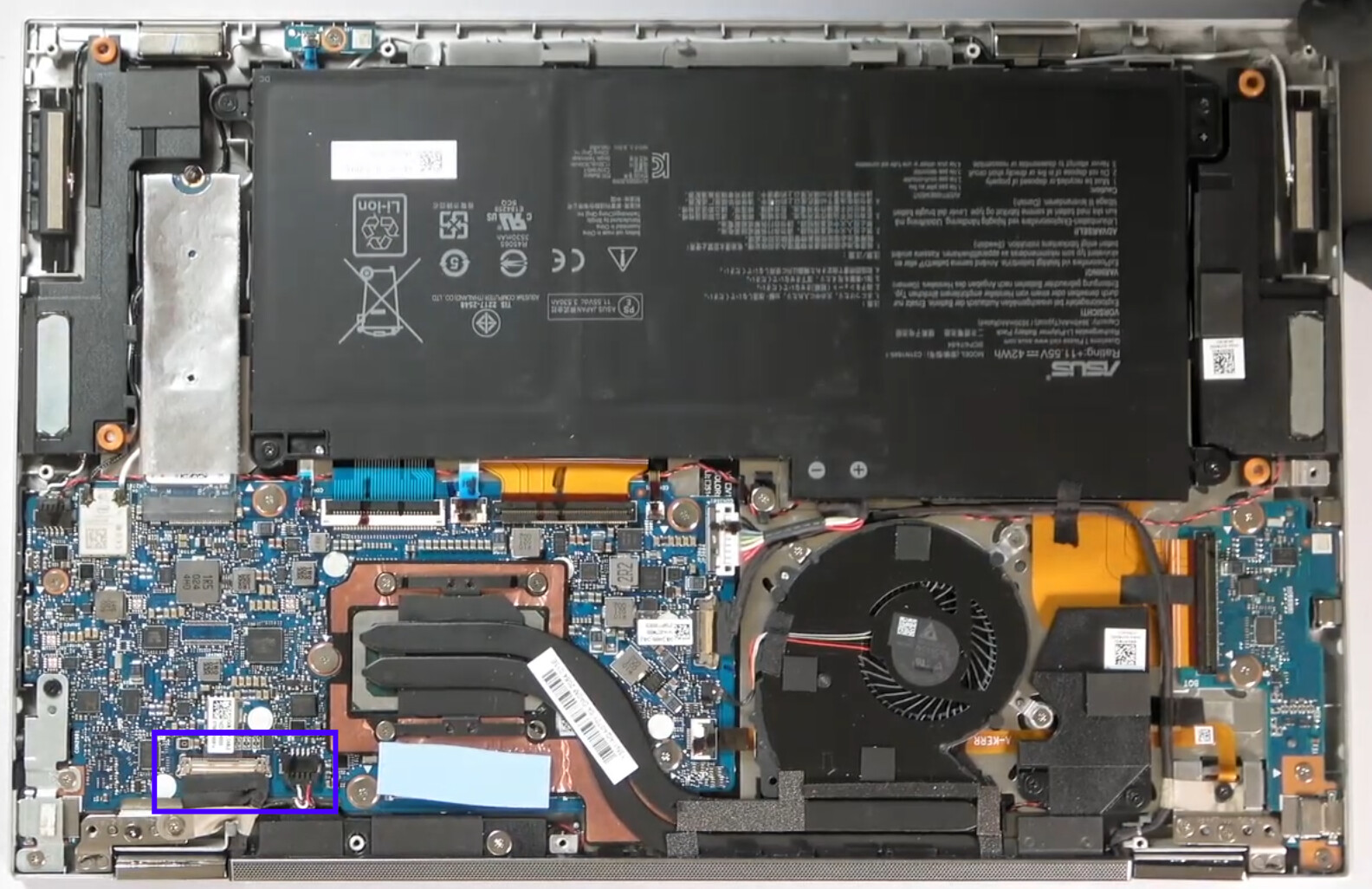
Normally, it should be the display cable or an additional cable connected to the display (not the Wi-Fi antenna cable).

If you want to do that, please take your time and before you do anything, disconnect the battery from the motherboard.

Edit 2:

I have marked the area where the display cable is (the wide connector with the wrapping). Next to it could be the cable responsible for the touch function.


sudo libinput list-devices

would help if it does not show any you could check journal:

journalctl -b -0 | grep touch or something