regarding last version of Thunderbird when I want to add email account , now password authentication method - Oauth2 - is not proposed , then no possibility of connection to yahoo server and then impossible to add my account !
Anyway on other Yahoo existing accounts , Oauth2 option is well configured ! also I remove Thunderbird and reinstall but nothing more .
New accounts that you create with a mail service?
Because I just add “anew” (from scratch on a newly installed Thunderbird) a couple of I have had with some mail service and it worked.
I confirm the last version I have proposes only 5 authentication options : Autodetect , Normal password , Encrypted password , Kerberos GSSAPI , NTLM ; but none Oauth2 , then impossible to create the yahoo account !!! Also not I have 2 existing accounts still working : one gmail and one yahoo both with Oauth2 method shown in accounts settings …the account I want to add is existing since years and perfectly working through yahoo application ( and also thunderbird in other distro ) , it’s only a thunderbird matter / bug specific to EOS /Arch
It seems downgrading my thunderbird into version 140 is not working ; by using pacman -U thunderbird xx ; still the last version in var/cache/pacman / pkg , always last version nb151 installed !! even if I installed version 140 in this folder ; Is there any way to fo that or where I am wrong?
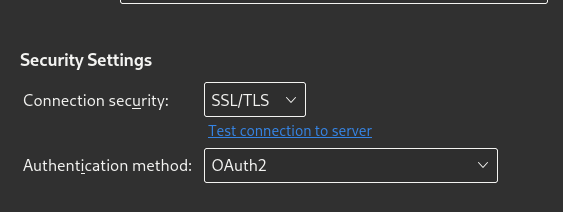
 : Autodetect , Normal password , Encrypted password , Kerberos GSSAPI , NTLM ; but none Oauth2 , then impossible to create the yahoo account !!! Also not I have 2 existing accounts still working : one gmail and one yahoo both with Oauth2 method shown in accounts settings …the account I want to add is existing since years and perfectly working through yahoo application ( and also thunderbird in other distro ) , it’s only a thunderbird matter / bug specific to EOS /Arch