Hi, I installed Ganymede version on my PC without problems, but at the end the system don’t find any other device on the LAN. It is therefore necessary to use the IP address to access to them. So I ask for an help.
I compared the system files with another PC that works correctly, and they seem to be the same. Avahi, wsdd, and nss-mdns are installed on both, and avahi-daemon and wsdd are running, but the command “avahi-browse --all --resolve --terminate” on the PC in question terminates without finding anything, while on the other it works correctly.
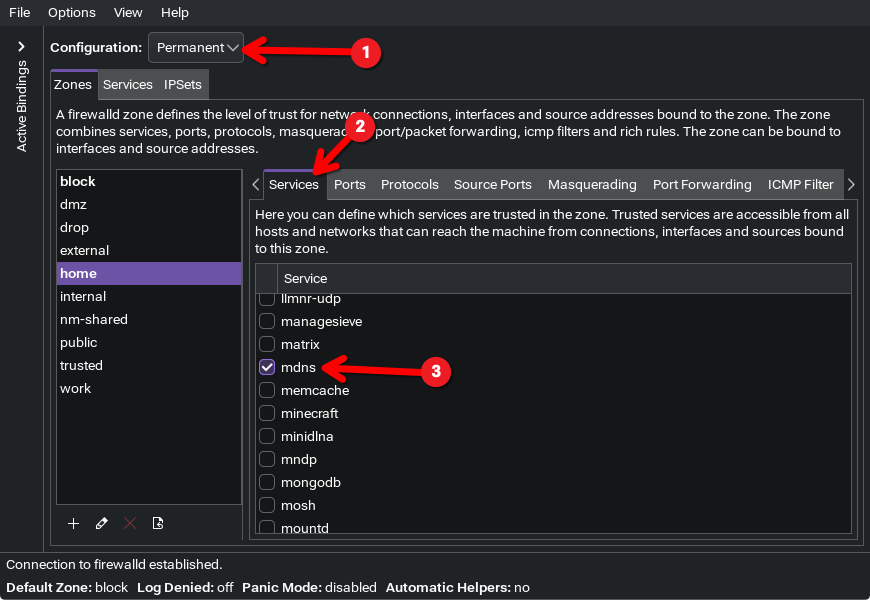
I also checked that firewalld is configured correctly.
However, when querying the status with the command systemctl status avahi-daemon, it reports:
Active: active (running) since Thu 2026-02-05 21:42:35 CET; 57min ago
 Invocation: 50a5a636410a4c4795b665e2e425d6fa
TriggeredBy: ● avahi-daemon.socket
   Main PID: 5747 (avahi-daemon)
     Status: "avahi-daemon 0.9-rc3 starting up."
      Tasks: 2 (limit: 18836)
     Memory: 1M (peak: 2.5M)
        CPU: 281ms
     CGroup: /system.slice/avahi-daemon.service
             ├─5747 "avahi-daemon: running [ThinkpadtT480s.local]"
             └─5754 "avahi-daemon: chroot helper"

feb 05 21:42:35 ThinkpadtT480s avahi-daemon[5747]: Registering new address record for 127.0.0.1 on lo.IPv4.
feb 05 21:42:35 ThinkpadtT480s avahi-daemon[5747]: Failed to parse address 'fe80::22b0:1ff:feeb:e26c%enp0s31f6', ignoring.
feb 05 21:42:35 ThinkpadtT480s avahi-daemon[5747]: Failed to parse address 'fe80::22b0:1ff:feeb:e26c%wlan0', ignoring.
feb 05 21:42:36 ThinkpadtT480s avahi-daemon[5747]: Server startup complete. Host name is ThinkpadtT480s.local. Local service cookie is 2251017878.
feb 05 21:42:39 ThinkpadtT480s avahi-daemon[5747]: Joining mDNS multicast group on interface wlan0.IPv4 with address 192.168.1.171.
feb 05 21:42:39 ThinkpadtT480s avahi-daemon[5747]: New relevant interface wlan0.IPv4 for mDNS.
feb 05 21:42:39 ThinkpadtT480s avahi-daemon[5747]: Registering new address record for 192.168.1.171 on wlan0.IPv4.
feb 05 21:42:40 ThinkpadtT480s avahi-daemon[5747]: Joining mDNS multicast group on interface wlan0.IPv6 with address fe80::588c:b9ed:73a9:9042.
feb 05 21:42:40 ThinkpadtT480s avahi-daemon[5747]: New relevant interface wlan0.IPv6 for mDNS.
I don’t know why, but this could be the cause of the issue, If I well understood, It ignores the eth and wlan interfaces, so It will never find anything…
How can I fix it? Thanks