Sounds familiar…might have been in the flux time when I was in between PCs.
I’ll give it a whirl. It should seem that a work-a-round shouldn’t be needed by an RC though? (just saying)
You are indeed correct! Thanks (better than using command line)…but I guess that precludes that the builtin Plasma chooser for logout/reboot/etc, is broken ? (I know it’s like a redundancy…did you really mean to do that?) 
It’s a widget, so it will likely be the last things fixed before the release or just after the release.
I just update. It fixed one of the spectacle bugs I was experiencing. As well as some text being off in a few apps. That is all I have noticed so far at least. Out of the 10 bugs that I reported a couple of days ago. I’m down to only experiencing 6. Most of the remaining ones have been confirmed at least with the exception of a couple that are hard to reproduce.
I can’t shutdown or start either from the application launcher or logout.
Hmmm - I still see no Window previews. I’ll do some sleuthing.
Can’t find “simple menu” - but that may be because the Widget-picker window doesn’t work properly on my setup under Plasma 6.
Hi intrepid testers, is there any sign of HDR or is that way off?
I’m afraid I don’t know - I have a very simple laptop with a very low level screen, so I’m not up to date with this topic. I hope others have some more info.
Any one else seeing two minimize icons?
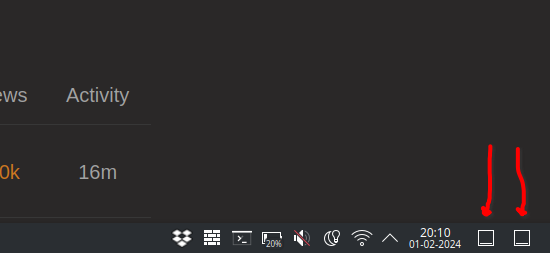
Just updated 5 min a go and rebooted and not seeing those.
Thanks for checking!
On the plus side: both work splendidly 
I’ll see if anything like this has been reported.
The popup texts shown if I hover above the icons are different. Not sure what the right English texts are but one says something like “Have a peek at the desktop”, the other says “Minimize all windows”.
So, they seem to be different things, though they have the same icons.
Not sure what’s going on.
Can’t find any bug reports which seem to be related.
Will dig some more.
Tried with most applications open and could not duplicate what you are seeing. What do you have open and what happens when you click on either?
I got two application launchers, one on the left (expected) and one on the very right, where you have the second “desktop”.
Afair Peek and Minimize were always two different widgets with the same icon. They have a similar but slightly different behavior.
The issue seems that an additional, “wrong” widget is created: for @SemLraug it was another peek/minimize desktop and for @chalex20 it was another launcher?
PS: No issues here.
1 Like
Yeah, its there under the display settings. I have been testing it out and so far so good. Of course if you are going to do some screen recording then you need to use something that uses pipewire screen recording. If you use one of the gpu screen recorders like I normally do. Then the colors will be all washed out in the recording. Pipewire seems to know what to do with the colors.
1 Like
Can you just remove one of them or is it stuck?
Both work as they should.
Both can be removed.
Restoring “Desktop Peek” after that, placed the icon at the far left of the panel, although it was at the far right of the panel initially. I could then move it to the right though.
1 Like