luxi@EndeavourOS ~> inxi -F
System:
  Host: EndeavourOS Kernel: 6.19.10-zen1-1-zen arch: x86_64 bits: 64
  Desktop: KDE Plasma v: 6.6.3 Distro: EndeavourOS
Machine:
  Type: Laptop System: LENOVO product: 82B5 v: Lenovo Legion 5-15ARH05
    serial: <superuser required>
  Mobo: LENOVO model: LNVNB161216 v: SDK0K17763 WIN
    serial: <superuser required> Firmware: UEFI vendor: LENOVO v: EUCN41WW
    date: 09/20/2023
Battery:
  ID-1: BAT0 charge: 39.6 Wh (75%) condition: 52.9/60 Wh (88.1%) volts: 15.49
    min: 15.44
CPU:
  Info: 8-core model: AMD Ryzen 7 4800H with Radeon Graphics bits: 64
    type: MT MCP cache: L2: 4 MiB
  Speed (MHz): avg: 2900 min/max: 1400/2900 cores: 1: 2900 2: 2900 3: 2900
    4: 2900 5: 2900 6: 2900 7: 2900 8: 2900 9: 2900 10: 2900 11: 2900 12: 2900
    13: 2900 14: 2900 15: 2900 16: 2900
Graphics:
  Device-1: NVIDIA TU117M [GeForce GTX 1650 Ti Mobile] driver: nvidia
    v: 595.58.03
  Device-2: Advanced Micro Devices [AMD/ATI] Renoir [Radeon Vega Series /
    Radeon Mobile Series] driver: amdgpu v: kernel
  Device-3: Syntek Integrated Camera driver: uvcvideo type: USB
  Display: wayland server: X.org v: 1.21.1.21 with: Xwayland v: 24.1.9
    compositor: kwin_wayland driver: X: loaded: amdgpu,nvidia
    unloaded: modesetting dri: radeonsi
    gpu: amdgpu,nv_platform,nvidia,nvidia-nvswitch resolution:
    1: 1920x1080~60Hz 2: 1920x1080~120Hz
  API: EGL v: 1.5 drivers: kms_swrast,nvidia,radeonsi,swrast
    platforms: gbm,wayland,x11,surfaceless,device
  API: OpenGL v: 4.6.0 compat-v: 4.5 vendor: amd mesa v: 26.0.3-arch1.1
    renderer: AMD Radeon Graphics (radeonsi renoir ACO DRM 3.64
    6.19.10-zen1-1-zen)
  API: Vulkan v: 1.4.341 drivers: radv,nvidia surfaces: N/A
  Info: Tools: api: clinfo, eglinfo, glxinfo, vulkaninfo
    de: kscreen-console,kscreen-doctor gpu: nvidia-settings,nvidia-smi
    wl: wayland-info x11: xdpyinfo, xprop, xrandr
Audio:
  Device-1: NVIDIA driver: snd_hda_intel
  Device-2: Advanced Micro Devices [AMD] Audio Coprocessor driver: N/A
  Device-3: Advanced Micro Devices [AMD] Ryzen HD Audio
    driver: snd_hda_intel
  API: ALSA v: k6.19.10-zen1-1-zen status: kernel-api
  Server-1: PipeWire v: 1.6.2 status: active
Network:
  Device-1: Realtek RTL8111/8168/8211/8411 PCI Express Gigabit Ethernet
    driver: r8169
  IF: eno1 state: down mac: XX:XX:XX:XX:XX:XX
  Device-2: Intel Wi-Fi 6 AX200 driver: iwlwifi
  IF: wlan0 state: up mac: XX:XX:XX:XX:XX:XX
  IF-ID-1: tailscale0 state: unknown speed: -1 duplex: full mac: N/A
Bluetooth:
  Device-1: Intel AX200 Bluetooth driver: btusb type: USB
  Report: btmgmt ID: hci0 state: up address: XX:XX:XX:XX:XX:XX bt-v: 5.2
Drives:
  Local Storage: total: 931.51 GiB used: 625.36 GiB (67.1%)
  ID-1: /dev/nvme0n1 vendor: Sabrent model: Rocket 4.0 1TB size: 931.51 GiB
Partition:
  ID-1: / size: 678.41 GiB used: 624.92 GiB (92.1%) fs: ext4 dev: /dev/dm-0
  ID-2: /boot/efi size: 499 MiB used: 450.3 MiB (90.2%) fs: vfat
    dev: /dev/nvme0n1p1
Swap:
  ID-1: swap-1 type: partition size: 7.45 GiB used: 4 KiB (0.0%)
    dev: /dev/nvme0n1p6
Sensors:
  System Temperatures: cpu: 67.1 C mobo: N/A gpu: amdgpu temp: 42.0 C
  Fan Speeds (rpm): N/A
Info:
  Memory: total: 16 GiB note: est. available: 14.99 GiB used: 7.11 GiB (47.5%)
  Processes: 417 Uptime: 1h 56m Shell: fish inxi: 3.3.40
luxi@EndeavourOS ~>
Hello there!
Recently, I realised that my SSD (using mission-center) got used at 100%, even with apps that don’t require a ton of throughput.
After looking with iotop, the culprit is apparently systemd, which spams the journal with error logs.
It’s hard to say which specific apps/circumstances causes this, for example, just focusing on LibreOffice causes this, sometimes, it’s just a pop-up window, etc.
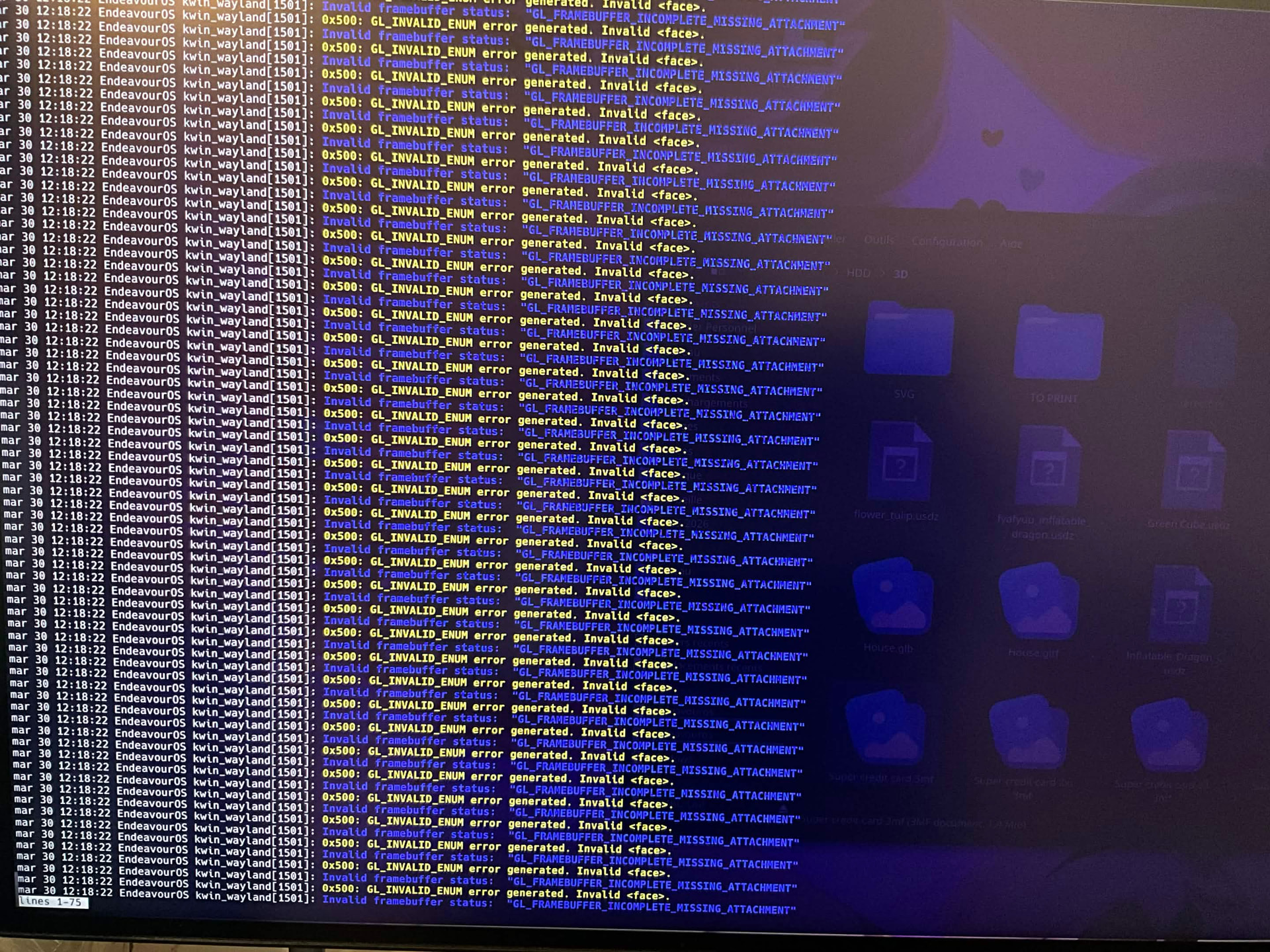
I unfortunately can’t upload videos here to show what happens.
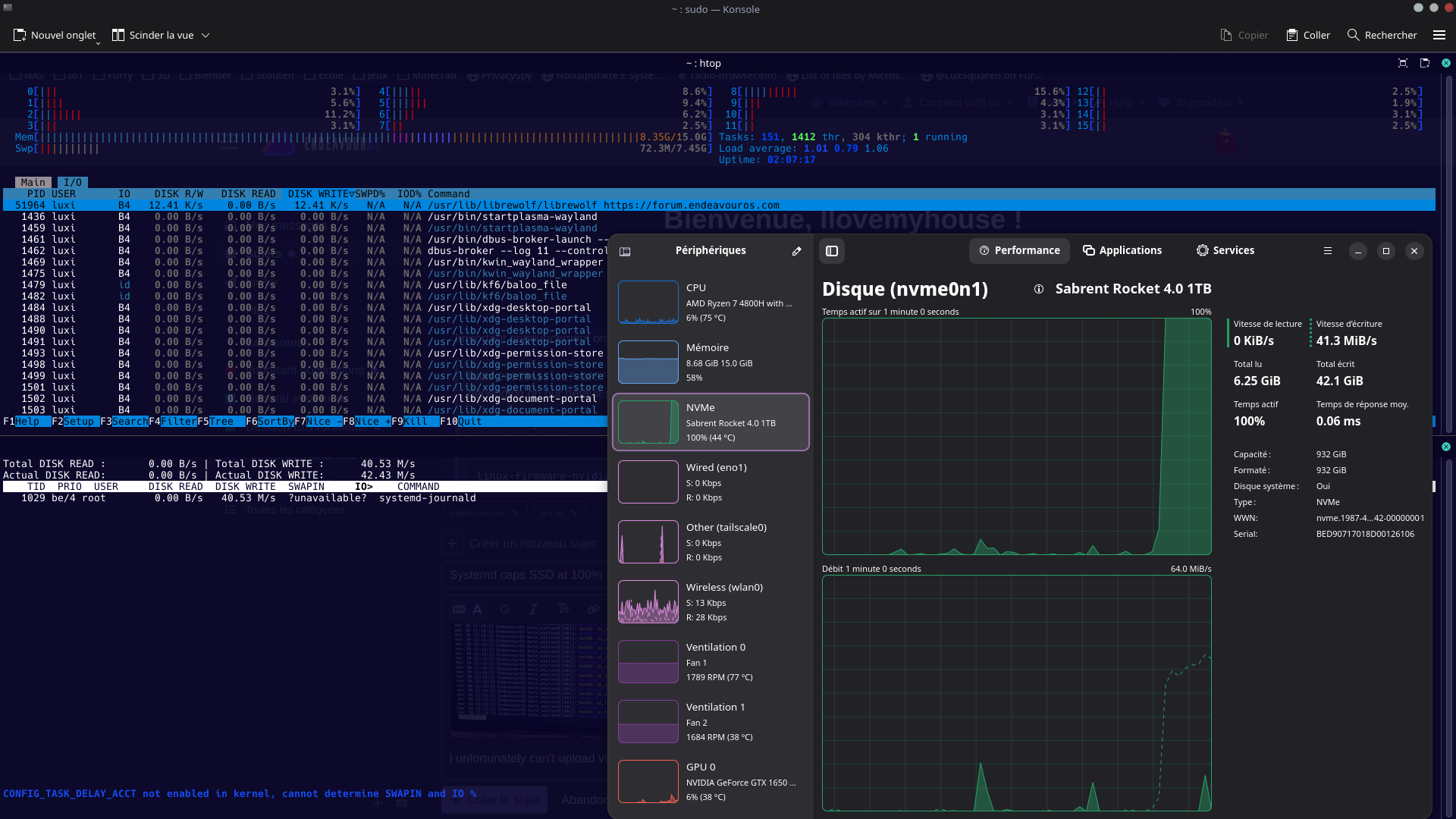
I also tried with the lts kernel that I have installed (6.18.20-1-LTS), but same behavior.

