My first post on this forum so let me begin by saying that I l am a linux noob, so thank you for your patience in advance.
I realize that there have been similar questions asked here in the forum but not quite the same as mine and my skill level is sadly not high enough to apply these solutions to my problem.
My problem is as follows:
For the last months I had a EOS and Windows 11 multiboot system using GRUB, which worked perfectly.
But it was not secure boot able and I wanted to change this to be able to play specific games under Windows 11. I found some guides to update GRUB accordingly but they seemed very complicated and frankly above my skill level. So I figured reinstalling EOS and switching to systemd-boot would be the easier way to do it.
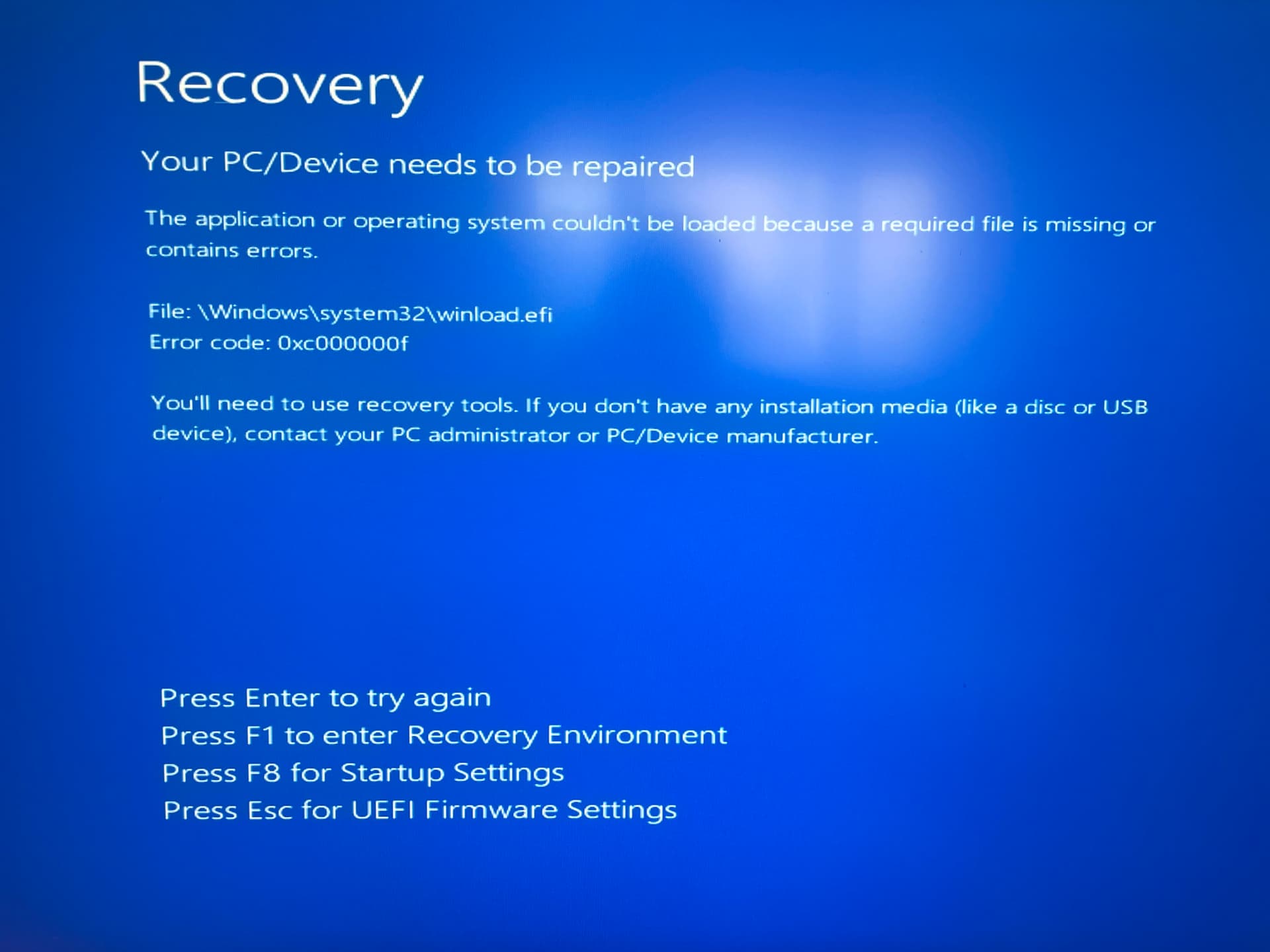
So after reinstalling, I do have a “Windows 10” (not 11) entry in systemd-boot that sends me to a recovery screen. EOS is working though. And I upgraded to Windows 11 from Windows 10, but that was before my first Linux installation.
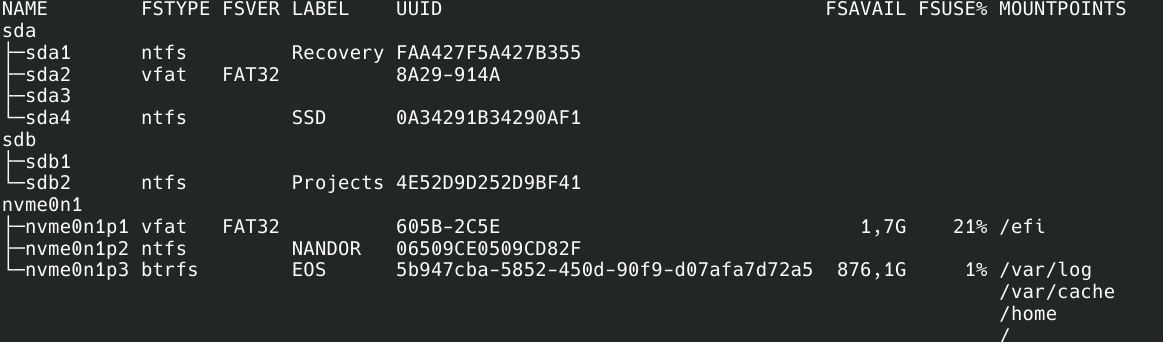
Some facts about my system:
I have Windows 11 and EOS on separate disks - and as I understand there is the problem. I think I have to copy the Windows EFI files to the Linux EFI drive but I do not fully understand how.
When I select the Windows disk in UEFI Bios I can boot into Windows just fine
Secure Boot and TPM are still disabled while I try and figure the booting problems out
I tried solving this with ChatGPT for hours now, which has been very frustrating since it really doesn’t know what it is doing and has been sending me in circles. Also I do not learn anything while following it and I would love to understand what is going on here.
I tried reading the Arch Wiki entry for systemd-boot and think that under “4.2.2 Boot from another disk” it explains my situation, but I do not quite understand it.
How do I get to point systemd-boot to my windows 11 efi partition? Or do I need to copy the necessary files to the linux EFI for that to work?
Getting secure boot to work would be the next step but for now I would be very happy with a working multi boot system.
Any help would be appreciated, thank you very much!
I did what you suggested, but sadly it still does not work. I get the blue recovery screen when I choose the Windows 10 entry in systemd-boot.
When I press F8 it suggests that a file is missing or corrupt but I am not sure that this is really the problem here but rather a result of incorrect linking.
With the help of ChatGPT I also created a windows11.conf file in /efi/loader/entries pointing to the PARTUUID of sda2 with the following content:
title Windows 11
efi /EFI/Microsoft/Boot/bootmgfw.efi
options root=PARTUUID=41104a4a-fae7-46d9-9cbe-e52f644c34c1
But this doesn’t work either. With this boot entry I also do get the blue recovery screen but not the error message regarding winload.efi when I press F8
I am just into similar tinkering . Windows.conf entry does not need the UUID, only needs the first 2 lines if you have the Microsoft folder copied over.
Auto generation is not working for EndeavourOS for unknown reason.
In case you could see if running windows from n ram (Windows Boot Loader). Over boot once F12 menu one time to resolve windows boot issue
I mean on power on press F12 or what is your Bootmenu key..
You got a boot once device menu there you can boot windows directly, may using this once fixing rescue thing
Yes, like I said, I can boot into Windows from Bios.
And I somehow do not believe that this file is truly missing, since I haven’t changed anything in my Windows installation and the multiboot worked perfectly fine with GRUB.
I saw such screen too on my testings and yes the file is not missing as of windows is working. Must be somehow it does search wrong path for me using windows.conf was working with correct title and ego lines
I have no clue what may be going on. I am running to this issue here on the forum by users reporting about it. Like this thread.
I don’t have access to dualboot systems on two disks to try.
It is also a bit strange that this is not happening on Arch and only on EOS.
only the issue to boot without adding a windows is the BUG on EndeavourOS but not your issue that the windows.conf was not able to boot, thats somehjing caused by missing part in that file you created before or a typo or using wrong path or soemthing else.
I wa salso tesing with cachy and ther eyou can boot from autogenerated boot entry after copy the files over to the Linux ESP same as with archlinux itself..
efishell way is working too also on EndeavourOS only thing that is not working is obly copy the Microsoft boot folder over alone.