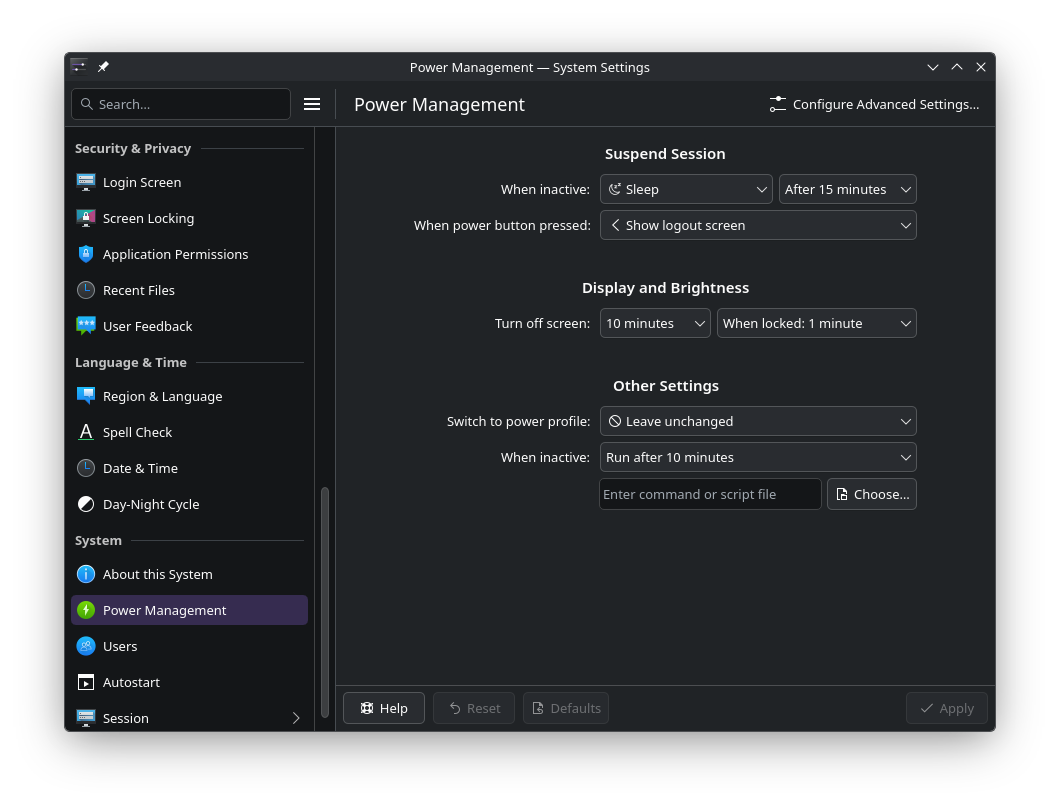
Is anyone else having issues recently with an unresponsive system after leaving your system idle overnight? This issue only started recently, after an update. I have my system configured not to sleep or hibernate when idle; I often just lock it and leave it on overnight. Lately, when I come back to the machine in the morning, the screen is black when I turn on my monitor and the machine is unresponsive to input.
System Info:
inxi -FAZ --no-host
System:
  Kernel: 7.1.3-arch1-2 arch: x86_64 bits: 64
  Desktop: KDE Plasma v: 6.7.2 Distro: EndeavourOS
Machine:
  Type: Desktop System: Gigabyte product: X570 I AORUS PRO WIFI v: -CF
    serial: <superuser required>
  Mobo: Gigabyte model: X570 I AORUS PRO WIFI serial: <superuser required>
    Firmware: UEFI vendor: American Megatrends LLC. v: F36d date: 07/20/2022
CPU:
  Info: 8-core model: AMD Ryzen 7 2700X bits: 64 type: MT MCP cache: L2: 4 MiB
  Speed (MHz): avg: 2200 min/max: 2200/4350 cores: 1: 2200 2: 2200 3: 2200
    4: 2200 5: 2200 6: 2200 7: 2200 8: 2200 9: 2200 10: 2200 11: 2200 12: 2200
    13: 2200 14: 2200 15: 2200 16: 2200
Graphics:
  Device-1: Advanced Micro Devices [AMD/ATI] Navi 21 [Radeon RX 6800/6800 XT
    / 6900 XT] driver: amdgpu v: kernel
  Device-2: Logitech BRIO Ultra HD Webcam
    driver: hid-generic,snd-usb-audio,usbhid,uvcvideo type: USB
  Display: wayland server: X.org v: 1.21.1.24 with: Xwayland v: 24.1.13
    compositor: kwin_wayland driver: X: loaded: amdgpu
    unloaded: modesetting,radeon dri: radeonsi gpu: amdgpu
    resolution: 2560x1440~144Hz
  API: EGL v: 1.5 drivers: radeonsi,swrast
    platforms: gbm,wayland,x11,surfaceless,device
  API: OpenGL v: 4.6 vendor: amd mesa v: 26.1.4-arch1.1 renderer: AMD
    Radeon RX 6800 (radeonsi navi21 ACO DRM 3.64 7.1.3-arch1-2)
  API: Vulkan v: 1.4.350 drivers: radv surfaces: N/A
  Info: Tools: api: clinfo, eglinfo, glxinfo, vulkaninfo
    de: kscreen-console,kscreen-doctor gpu: radeontop wl: wayland-info
    x11: xdpyinfo, xprop, xrandr
Audio:
  Device-1: Advanced Micro Devices [AMD/ATI] Navi 21/23 HDMI/DP Audio
    driver: snd_hda_intel
  Device-2: BEHRINGER GmbH UMC404HD 192k driver: snd-usb-audio type: USB
  Device-3: Logitech BRIO Ultra HD Webcam
    driver: hid-generic,snd-usb-audio,usbhid,uvcvideo type: USB
  API: ALSA v: k7.1.3-arch1-2 status: kernel-api
  Server-1: PipeWire v: 1.6.7 status: active
Network:
  Device-1: Intel I211 Gigabit Network driver: igb
  IF: enp5s0 state: up speed: 1000 Mbps duplex: full mac: d8:5e:d3:83:a7:dc
  Device-2: Intel Wi-Fi 6 AX200 driver: iwlwifi
  IF: wlan0 state: down mac: 46:6a:fd:fd:d3:1e
  IF-ID-1: virbr0 state: down mac: 52:54:00:08:ae:49
Bluetooth:
  Device-1: Intel AX200 Bluetooth driver: btusb type: USB
  Report: btmgmt ID: hci0 rfk-id: 0 state: down bt-service: enabled,running
    rfk-block: hardware: no software: yes address: 68:54:5A:D2:38:AD bt-v: 5.2
Drives:
  Local Storage: total: 4.3 TiB used: 2.7 TiB (62.8%)
  ID-1: /dev/nvme0n1 vendor: Corsair model: MP400 size: 1.82 TiB
  ID-2: /dev/nvme1n1 vendor: Corsair model: MP400 size: 1.82 TiB
  ID-3: /dev/sda vendor: PNY model: CS1311 480GB SSD size: 447.13 GiB
  ID-4: /dev/sdb vendor: Samsung model: SSD 860 EVO 250GB size: 232.89 GiB
Partition:
  ID-1: / size: 931.02 GiB used: 522.47 GiB (56.1%) fs: btrfs
    dev: /dev/nvme0n1p2
  ID-2: /boot/efi size: 998 MiB used: 636 KiB (0.1%) fs: vfat
    dev: /dev/nvme0n1p1
  ID-3: /home size: 931.02 GiB used: 530.97 GiB (57.0%) fs: btrfs
    dev: /dev/nvme0n1p3
  ID-4: /var/log size: 931.02 GiB used: 522.47 GiB (56.1%) fs: btrfs
    dev: /dev/nvme0n1p2
Swap:
  Alert: No swap data was found.
Sensors:
  System Temperatures: cpu: 52.1 C mobo: 44.0 C gpu: amdgpu temp: 57.0 C
  Fan Speeds (rpm): N/A gpu: amdgpu fan: 0
Info:
  Memory: total: 64 GiB note: est. available: 62.71 GiB used: 4.95 GiB (7.9%)
  Processes: 540 Uptime: 13m Shell: Zsh inxi: 3.3.41