[Sway] I can't launch GTK3 apps with elevated privileges

I can’t launch GTK3 [and possibly other] apps with elevated privileges. Here’s what happens when I try to use e.g. Ventoy:

[halvar@marek-ms7e56 ventoy-1.1.10]$ ./VentoyGUI.x86_64 
Authorization required, but no authorization protocol specified


(Ventoy2Disk.gtk3:6726): Gtk-WARNING **: 12:29:30.125: cannot open display: :0

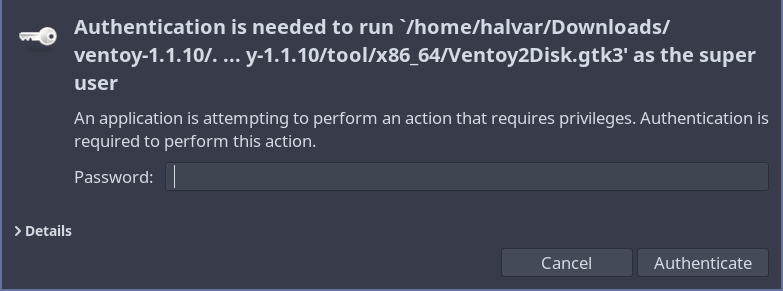
I did my research on this topic and what I found is I need a Polkit agent. However, I have one running already, it’s polkit-gnome, and when I try to launch Ventoy, I get the authentication window:

I can’t find anything else to try, so I ask here. Thanks in advance.

When I changed my polkit agent to lxpolkit it still doesn’t work, so it’s not that.

What if you try from a terminal - does it give any feedback?

yeah, it gives what I posted

Sorry missed it completely :blush: Try sudo instead.

Quick google - xhost +SI:localuser:root run first

Ok, so this works (sudo -EH). At least I know it can be launched. But I would like to be able to launch apps like gparted from my app menu (it’s Fuzzel) :slight_smile:

Oh, it just works now after that xhost command. So that’s great.

I tried using xhost before, but knew about a slightly different command, so maybe that’s why it didn’t work

(And now I could create another topic asking why after fixing Qt apps not using dark mode my GTK apps don’t use dark mode, but it’s just gparted, and KDE Partition Manager exists, so I guess I will just use KDE one)
gsettings set org.gnome.desktop.interface color-scheme "prefer-dark"

did so probably a few times, doesn’t work

it’s just gparted with issues (for now)

weird

I even installed Kooha, an app that always had issues with dark mode, works perfectly

just gparted

Never noticed, but not working here either (MangoWC):

at least we know it’s not just me :slight_smile:

copy ~/.config/gtk-{3,4}.0 to /root/.config/.

That should do it.

This topic was automatically closed 2 days after the last reply. New replies are no longer allowed.