Issue: I’ve been running my 4k monitor at 1440p for a couple years. I decided I want to run it at it’s full 4k potential. When I do this I get a strange flickering across the screen. This issue is unique to my endeavorOS install (it does not happen on my dual booted Windows 11).
Environment Info (see output of inxi -Faz --no-host below):
Desktop: KDE plasma
GPU: Radeon Red Devil 7800xt
Display manager: wayland
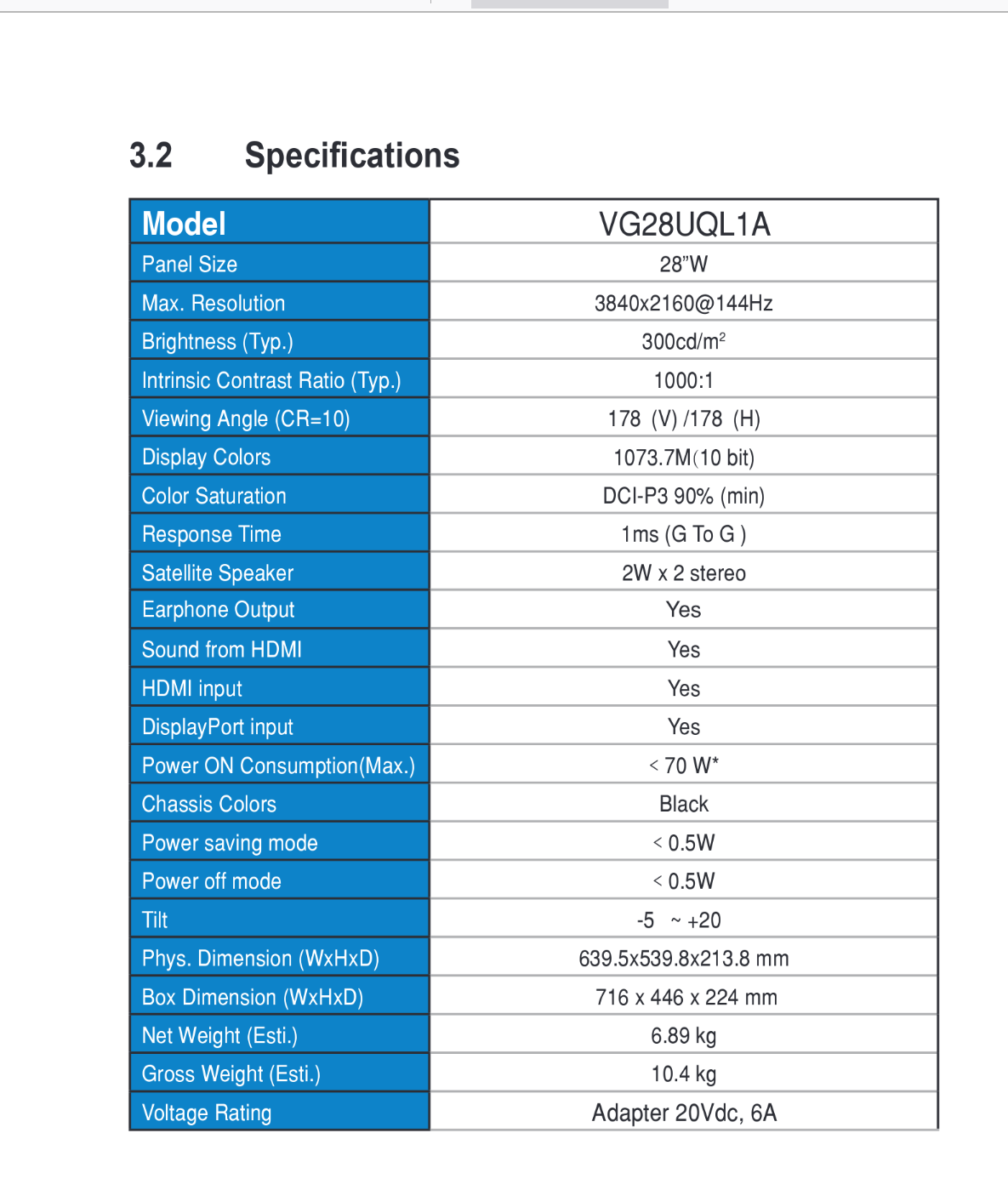
Display monitor: Asus TUF VG28UQL1A (only 1 monitor right now)
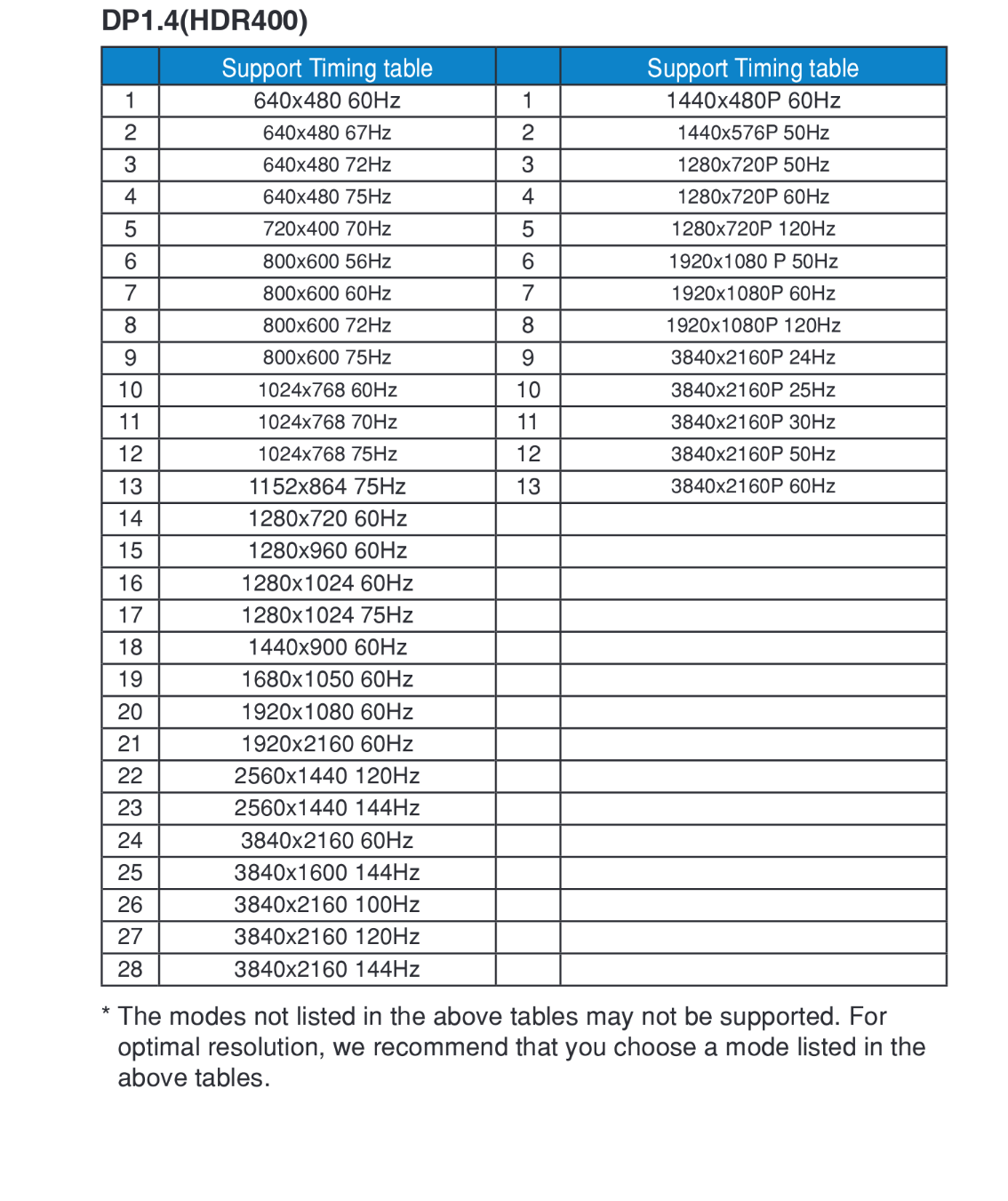
Display Cable: displayport v1.4 out of the GPU to the monitor
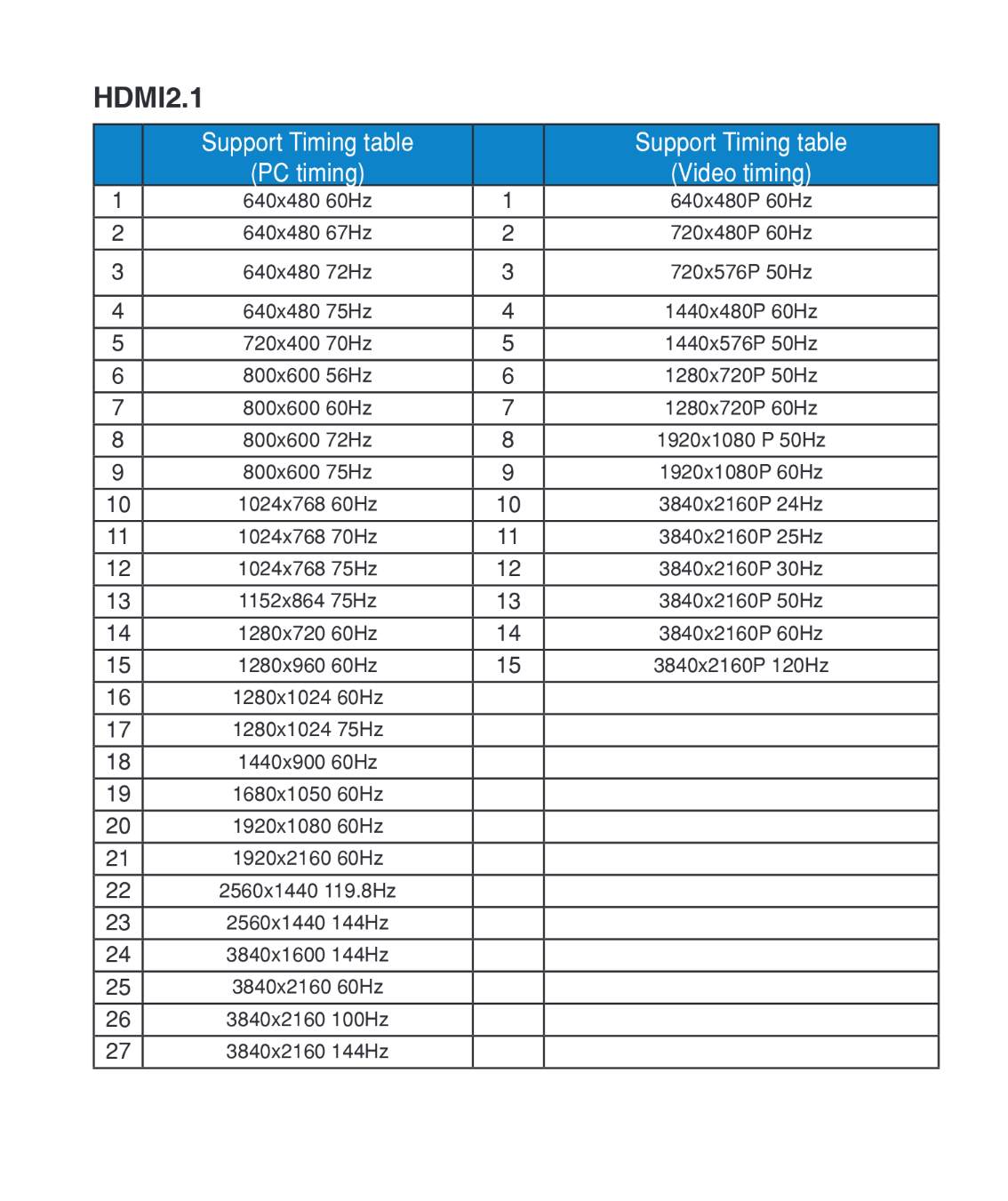
Display resolution: 4k at 144 hz
Other: Per advice from similar threads, adaptive sync is turned on in the display settings in KDE plasma AND on the monitor. This temporarily fixes the issue.
Does NOT happen when:
- at lower than 144 hz
- downscaling to 1440p
- In Windows 11 at 4k 144 hz
Goes away temporarily when:
- I toggle nvidia adaptive sync on and off from the MONITOR settings
It comes back when:
- I wake the PC from sleep and log in after being away for awhile
Things that make it worse:
- plugging in a 2nd monitor
- turning off adaptive sync
Bottom line:
I’ve done a lot of googling and read all the related posts to this issue. I’m looking for tips and suggestions for additional troubleshooting.
See video of issue here (not me in the video): https://drive.proton.me/urls/BZFABFMEJG#AYKkKDU1Y4D5
Here is how the issue is temp resolved by toggling adaptive sync on the monitor settings (sorry for the orientation): https://drive.proton.me/urls/A615FVF5X0#JlrrE9QDmypn
System info:
System:
Kernel: 6.15.6-arch1-1 arch: x86_64 bits: 64 compiler: gcc v: 15.1.1
clocksource: tsc avail: hpet,acpi_pm
parameters: initrd=\102d1f6fa6ef4a6a842762175e636b34\6.15.6-arch1-1\initrd
nvme_load=YES nowatchdog rw
rd.luks.uuid=ec5bf033-5259-4554-a8ab-2d0df4261eb5
root=/dev/mapper/luks-ec5bf033-5259-4554-a8ab-2d0df4261eb5
systemd.machine_id=102d1f6fa6ef4a6a842762175e636b34
Desktop: KDE Plasma v: 6.4.2 tk: Qt v: N/A info: frameworks v: 6.16.0
wm: kwin_wayland vt: 1 dm: SDDM Distro: EndeavourOS base: Arch Linux
Machine:
Type: Desktop Mobo: ASUSTeK model: TUF GAMING X570-PLUS (WI-FI) v: Rev X.0x
serial: part-nu: SKU uuid:
UEFI: American Megatrends v: 4005 date: 07/13/2021
CPU:
Info: model: AMD Ryzen 9 5900X bits: 64 type: MT MCP arch: Zen 3+ gen: 3
level: v3 note: check built: 2022 process: TSMC n6 (7nm) family: 0x19 (25)
model-id: 0x21 (33) stepping: 0 microcode: 0xA20102E
Topology: cpus: 1x dies: 1 clusters: 1 cores: 12 threads: 24 tpc: 2
smt: enabled cache: L1: 768 KiB desc: d-12x32 KiB; i-12x32 KiB L2: 6 MiB
desc: 12x512 KiB L3: 64 MiB desc: 2x32 MiB
Speed (MHz): avg: 4200 min/max: 644/5623 boost: enabled scaling:
driver: amd-pstate-epp governor: powersave cores: 1: 4200 2: 4200 3: 4200
4: 4200 5: 4200 6: 4200 7: 4200 8: 4200 9: 4200 10: 4200 11: 4200 12: 4200
13: 4200 14: 4200 15: 4200 16: 4200 17: 4200 18: 4200 19: 4200 20: 4200
21: 4200 22: 4200 23: 4200 24: 4200 bogomips: 201600
Flags: avx avx2 ht lm nx pae sse sse2 sse3 sse4_1 sse4_2 sse4a ssse3 svm
Vulnerabilities:
Type: gather_data_sampling status: Not affected
Type: ghostwrite status: Not affected
Type: indirect_target_selection status: Not affected
Type: itlb_multihit status: Not affected
Type: l1tf status: Not affected
Type: mds status: Not affected
Type: meltdown status: Not affected
Type: mmio_stale_data status: Not affected
Type: reg_file_data_sampling status: Not affected
Type: retbleed status: Not affected
Type: spec_rstack_overflow mitigation: Safe RET
Type: spec_store_bypass mitigation: Speculative Store Bypass disabled via
prctl
Type: spectre_v1 mitigation: usercopy/swapgs barriers and __user pointer
sanitization
Type: spectre_v2 mitigation: Retpolines; IBPB: conditional; IBRS_FW;
STIBP: always-on; RSB filling; PBRSB-eIBRS: Not affected; BHI: Not
affected
Type: srbds status: Not affected
Type: tsa mitigation: Clear CPU buffers
Type: tsx_async_abort status: Not affected
Graphics:
Device-1: Advanced Micro Devices [AMD/ATI] Navi 32 [Radeon RX 7700 XT /
7800 XT] vendor: Tul / PowerColor driver: amdgpu v: kernel arch: RDNA-3
code: Navi-3x process: TSMC n5 (5nm) built: 2022+ pcie: gen: 4
speed: 16 GT/s lanes: 16 ports: active: DP-1 empty: DP-2, DP-3, HDMI-A-1,
Writeback-1 bus-ID: 07:00.0 chip-ID: 1002:747e class-ID: 0300
Display: wayland server: X.org v: 1.21.1.18 with: Xwayland v: 24.1.8
compositor: kwin_wayland driver: X: loaded: amdgpu
unloaded: modesetting,radeon alternate: fbdev,vesa dri: radeonsi
gpu: amdgpu display-ID: 0
Monitor-1: DP-1 model: VG28UQL1A serial: built: 2021 res:
mode: 3840x2160 hz: 144 scale: 150% (1.5) to: 2560x1440 dpi: 157 gamma: 1.2
size: 621x341mm (24.45x13.43") diag: 708mm (27.9") ratio: 16:9 modes:
max: 3840x2160 min: 720x400
API: EGL v: 1.5 hw: drv: amd radeonsi platforms: device: 0 drv: radeonsi
device: 1 drv: swrast gbm: drv: kms_swrast surfaceless: drv: radeonsi
wayland: drv: radeonsi x11: drv: radeonsi
API: OpenGL v: 4.6 compat-v: 4.5 vendor: amd mesa v: 25.1.5-arch1.1
glx-v: 1.4 direct-render: yes renderer: AMD Radeon RX 7800 XT (radeonsi
navi32 LLVM 20.1.7 DRM 3.63 6.15.6-arch1-1) device-ID: 1002:747e
memory: 15.62 GiB unified: no display-ID: :1.0
API: Vulkan v: 1.4.313 layers: 4 device: 0 type: discrete-gpu name: AMD
Radeon RX 7800 XT (RADV NAVI32) driver: mesa radv v: 25.1.5-arch1.1
device-ID: 1002:747e surfaces: N/A
Info: Tools: api: clinfo, eglinfo, glxinfo, vulkaninfo
de: kscreen-console,kscreen-doctor gpu: radeontop wl: wayland-info
x11: xdpyinfo, xprop, xrandr
Audio:
Device-1: Advanced Micro Devices [AMD/ATI] Navi 31 HDMI/DP Audio
driver: snd_hda_intel v: kernel pcie: gen: 4 speed: 16 GT/s lanes: 16
bus-ID: 07:00.1 chip-ID: 1002:ab30 class-ID: 0403
Device-2: Advanced Micro Devices [AMD] Starship/Matisse HD Audio
vendor: ASUSTeK driver: snd_hda_intel v: kernel pcie: gen: 4 speed: 16 GT/s
lanes: 16 bus-ID: 0d:00.4 chip-ID: 1022:1487 class-ID: 0403
Device-3: Razer USA BlackShark V2 Pro
driver: hid-generic,snd-usb-audio,usbhid type: USB rev: 1.1 speed: 12 Mb/s
lanes: 1 mode: 1.1 bus-ID: 5-3.2:5 chip-ID: 1532:0528 class-ID: 0300
API: ALSA v: k6.15.6-arch1-1 status: kernel-api
tools: alsactl,alsamixer,amixer
Server-1: PipeWire v: 1.4.6 status: active with: 1: pipewire-pulse
status: active 2: wireplumber status: active 3: pipewire-alsa type: plugin
4: pw-jack type: plugin tools: pactl,pw-cat,pw-cli,wpctl
Network:
Device-1: Realtek RTL8111/8168/8211/8411 PCI Express Gigabit Ethernet
vendor: ASUSTeK driver: r8169 v: kernel pcie: gen: 1 speed: 2.5 GT/s
lanes: 1 port: e000 bus-ID: 08:00.0 chip-ID: 10ec:8168 class-ID: 0200
IF: enp8s0 state: up speed: 1000 Mbps duplex: full mac:
IF-ID-1: wg0-mullvad state: unknown speed: N/A duplex: N/A mac: N/A
Info: services: NetworkManager,systemd-timesyncd
Bluetooth:
Device-1: Intel Wireless-AC 9260 Bluetooth Adapter driver: btusb v: 0.8
type: USB rev: 2.0 speed: 12 Mb/s lanes: 1 mode: 1.1 bus-ID: 3-5:4
chip-ID: 8087:0025 class-ID: e001
Report: btmgmt ID: hci0 rfk-id: 1 state: down bt-service: disabled
rfk-block: hardware: no software: no address: N/A
RAID:
Supported mdraid levels: raid0
Device-1: md0 maj-min: 9:0 type: mdraid level: raid-0 status: active
size: 3.64 TiB
Info: report: N/A blocks: 3906516992 chunk-size: 512k super-blocks: 1.2
Components: Online:
0: sdb1 maj-min: 8:17 size: 931.51 GiB
1: sdc1 maj-min: 8:33 size: 931.51 GiB
2: sdd1 maj-min: 8:49 size: 931.51 GiB
3: sde1 maj-min: 8:65 size: 931.51 GiB
Drives:
Local Storage: total: raw: 6.82 TiB usable: 6.82 TiB used: 1.29 TiB (19.0%)
SMART Message: Unable to run smartctl. Root privileges required.
ID-1: /dev/nvme0n1 maj-min: 259:0 vendor: Samsung model: SSD 990 PRO 2TB
size: 1.82 TiB block-size: physical: 512 B logical: 512 B speed: 63.2 Gb/s
lanes: 4 tech: SSD serial: fw-rev: 4B2QJXD7 temp: 41.9 C
scheme: GPT
ID-2: /dev/nvme1n1 maj-min: 259:4 vendor: Samsung
model: SSD 970 EVO Plus 500GB size: 465.76 GiB block-size: physical: 512 B
logical: 512 B speed: 31.6 Gb/s lanes: 4 tech: SSD serial:
fw-rev: 2B2QEXM7 temp: 34.9 C scheme: GPT
ID-3: /dev/sda maj-min: 8:0 vendor: Samsung model: SSD 870 EVO 1TB
size: 931.51 GiB block-size: physical: 512 B logical: 512 B speed: 6.0 Gb/s
tech: SSD serial: fw-rev: 1B6Q scheme: GPT
ID-4: /dev/sdb maj-min: 8:16 vendor: Samsung model: SSD 860 EVO 1TB
size: 931.51 GiB block-size: physical: 512 B logical: 512 B speed: 6.0 Gb/s
tech: SSD serial: fw-rev: 4B6Q scheme: GPT
ID-5: /dev/sdc maj-min: 8:32 vendor: Samsung model: SSD 860 EVO 1TB
size: 931.51 GiB block-size: physical: 512 B logical: 512 B speed: 6.0 Gb/s
tech: SSD serial: fw-rev: 4B6Q scheme: GPT
ID-6: /dev/sdd maj-min: 8:48 vendor: Samsung model: SSD 860 EVO 1TB
size: 931.51 GiB block-size: physical: 512 B logical: 512 B speed: 6.0 Gb/s
tech: SSD serial: fw-rev: 4B6Q scheme: GPT
ID-7: /dev/sde maj-min: 8:64 vendor: Samsung model: SSD 860 EVO 1TB
size: 931.51 GiB block-size: physical: 512 B logical: 512 B speed: 6.0 Gb/s
tech: SSD serial: fw-rev: 4B6Q scheme: GPT
Partition:
ID-1: / raw-size: 1.76 TiB size: 1.73 TiB (98.37%) used: 434.36 GiB (24.5%)
fs: ext4 dev: /dev/dm-0 maj-min: 253:0
mapped: luks-ec5bf033-5259-4554-a8ab-2d0df4261eb5
Swap:
Kernel: swappiness: 60 (default) cache-pressure: 100 (default) zswap: yes
compressor: zstd max-pool: 20%
ID-1: swap-1 type: partition size: 62.5 GiB used: 0 KiB (0.0%)
priority: -2 dev: /dev/nvme0n1p3 maj-min: 259:3
Sensors:
System Temperatures: cpu: 37.8 C mobo: N/A gpu: amdgpu temp: 47.0 C
mem: 66.0 C
Fan Speeds (rpm): N/A gpu: amdgpu fan: 144
Info:
Memory: total: 32 GiB available: 31.23 GiB used: 13.99 GiB (44.8%)
Processes: 538 Power: uptime: 1h 44m states: freeze,mem,disk suspend: deep
avail: s2idle wakeups: 1 hibernate: platform avail: shutdown, reboot,
suspend, test_resume image: 12.48 GiB services: org_kde_powerdevil,
power-profiles-daemon, upowerd Init: systemd v: 257 default: graphical
tool: systemctl
Packages: 1233 pm: pacman pkgs: 1227 libs: 328 tools: yay pm: flatpak
pkgs: 6 Compilers: clang: 20.1.7 gcc: 15.1.1 Shell: Bash v: 5.2.37
running-in: konsole inxi: 3.3.38