Trying to do this upgrade of “gcc14-libs“ with yay command, resulted in “a lot“ happening in the terminal but ALL DAY long, until I had to interrupt to go to bed. Something must be wrong. What is this “gcc14”? How to find out why it cannot be upgraded within a day(!!)?
Given it’s pulling it from the AUR, it’s likely an AUR package you have installed that needs it… or perhaps not, and it’s simply hanging around as an orphan.
To address the orphan issue, you can run this to remove unused dependencies (orphans):
yay -Ycc
If you’ve never run this command before, it can sometimes be alarming as a lot of packages might be hanging around as orphans! That may remove gcc14-libs in its cleanup and the problem resolved.
To clarify, an orphan is a package that was not explicitly installed, and nothing currently installed needs it.
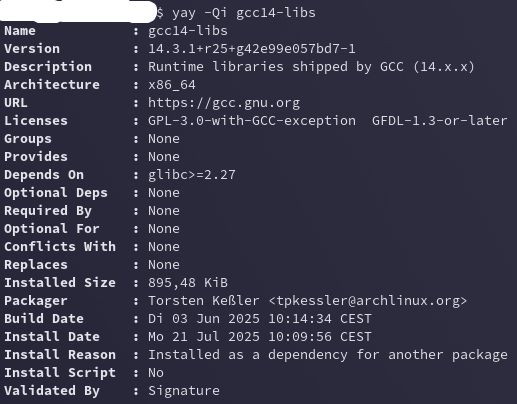
Failing that, you can also try to identify what package/s are needing gcc14-libs, and you can perhaps decide whether or not you still need them:
Gcc14 was moved from the Arch repositories to the AUR recently and compiles before installation now. You most likely don’t need gcc14 at all anymore, try to uninstall and check if a dependency complains.
So under Install Reason it says it’s a dependency for another package. Then I should probably not uninstall? Is there a command to find out for which other package it’s a dependency?
With yay -Ycc indeed it looks like I’d be removing the whole system …
I used yay -Yc and with that removed gcc14 (and many others). So far I only noticed a weird font in the terminal after that (no system font available apparently).
Looks like each of the answers could have served as solution .
Well to be honest I was not familiar with yay -Ycc but running that on my system I was pretty sure that it wanted to remove more then just orphans , not a good thing I think.

 …
… .
.