sorry, I’m genuinely unsure what category to post this in, and all attempts at googling for answers has left me with guides that don’t work, or that partially work but fail at the critical point of being useful. I need something, a working guide, application suggestions, anything, to help me find a piece of software for EOS that will allow me to backup data to tape, bacula is what I’d prefer to use, but I can get bacula-console to show as existing in yay, but then have no way to install a gui or even enable the service to show its installed at all, leaving it non-functional, and amanda supposedly is installed, but then shows no signs of existing or having any gui I can find, and borg seems to only allow remote backups which is not what I need…so…any help or insight is HUGELY appreciated here since this is to be the offsite/second medium of my backup plan, so, I really could use some help here in figuring out what to do to utilize my tape drive.
Bacula on EOS (Recommended Path)
- Install Core Packages: You likely need
bacula-director,bacula-storage,bacula-client, andbacula-console(orbacula-console-qtfor a potential GUI, but expect command-line focus). - Configure Tape Device: Edit
/etc/bacula/bacula-sd.confto define your tape drive (e.g.,/dev/st0) and library, ensuring you have the proper OS drivers loaded. - Start Services: Use
systemctl start bacula-dir bacula-sdand enable them. - Use
bconsole: Manage jobs and check status from the command line.
none of those were found on pacman for me, and only bacula-client and bacula-console were found on yay…do I have something broken in the package management now I wonder o.0
you need to run yay not pacman. These are AUR packages.
only the two mentioned were found on YAY when I ran it, which is why I was confused. running a full system update now to see if that changes things.
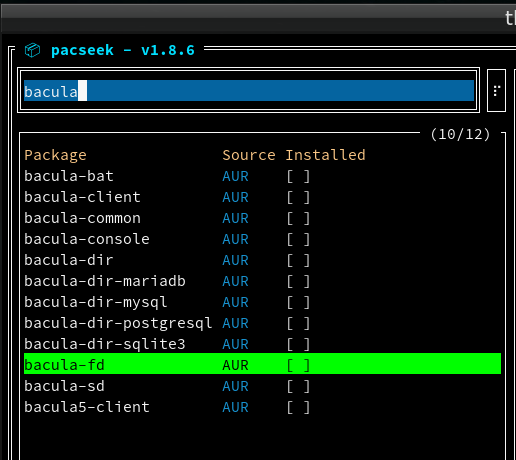
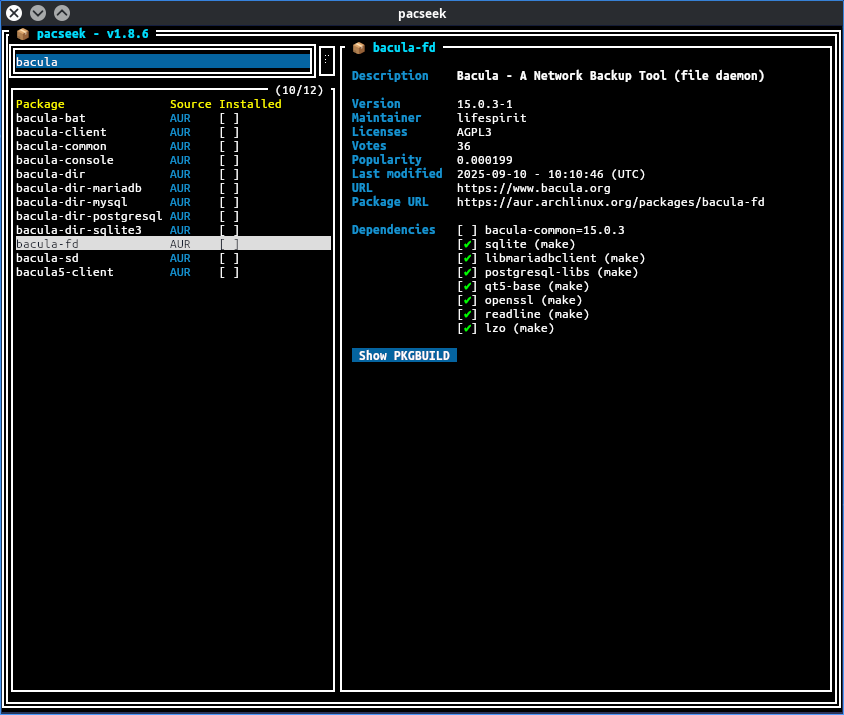
Yeah, but only two of the mentioned packages are in there.
okay so something is definitely broken on my system then…huh. trying to run a full system update errors out too so it seems i’ve some fixing to do, thanks everyone, I have what I needed and now know what the problem I’m having is from too. much appreciated.
The only one i see missing is bacula-console-qt
bacula-director and bacula-storage aren’t there either.
I see bacula-sd and bacula-dir
Edit: I’m not sure all that’s needed or whether one can get it working. Just passing on info if it helps.
I might have guessed bacula-dir but I would never have guessed bacula-sd
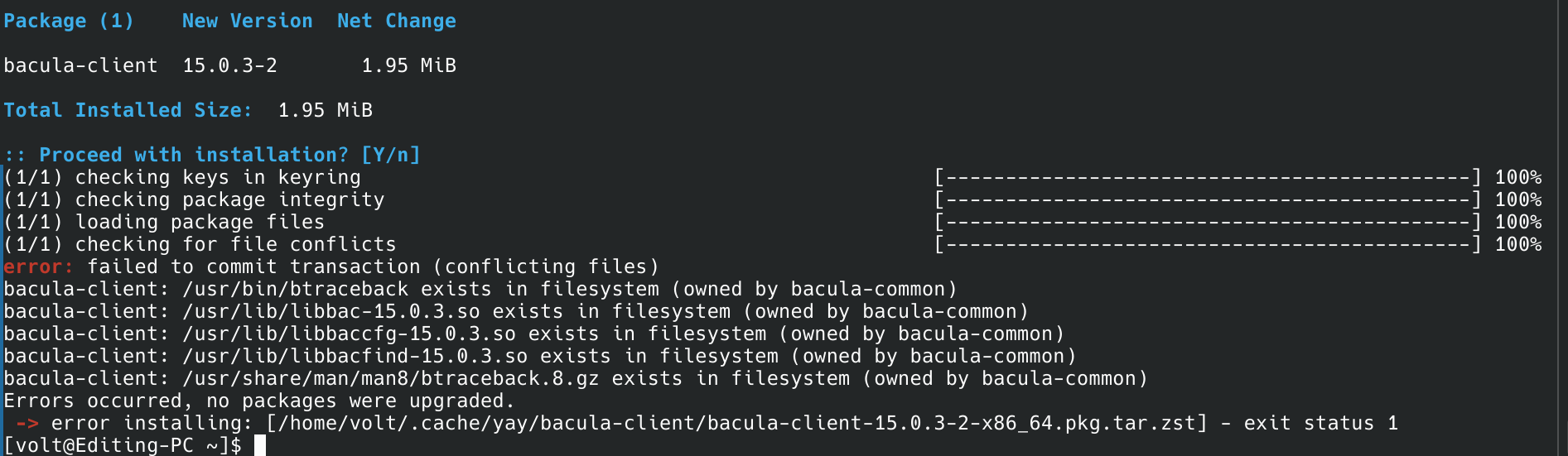
okay to heck with this, I’m out of my element enough I’ll just straight up ask, trying to clean install bacula-client just refuses to do anything but error, what am I not doing right here?
EDIT: I forgot, had a dumb moment, the welcome app, forgot I can use it to update the repos and stuff, doing that ow, pardon my dumb moment. hah.
There is also bareos which is a fork of bacula.
@High_Voltage
Not sure what you are doing but maybe try building it again and type in A for all to clean build the package as it installed for me no problem.
make[1]: Leaving directory '/home/ricklinux/.cache/yay/bacula-client/src/bacula-15.0.3/manpages'
==> Tidying install...
  -> Removing libtool files...
  -> Removing static library files...
  -> Purging unwanted files...
  -> Stripping unneeded symbols from binaries and libraries...
  -> Compressing man and info pages...
==> Checking for packaging issues...
==> Creating package "bacula-client"...
  -> Generating .PKGINFO file...
  -> Generating .BUILDINFO file...
  -> Generating .MTREE file...
  -> Compressing package...
==> Leaving fakeroot environment.
==> Finished making: bacula-client 15.0.3-2 (Sun 18 Jan 2026 02:55:27 PM)
==> Cleaning up...
loading packages...
resolving dependencies...
looking for conflicting packages...

Package (1)    New Version  Net Change

bacula-client  15.0.3-2       1.95 MiB

Total Installed Size:  1.95 MiB

:: Proceed with installation? [Y/n]
(1/1) checking keys in keyring                                                                                                                [---------------------------------------------------------------------------------------] 100%
(1/1) checking package integrity                                                                                                              [---------------------------------------------------------------------------------------] 100%
(1/1) loading package files                                                                                                                   [---------------------------------------------------------------------------------------] 100%
(1/1) checking for file conflicts                                                                                                             [---------------------------------------------------------------------------------------] 100%
(1/1) checking available disk space                                                                                                           [---------------------------------------------------------------------------------------] 100%
:: Running pre-transaction hooks...
(1/1) Performing snapper pre snapshots for the following configurations...
==> root: 1130
:: Processing package changes...
(1/1) installing bacula-client                                                                                                                [---------------------------------------------------------------------------------------] 100%
Optional dependencies for bacula-client
    bash: support for some util scripts [installed]
    lzo: LZO support [installed]
    perl: support for some provided scripts [installed]
    python: to use key-manager.py and other provided scripts [installed]
:: Running post-transaction hooks...
(1/3) Reloading system manager configuration...
(2/3) Arming ConditionNeedsUpdate...
(3/3) Performing snapper post snapshots for the following configurations...
==> root: 1131
[ricklinux@rick-ms7c91 ~]$
Edit: You ALWAYS have to make sure your system is up to date before EVER installing anything!
seems I had some stray files from the previous attempts to install bacula, manually removing them fixed it and its now compiling from source for bacula-sd and bacula-dir, bacula-client installed properly after removing those stray files. thank you all. will edit this with an update after the source compiling finishes and I find out if the sd/dir install right or not. again, thank you all for the assistance.
EDIT: I should clarify, when i say it installed, I mean even clean building was failing due to the stray files.