I’ve only been on the EOS train for about a week now and i’ve been loving it, however something odd is that when i press the “Shut down” button to turn the PC off it doesn’t actually. It turns off the monitor and i assume the OS is off but the lights and fans on my desktop are still running.
Does shutdown not actually shut it all down or is something wrong? How would i fix this
Welcome to the community @Timpani 


It is possible to change the behaviour of the power button, but how you do that also depends on which desktop environment you’re using.
Under KDE Plasma for example, that setting is found under Power Management.
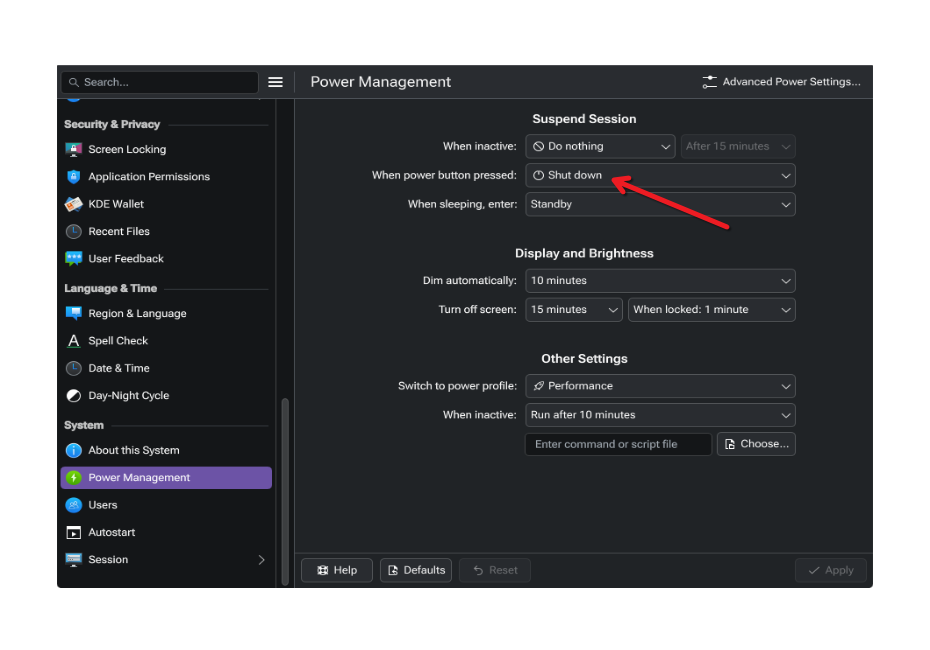
Thank you. Actually fairly new to linux as a whole, starting to make the jump to migrate over given current circumstances.
Though i think there was a misunderstanding. Holding the power button on my physical desktop turns everything off perfectly fine, but when i try to press “Shut Down” in the bottom left corner, it does what i had described before, turning off the screen (and i think the OS) but not the Desktops fans and lights which is sorta important.
If it’s a weird bug that isn’t fixable i’ll stick to shutting it off via the actual button but this is a weird inconsistency that stuck out to me when making the jump from windows, i needed to ask about it
Sorry yes, I did misunderstand that 
What desktop environment are you using @Timpani ?
Eg: KDE Plasma, Gnome, i3, Cinnamon, LXQt, XFCE, etc…
I am using KDE plasma and am on the Latest version of EOS and not the LTS kernel
Please don’t do this. This is a surefire way to eventually break something, especially if you went with btrfs. Please setup sysrq ASAP to avoid this.
and a simple inxi -Faz --no-host will provide a lot of system info for folks to help you with/start you off with.
Please also check the LTS kernel as you noted. Sometimes there’s regressions on latest kernel. I for one used to always use the LTS kernel on my machines.
Dont use the button on my box or use the “shut down” button explicitly baked into the DE???
I do not have a printscreen key on this keyboard either it’s genuinely been a massive pain
thanks for the headsup on the system information command atleast, i’ll write it down for later
I believe @anon63071375 is referring to:
As opposed to a graceful shutdown. Using the “Shut down” button in Plasma is (normally) fine.
Noted then, i will continue using the shut down button in plasma, i was already doing that 90% of the time anyway.
But we still circle back around to the original issue of the fans and lights still being on. If those would turn off aswell i have no problems
Also on the slim chance something has broke how would i troubleshoot it, my maintenance knowledge for linux OS’s is still very low
also idk what btrfs is or means or the implications of it in regards to all of this, so thats another thing. Apologies
No need to apologise @Timpani, we all started somewhere.
You’re able to access the log of previous sessions. This command here, accesses the last 25 lines (tail -n 25) of the previous session’s log (-1) :
journalctl -b -1 | tail -n 25
To access two sessions ago (-2), adjust the command to:
journalctl -b -2 | tail -n 25
And so on…
Hopefully those will tell us what the system was trying to do, or got stuck on.
Welcome to the EndeavourOS forum.  I hope you enjoy your time here.
ext4 and btrfs are formats used on Mass Storage Devices such as SSD, NVME, and etc.
This explains the differences between them
As a beginner, I would highly suggest using ext4 and save btrfs for later. Just my opinion.
Pudge
Ty for the welcomes, my filesystem is in ext4, i’m not sure how i would even change the filesystem this late after installing and getting all my things setup. I didn’t do anything unique in the installation process, bar grabbing the LTS kernel i left everything as their defaults
To my understanding, the warning issued above about pressing the shutdown button is valid for the situations where you have some applications open and some disk IO operation is going on.
Or if you have a frozen and unresponsive system while still having some applications open etc.
In these scenarios, pressing the shutdown button is not advisable and may lead to filesystem and data corruption.
Otherwise, on systems using systemd, both hardware signals (such as the shutdown button) and shutdown commands are ultimately handled by systemd and are usually similar in effect. They both initiate a controlled shutdow. Pressing the button invokes kernel or ACPI handlers first, while systemctl poweroff interacts directly with the system manager.
If I’ve got it wrong, partially or entirely, please point out to me what and where and I’ll stand corrected.
Please give the requested information
also what happens if you open a terminal and enter
sudo shutdown now
From shutdown --help
This is a compatibility interface, please use the more powerful ‘systemctl halt’,
‘systemctl poweroff’, ‘systemctl reboot’ commands instead.

System:
Kernel:6.17.8-arch1-1arch:x86_64bits:64compiler:gccv: 15.2.1
clocksource:tscavail: hpet,acpi_pm
parameters: initrd=\09f1f04d10ae42689a3e505c69aeb8b0\6.17.8-arch1-1\initrd
nvme_load=YES nowatchdog rw
root=UUID=ebbd6e7d-669b-4da5-b95b-b2466d0b9627
systemd.machine_id=09f1f04d10ae42689a3e505c69aeb8b0
Desktop:KDE Plasmav:6.5.2tk:Qtv:N/Ainfo:frameworksv: 6.19.0
wm:kwin_waylandvt:1dm:SDDMDistro:EndeavourOSbase: Arch Linux
Machine:
Type:DesktopMobo:ASRockmodel: B650E PG Riptide WiFi
serial: uuid: UEFI: American
Megatrends LLC. v:2.01date: 11/16/2023
CPU:
Info: model:AMD Ryzen 7 7800X3Dbits:64type:MT MCParch:Zen 4gen: 4
level:v4note:checkbuilt:2022+process:TSMC n5 (5nm)family: 0x19 (25)
model-id:0x61 (97)stepping:2microcode: 0xA60120A
Topology: cpus:1xdies:1clusters:1cores:8threads:16tpc: 2
smt:enabledcache: L1:512 KiBdesc:d-8x32 KiB; i-8x32 KiBL2: 8 MiB
desc:8x1024 KiBL3:96 MiBdesc: 1x96 MiB
Speed (MHz): avg:2983min/max:426/5053boost:enabledscaling:
driver:amd-pstate-eppgovernor:performancecores: 1:29832:29833: 2983
4:29835:29836:29837:29838:29839:298310:298311:298312: 2983
13:298314:298315:298316:2983bogomips: 134156
Flags-basic: avx avx2 ht lm nx pae sse sse2 sse3 sse4_1 sse4_2 sse4a
ssse3 svm
Vulnerabilities:
Type:gather_data_samplingstatus: Not affected
Type:ghostwritestatus: Not affected
Type:indirect_target_selectionstatus: Not affected
Type:itlb_multihitstatus: Not affected
Type:l1tfstatus: Not affected
Type:mdsstatus: Not affected
Type:meltdownstatus: Not affected
Type:mmio_stale_datastatus: Not affected
Type:old_microcodestatus: Not affected
Type:reg_file_data_samplingstatus: Not affected
Type:retbleedstatus: Not affected
Type:spec_rstack_overflowmitigation: Safe RET
Type:spec_store_bypassmitigation: Speculative Store Bypass disabled via
prctl
Type:spectre_v1mitigation: usercopy/swapgs barriers and __user pointer
sanitization
Type:spectre_v2mitigation: Enhanced / Automatic IBRS; IBPB:
conditional; STIBP: always-on; PBRSB-eIBRS: Not affected; BHI: Not
affected
Type:srbdsstatus: Not affected
Type:tsamitigation: Clear CPU buffers
Type:tsx_async_abortstatus: Not affected
Type:vmscapemitigation: IBPB before exit to userspace
Graphics:
Device-1: Advanced Micro Devices [AMD/ATI] Navi 31 [Radeon RX 7900 XT/7900
XTX/7900 GRE/7900M] vendor:XFXdriver:amdgpuv:kernelarch: RDNA-3
code:Navi-3xprocess:TSMC n5 (5nm)built:2022+pcie: gen: 4
speed:16 GT/slanes:16ports: active: DP-1,HDMI-A-1
empty:DP-2,DP-3,Writeback-1bus-ID:03:00.0chip-ID: 1002:744c
class-ID: 0300
Device-2:Advanced Micro Devices [AMD/ATI] Raphaeldriver: amdgpu
v:kernelarch:RDNA-2code:Navi-2xprocess:TSMC n7 (7nm)built: 2020-22
pcie: gen:4speed:16 GT/slanes:16ports: active:noneempty: DP-4,
DP-5, DP-6, HDMI-A-2, Writeback-2 bus-ID:11:00.0chip-ID: 1002:164e
class-ID:0300temp: 34.0 C
Display:waylandserver:``X.org``v:1.21.1.20with:Xwaylandv: 24.1.9
compositor:kwin_waylanddriver: X: loaded: amdgpu
unloaded:modesetting,radeonalternate:fbdev,vesadri: radeonsi
gpu:amdgpud-rect:4480x2520display-ID: 0
Monitor-1:DP-1pos:bottom-rmodel:Lenovo R27qeserial:
built:2024res: mode:2560x1440hz:180scale:125% (1.25)to: 2048x1152
dpi:109gamma:1.2size:597x336mm (23.5x13.23")diag: 685mm (27")
ratio:16:9modes: max:2560x1440min: 720x400
Monitor-2:HDMI-A-1pos:primary,top-leftmodel:VG245serial:
built:2020res: mode:1920x1080hz:75scale:178% (1.78)to: 1080x1920
dpi:92gamma:1.2size:531x299mm (20.91x11.77")diag: 609mm (24")
ratio:16:9modes: max:1920x1080min: 720x400
API:EGLv:1.5hw: drv:amd radeonsiplatforms: device:0drv: radeonsi
device:1drv:radeonsidevice:2drv:swrastgbm: drv: radeonsi
surfaceless: drv:radeonsiwayland: drv:radeonsix11: drv: radeonsi
API:OpenGLv:4.6compat-v:4.5vendor:amd mesav: 25.2.7-arch1.1
glx-v:1.4direct-render:yesrenderer: AMD Radeon RX 7900 XT (radeonsi
navi31 LLVM 21.1.5 DRM 3.64 6.17.8-arch1-1) device-ID: 1002:744c
memory:19.53 GiBunified:nodisplay-ID: :1.0
API:Vulkanv:1.4.328layers:7device:0type:discrete-gpuname: AMD
Radeon RX 7900 XT (RADV NAVI31) driver:mesa radvv: 25.2.7-arch1.1
device-ID:1002:744csurfaces:N/Adevice:1type:integrated-gpuname: AMD
Ryzen 7 7800X3D 8-Core Processor (RADV RAPHAEL_MENDOCINO)
driver:mesa radvv:25.2.7-arch1.1device-ID:1002:164esurfaces: N/A
Info: Tools: api: clinfo, eglinfo, glxinfo, vulkaninfo
de:kscreen-console,kscreen-doctorwl: wayland-info
x11: xdpyinfo, xprop, xrandr
Audio:
Device-1: Advanced Micro Devices [AMD/ATI] Navi 31 HDMI/DP Audio
driver:snd_hda_intelv:kernelpcie: gen:4speed:16 GT/slanes: 16
bus-ID:03:00.1chip-ID:1002:ab30class-ID: 0403
Device-2: Advanced Micro Devices [AMD/ATI] Radeon High Definition Audio
[Rembrandt/Strix] driver:snd_hda_intelv:kernelpcie: gen: 4
speed:16 GT/slanes:16bus-ID:11:00.1chip-ID:1002:1640class-ID: 0403
Device-3: Advanced Micro Devices [AMD] Family 17h/19h/1ah HD Audio
vendor:ASRockdriver:snd_hda_intelv:kernelpcie: gen:4speed: 16 GT/s
lanes:16bus-ID:11:00.6chip-ID:1022:15e3class-ID: 0403
Device-4:Logitech Blue Snowballdriver: hid-generic,snd-usb-audio,usbhid
type:USBrev:2.0speed:12 Mb/slanes:1mode:1.1bus-ID: 1-6.4:6
chip-ID:046d:0ab9class-ID:0300serial:
Device-5: Apple USB-C to 3.5mm Headphone Jack Adapter
driver:hid-generic,snd-usb-audio,usbhidtype:USBrev:2.0speed: 12 Mb/s
lanes:1mode:1.1bus-ID:5-1:2chip-ID:05ac:110aclass-ID: 0300
serial:
API:ALSAv:k6.17.8-arch1-1status: kernel-api
tools: alsactl,alsamixer,amixer
Server-1:PipeWirev:1.4.9status:activewith: 1: pipewire-pulse
status:active2:wireplumberstatus:active3:pipewire-alsatype: plugin
4:pw-jacktype:plugintools: pactl,pw-cat,pw-cli,wpctl
Network:
Device-1:MEDIATEK MT7921K Wi-Fi 6E 80MHzdriver:mt7921ev:kernelpcie:
gen:2speed:5 GT/slanes:1bus-ID:0c:00.0chip-ID: 14c3:0608
class-ID: 0280
IF:wlan0state:downmac:
Device-2:Realtek Killer E3000 2.5GbEvendor:ASRockdriver: r8169
v:kernelpcie: gen:2speed:5 GT/slanes:1port:c000bus-ID: 0d:00.0
chip-ID:10ec:3000class-ID: 0200
IF:enp13s0state:upspeed:1000 Mbpsduplex:fullmac:
Device-3: ASUSTek ROG STRIX SCOPE II 96 WIRELESS
driver:hid-generic,usbhidtype:USBrev:2.0speed:12 Mb/slanes: 1
mode:1.1bus-ID:1-4:3chip-ID:0b05:1aaeclass-ID:0300serial:
Info: services: NetworkManager, systemd-timesyncd, wpa_supplicant
Bluetooth:
Device-1:MediaTek Wireless_Devicedriver:btusbv:0.8type:USBrev: 2.1
speed:480 Mb/slanes:1mode:2.0bus-ID:1-5:4chip-ID: 0e8d:0608
class-ID:e001serial:
Report:btmgmtID:hci0rfk-id:0state:downbt-service: disabled
rfk-block: hardware:nosoftware:noaddress: N/A
Drives:
Local Storage: total:2.77 TiBused: 58.61 GiB (2.1%)
SMART Message: Unable to run smartctl. Root privileges required.
ID-1:/dev/nvme0n1maj-min:259:0vendor:TeamGroupmodel: TM8FPK002T
size:1.86 TiBblock-size: physical:512 Blogical:512 Bspeed: 63.2 Gb/s
lanes:4tech:SSDserial: fw-rev:SN10932temp: 41.9 C
scheme: GPT
ID-2:/dev/sdamaj-min:8:0vendor:Samsungmodel: PSSD T7
size:931.51 GiBblock-size: physical:512 Blogical:512 Btype: USB
rev:3.2spd:5 Gb/slanes:1mode:3.2 gen-1x1tech:SSDserial:
scheme: MBR
Partition:
ID-1:/raw-size:951.46 GiBsize: 935.45 GiB (98.32%)
used:58.37 GiB (6.2%)fs:ext4dev:/dev/nvme0n1p6maj-min: 259:6
Swap:
Alert: No swap data was found.
Sensors:
System Temperatures: cpu:44.9 Cmobo: 39.2 C
Fan Speeds (rpm): N/A
GPU: device:amdgputemp:40.0 Cmem:49.0 Cfan:3watts: 27.00
device:amdgputemp: 34.0 C
Info:
Memory: total:32 GiBnote:est.available:30.47 GiBused: 3.56 GiB (11.7%)
Processes:438Power: uptime:1mstates:freeze,mem,disksuspend: deep
avail:s2idlewakeups:0hibernate:platformavail: shutdown, reboot,
suspend, test_resume image:12.17 GiBservices: org_kde_powerdevil,
power-profiles-daemon, upowerd Init:systemdv:258default: graphical
tool: systemctl
Packages:1216pm:pacmanpkgs:1190libs:332tools:yaypm: flatpak
pkgs:26Compilers: gcc:15.2.1Shell:Bashv:5.3.3running-in: konsole
inxi: 3.3.39
You’re the boss, heres the system info.
also i tried the sudo shutdown command, same thing, OS powers off, hardware is not powering off. The problem i am trying to settle here
Please format the terminal output in the post.
You can edit your post, highlight the text and press </> in the reply box’ toolbar. Thanks!
Also, you could get important info from your logs as mentioned before:
Sorrysorry, should i just make a seperate post and restart this from the beginning though i’m concerned this is getting messy