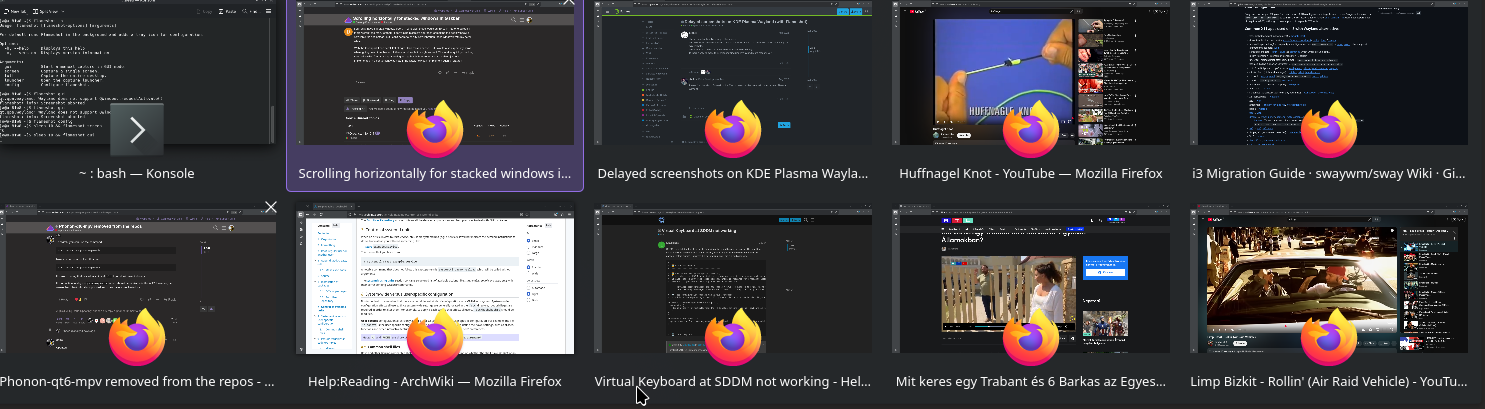
I currently have 8 firefox windows open. In windows, these would shrink to fit into one screen if there weren’t too many of them. I don’t mind plasma’s approach of making the peek window a scrollable tile set instead, but I can’t seem to easilty scroll through these windows with my scroll wheel.
With the touchpad, I can scroll left of right. This makes sense. But I would also expect my scroll wheel going down to either scroll these windows left or right as well. This makes quickly checking them all easier. Am I missing a setting to toggle this feature, or is such a thing just not implemented in a convenient way yet? If the latter, how can I implement such a feature?
It serves a similar function but not the exact use-case. I want to only browse the open firefox windows, and the most straightforward way is through the taskbar. I’ve attached exactly what I mean here. As I stated, I’d like to do horizontal scrolling of this panel with my mouse’s scroll wheel. Using the touchpad for this purpose is possible but not preferable.
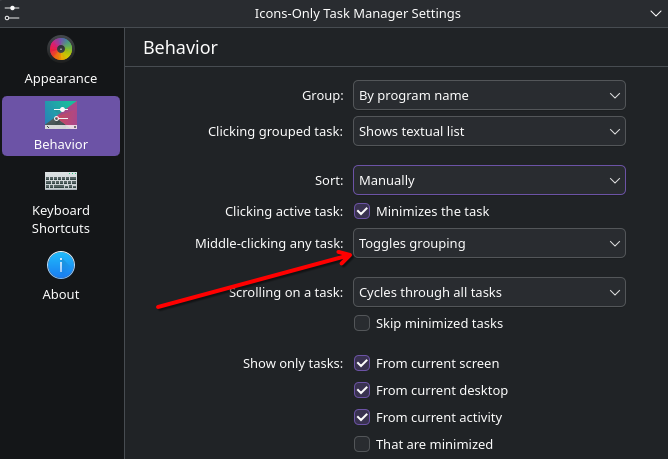
Oh interesting. I was confused on what that option meant when I was looking around initially. I guess this solution helps a bit. Not a perfect solution since it has some slight annoyances but definitely better than the stacked view. It is overall a very close thing to what I wanted. Thanks!
I’ll keep the post open for a few days just in case. Otherwise, your solution answers my question sufficiently.