Removing nvidia drivers and installing 580, then disabling GSP firmware

Hi.

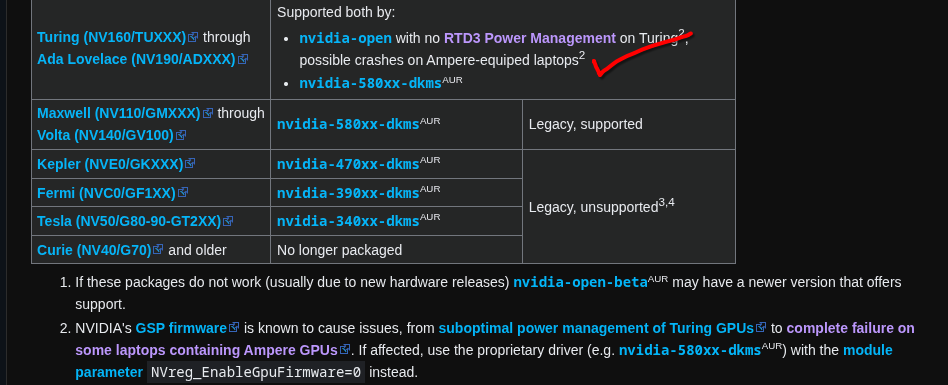
Having some issues after a fresh install of Endeavor using the Nvidia install. My hybrid graphics laptop needs to have the GSP firmware disabled, otherwise the Nvidia card crashes. This means I need to remove all nvidia drivers and then install the 580 drivers. Then I need to disable the GSP firmware with modprobe and regenerate the intrafms.

I’m trying to figure out the necessary steps to do all of this. I tried checking nvidia-inst help but that seems to be more an automatic install of the highest available drivers (590) in my case, which is open driver, thus I cannot disable the GSP firmware. So needs to be manually done.

The steps I am thinking I need to do are -

sudo yay -Rns nvidia nvidia-utils

sudo yay -S nvidia-580xx nvidia-580xx-utils

reboot

I then need to add nvidia.NVreg_EnableGpuFirmware=0 to my systemd bootloader file (not exactly sure which one that is on Gnome?)

Last night when trying this I then did sudo mkinitcpio -Pbut the command was not recognised for some reason. How exactly would I regenerate the intrafms on Endeavor systemd? sudo reinstall kernel?

Any help or guidance would be greatly appreciated.

Realised I shouldn’t be using sudo with yay after a warning. I was able to remove the 3 main nvidia parts with

yay -Rns nvidia-open-dkms nvidia-utils nvidia-settings

I tried installing with yay -S nvidia-580xx-dkms nvidia-580xx-utils

Can’t figure out how to do the nvidia-settings one however, as that seems to install 590 version each time so have simply removed that for now.

Welcome to the forum :enos_flag: :enos:
I don’t use Nvidia but I can see there is this package you might be looking for.

2 Likes

Cheers for that! Yep, that’s exactly the one I need it seems.

I was able to get the GSP firmware disabled as well (created a modprobe file for it with the line inside it) and used sudo dracut -f –regenerate-all to regenerate the intramfs. Restarted there, now used nvidia-smi -q | grep “GSP Firmware Version” to see if the GSP firmware was disabled and it is. So I believe that is me all good to go with my new Endeavor OS.

I tried this last night when very tired before bed and had quite a few issues, hence why I wanted to get help on the forum ASAP today. Even though I’ve got it sorted already. Apologies for the slight panic lol.

One minor thing, totally unrelated, how can I disable the text that appears on each reboot, similar to the text when installing a new OS? As you might be able to tell I don’t quite know the correct language to use a search engine to fix this minor issue lol

welcome @Lets_Disco :enos:

Default selected bootloader on the installer is systemd-boot, and the config file you need to add boot kernel options is:
/etc/kernel/cmdline

And yes EndeavourOS is using dracut to generate initramfs:
sudo reintstall-kernels to regenerate these.

1 Like

should work .. but wil not be in early boot, but no clue if the load of the firmware happens that early anyway.

Ah okay. It is working for now but this needs to be done and then I can forget about it going forward, so I think I will delete that file I created and then add the line in the file you suggested and then will regenerate the intramfs.

That line I found (using dracut) was actually from the Nobara wiki, one of my last distros. They recently made it so the open driver is installed no matter what and you have to do quite a lot of very complicated steps to force the closed driver instead so have been checking out other distros since then. I will use the correct command you suggested with sudo reinstall-kernels.

Cheers, really appreciate the help

For the record, please show the output of

inxi -Gza
Graphics: 
  Device-1: Intel TigerLake-H GT1 \[UHD Graphics\] vendor: Acer Incorporated ALI 
    driver: i915 v: kernel alternate: xe arch: Xe process: Intel 10nm 
    built: 2020-21 ports: active: eDP-1 empty: DP-1,DP-2 bus-ID: 0000:00:02.0 
    chip-ID: 8086:9a60 class-ID: 0300 
  Device-2: NVIDIA GA104M \[GeForce RTX 3070 Mobile / Max-Q\] 
    vendor: Acer Incorporated ALI driver: nvidia v: 580.126.09 
    alternate: nouveau,nvidia_drm non-free: 550-580.xx+ status: current (as 
    of 2025-11; EOL\~2026-12-xx) arch: Ampere code: GAxxx 
    process: TSMC n7 (7nm) built: 2020-2023 ports: active: none 
    empty: DP-3,HDMI-A-1 bus-ID: 0000:01:00.0 chip-ID: 10de:249d 
    class-ID: 0300 
  Device-3: Quanta HD User Facing driver: uvcvideo type: USB rev: 2.0 
    speed: 480 Mb/s lanes: 1 mode: 2.0 bus-ID: 3-9:4 chip-ID: 0408:a061 
    class-ID: 0e02 
  Display: wayland server: X.org v: 1.21.1.21 with: Xwayland v: 24.1.9 
    compositor: kwin_wayland driver: gpu: i915 display-ID: 0 
  Monitor-1: eDP-1 model: BOE Display 0x08b3 built: 2019 res: 
    mode: 1920x1080 hz: 144 scale: 100% (1) dpi: 139 gamma: 1.2 
    size: 344x193mm (13.54x7.6") diag: 398mm (15.7") ratio: 16:9 
    modes: 1920x1080 
  API: EGL v: 1.5 hw: drv: intel iris drv: nvidia platforms: device: 0 
    drv: nvidia device: 2 drv: iris device: 3 drv: swrast gbm: drv: nvidia 
    surfaceless: drv: nvidia wayland: drv: iris x11: drv: iris 
    inactive: device-1 
  API: OpenGL v: 4.6.0 compat-v: 4.5 vendor: intel mesa v: 25.3.5-arch1.2 
    glx-v: 1.4 direct-render: yes renderer: Mesa Intel UHD Graphics (TGL GT1) 
    device-ID: 8086:9a60 memory: 15.03 GiB unified: yes display-ID: :0.0 
  API: Vulkan v: 1.4.335 layers: 11 device: 0 type: integrated-gpu 
    name: Intel UHD Graphics (TGL GT1) driver: mesa intel v: 25.3.5-arch1.2 
    device-ID: 8086:9a60 surfaces: N/A device: 1 type: discrete-gpu 
    name: NVIDIA GeForce RTX 3070 Laptop GPU driver: nvidia v: 580.126.09 
    device-ID: 10de:249d surfaces: N/A 
  Info: Tools: api: clinfo, eglinfo, glxinfo, vulkaninfo 
    de: kscreen-console,kscreen-doctor gpu: nvidia-settings,nvidia-smi 
    wl: wayland-info x11: xdpyinfo, xprop, xrandr

For the record I have been able to sort the issue.

My gaming laptop is from 2021/2022, just before they started putting MUXes into them. My friend has a similar model but newer, his has a MUX and has absolutely no bother with hybrid graphics on Linux.

My issue was always that when in hybrid mode, my Nvidia dgpu would crash and wouldn’t load anything. Researched it for ages and then found the troubleshooting step of disabling GSP firmware and that sorted it. So even though my Nvidia card supports the open 590 driver, whatever weird UEFI my Acer laptop has without a MUX, it seems to need the GSP firmware disabled.

This is where first discovered the fix, on the Arch wiki -

good to know that ..

This topic was automatically closed 2 days after the last reply. New replies are no longer allowed.