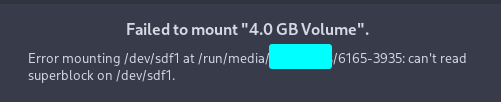
I don’t really know? Probably this one but not 100% sure.
ums_realtek
Edit: You could try
sudo rmmod ums_realtek
sudo modprobe ums_realtek
I don’t really know? Probably this one but not 100% sure.
ums_realtek
Edit: You could try
sudo rmmod ums_realtek
sudo modprobe ums_realtek
hasnt seemed to really do anything
It could be also that it needs what they call a quirk to get it working. I don’t think i can help much at this point.
One of these days I’m just going to get a good USB SD card reader, thank you for your assistance nonetheless.
I did find on another site showing the hardware.
  Device-3: 3-10:4 info: Realtek RTS5182 Card Reader type: Mass Storage
driver: ums-realtek
     interfaces: 1 rev: 2.0 speed: 480 Mb/s power: 500mA chip-ID:
0bda:0184 class-ID: 0806
So i am right on the module it should be using. It’s the same chip.
Edit: This was on linux mint.
That’s interesting. On your output it shows an underscore for the module. On the mint site it shows a dash. I’m not sure that makes any difference.
unplugged and plugged it in, its working now!
sudo rmmod ums_realtek
sudo modprobe ums_realtek
was the solution
Excellent… My guess was right then.
This topic was automatically closed 2 days after the last reply. New replies are no longer allowed.