DenalB
March 16, 2026, 4:32pm
1
Just typed kinfo into the terminal and got the following warning:
WARNING: radv is not a conformant Vulkan implementation, testing use only.
Here’s the full output:
$ kinfo
WARNING: radv is not a conformant Vulkan implementation, testing use only.
Operating System: Arch Linux
KDE Plasma Version: 6.6.2
KDE Frameworks Version: 6.24.0
Qt Version: 6.10.2
Kernel Version: 6.19.8-zen1-1-zen (64-bit)
Graphics Platform: Wayland
Processors: 24 × AMD Ryzen 9 3900X 12-Core Processor
Memory: 32 GiB of RAM (31.3 GiB usable)
Graphics Processor: AMD Radeon RX 9070 XT
What does that mean? Do I have to do anything special?
According to AI…
This warning indicates the
RADV (Radeon Vulkan) driver used on Linux has not undergone formal, paid Khronos Group conformance certification. It is a legally required notification, not a functional error, meaning the driver generally works well for gaming and testing, particularly on Steam Deck and AMD hardware.
Edit: Ran the command on my nvidia system and it doesn’t show that warning?
[ricklinux@rick-systemproductname ~]$ kinfo
Operating System: EndeavourOS
KDE Plasma Version: 6.6.2
KDE Frameworks Version: 6.24.0
Qt Version: 6.10.2
Kernel Version: 6.19.8-arch1-1 (64-bit)
Graphics Platform: Wayland
Processors: 12 × Intel® Core™ i7-8086K CPU @ 4.00GHz
Memory: 32 GiB of RAM (31.2 GiB usable)
Graphics Processor 1: NVIDIA GeForce GTX 1060 6GB/PCIe/SSE2
Graphics Processor 2: NVIDIA GeForce GTX 1060 6GB/PCIe/SSE2
DenalB
March 16, 2026, 4:40pm
3
So, it must be a warning other AMD users should also get, right?
I’ll check my amd in a minute. I have multiple amdgpu machines.
I checked my amd machine and it also doesn’t have the error messaging.
[ricklinux@rick-ms7c91 ~]$ kinfo
Operating System: EndeavourOS
KDE Plasma Version: 6.6.2
KDE Frameworks Version: 6.24.0
Qt Version: 6.10.2
Kernel Version: 6.19.8-arch1-1 (64-bit)
Graphics Platform: Wayland
Processors: 16 × AMD Ryzen 7 5800X 8-Core Processor
Memory: 32 GiB of RAM (31.3 GiB usable)
Graphics Processor: AMD Radeon RX 6750 XT
Edit: What is your hardware?
inxi -Gaz
DenalB
March 16, 2026, 4:50pm
6
ricklinux:
What is your hardware?
Graphics:
  Device-1: Advanced Micro Devices [AMD/ATI] Navi 48 [Radeon RX 9070/9070
    XT/9070 GRE] vendor: Sapphire driver: amdgpu v: kernel arch: RDNA-4
    code: Navi-4x process: TSMC n4 (4nm) built: 2025+ pcie: gen: 5
    speed: 32 GT/s lanes: 16 ports: active: DP-1 empty: DP-2, HDMI-A-1,
    HDMI-A-2, Writeback-1 bus-ID: 2f:00.0 chip-ID: 1002:7550 class-ID: 0300
  Device-2: Logitech HD Pro Webcam C920 driver: snd-usb-audio,uvcvideo
    type: USB rev: 2.0 speed: 480 Mb/s lanes: 1 mode: 2.0 bus-ID: 5-3.3:3
    chip-ID: 046d:082d class-ID: 0102 serial: <filter>
  Display: wayland server: X.org v: 1.21.1.21 with: Xwayland v: 24.1.9
    compositor: kwin_wayland driver: X: loaded: amdgpu
    unloaded: modesetting,radeon alternate: fbdev,vesa dri: radeonsi
    gpu: amdgpu display-ID: 0
  Monitor-1: DP-1 model: Dell S3422DWG serial: <filter> built: 2023 res:
    mode: 3440x1440 hz: 144 scale: 100% (1) dpi: 110 gamma: 1.2
    size: 797x334mm (31.38x13.15") diag: 864mm (34") modes: max: 3440x1440
    min: 720x400
  API: EGL v: 1.5 hw: drv: amd radeonsi platforms: device: 0 drv: radeonsi
    device: 1 drv: swrast gbm: drv: kms_swrast surfaceless: drv: radeonsi
    wayland: drv: radeonsi x11: drv: radeonsi
  API: OpenGL v: 4.6 compat-v: 4.5 vendor: amd mesa v: 26.0.2-arch1.1
    glx-v: 1.4 direct-render: yes renderer: AMD Radeon RX 9070 XT (radeonsi
    gfx1201 ACO DRM 3.64 6.19.8-zen1-1-zen) device-ID: 1002:7550
    memory: 15.62 GiB unified: no display-ID: :0.0
  API: Vulkan v: 1.4.341 layers: 6 device: 0 type: discrete-gpu name: AMD
    Radeon RX 9070 XT (RADV GFX1201) driver: mesa radv v: 26.0.2-arch1.1
    device-ID: 1002:7550 surfaces: N/A
  Info: Tools: api: clinfo, eglinfo, glxinfo, vulkaninfo
    de: kscreen-console,kscreen-doctor wl: wayland-info
    x11: xdpyinfo, xprop, xrandr
I found several things doing a web search…
opened 04:58PM - 29 Jul 24 UTC
closed 04:16AM - 05 Aug 24 UTC
0.kind: bug
### Describe the bug
Vulkan drivers for my AMD R9 390 aren't working. `vulkani… nfo` finds my graphics card but prints following warnings:
```console
WARNING: [Loader Message] Code 0 : terminator_CreateInstance: Received return code -3 from call to vkCreateInstance in ICD /nix/store/wis0bx9jxzcklxpmh1lhsg325g70wxns-mesa-24.1.2-drivers/lib/libvulkan_dzn.so. Skipping this driver.
WARNING: [Loader Message] Code 0 : terminator_CreateInstance: Received return code -3 from call to vkCreateInstance in ICD /nix/store/wis0bx9jxzcklxpmh1lhsg325g70wxns-mesa-24.1.2-drivers/lib/libvulkan_virtio.so. Skipping this driver.
WARNING: radv is not a conformant Vulkan implementation, testing use only.
vulkan: No DRI3 support detected - required for presentation
Note: you can probably enable DRI3 in your Xorg config
...
Instance Layers: count = 3
--------------------------
VK_LAYER_INTEL_nullhw INTEL NULL HW 1.1.73 version 1
VK_LAYER_MESA_device_select Linux device selection layer 1.3.211 version 1
VK_LAYER_MESA_overlay Mesa Overlay layer 1.3.211 version 1
Devices:
========
GPU0:
apiVersion = 1.3.278
driverVersion = 24.1.2
vendorID = 0x1002
deviceID = 0x67b1
deviceType = PHYSICAL_DEVICE_TYPE_DISCRETE_GPU
deviceName = AMD Radeon R9 390 Series (RADV HAWAII)
driverID = DRIVER_ID_MESA_RADV
driverName = radv
driverInfo = Mesa 24.1.2
conformanceVersion = 0.0.0.0
deviceUUID = 00000000-0100-0000-0000-000000000000
driverUUID = 414d442d-4d45-5341-2d44-525600000000
GPU1:
apiVersion = 1.3.278
driverVersion = 0.0.1
vendorID = 0x10005
deviceID = 0x0000
deviceType = PHYSICAL_DEVICE_TYPE_CPU
deviceName = llvmpipe (LLVM 17.0.6, 256 bits)
driverID = DRIVER_ID_MESA_LLVMPIPE
driverName = llvmpipe
driverInfo = Mesa 24.1.2 (LLVM 17.0.6)
conformanceVersion = 1.3.1.1
deviceUUID = 6d657361-3234-2e31-2e32-000000000000
driverUUID = 6c6c766d-7069-7065-5555-494400000000
```
I didn't notice until I tried running godot4 again after 6 months (it was working then). Now it wasn't able to use my graphics card, due to following warnings:
```console
WARNING: GENERAL - Message Id Number: 0 | Message Id Name: Loader Message
terminator_CreateInstance: Failed to CreateInstance in ICD 4. Skipping ICD.
Objects - 1
Object[0] - VK_OBJECT_TYPE_INSTANCE, Handle 144507584
at: _debug_messenger_callback (drivers/vulkan/vulkan_context.cpp:264)
WARNING: GENERAL - Message Id Number: 0 | Message Id Name: Loader Message
terminator_CreateInstance: Failed to CreateInstance in ICD 6. Skipping ICD.
Objects - 1
Object[0] - VK_OBJECT_TYPE_INSTANCE, Handle 144507584
at: _debug_messenger_callback (drivers/vulkan/vulkan_context.cpp:264)
WARNING: radv is not a conformant Vulkan implementation, testing use only.
Vulkan devices:
vulkan: No DRI3 support detected - required for presentation
Note: you can probably enable DRI3 in your Xorg config
#0: AMD AMD Radeon R9 390 Series (RADV HAWAII) - Unsupported, Discrete
#1: Unknown llvmpipe (LLVM 17.0.6, 256 bits) - Supported, CPU
```
As far as I know, xwayland enforces DRI3, but I also tried setting it "the X way" in `/etc/X11/xorg.conf.d/20-amdgpu.conf` without any effect.
### Steps To Reproduce
1. Setup
* CPU: Intel Xeon E3-1231 v3 (has no internal graphics card)
* Graphics card: AMD Radeon R9 390 Series (RADV HAWAII)
* Hyprland
2. Run `vulkaninfo --summary`
### Additional context
* Im using wayland + Hyprland
* Parts of my nixos config, that could be relevant:
```nix
boot.initrd.kernelModules = [ "amdgpu" ];
boot.kernelParams = [ "radeon.cik_support=0" "amdgpu.cik_support=1" ];
hardware = {
graphics = {
enable = true;
enable32Bit = true;
};
};
```
Edit: Removing the `boot.kernelParams` results in vulkaninfo not finding the graphics card and printing following error:
```console
ERROR: [../src/amd/vulkan/radv_physical_device.c:1944] Code 0 : Device '/dev/dri/renderD128' is not using the AMDGPU kernel driver: Invalid argument (VK_ERROR_INCOMPATIBLE_DRIVER)
```
### Notify maintainers
### Metadata
```console
- system: `"x86_64-linux"`
- host os: `Linux 6.6.42, NixOS, 24.11 (Vicuna), 24.11.20240727.b73c222`
- multi-user?: `yes`
- sandbox: `yes`
- version: `nix-env (Nix) 2.18.5`
- nixpkgs: `/nix/store/qxf6anli54ij0q1sdlnlgx9hyl658a4v-source`
```
---
Add a :+1: [reaction] to [issues you find important].
[reaction]: https://github.blog/2016-03-10-add-reactions-to-pull-requests-issues-and-comments/
[issues you find important]: https://github.com/NixOS/nixpkgs/issues?q=is%3Aissue+is%3Aopen+sort%3Areactions-%2B1-desc
Hello, I’m a relatively new CachyOS user and have been extremely happy with it so far, even during a couple of moments where I’ve had to get my feet wet fixing some small issues. Recently I experienced a similar issue as in this thread and decided...
Reading time: 3 mins 🕑
Likes: 3 ❤
Also, a couple from Reddit
Wow… you got the high end gpu! I’m jealous. Do you have yours set up according to the arch wiki?
Is vulkan-radeon installed? Do you have hardware video acceleration set up? and verified? Can you run vulkaninfo?
Edit: Not sure why this isn’t showing on my system. But anyway what @UncleSpellbinder posted i see this on arch.
No warnings:
kinfo
Operating System: EndeavourOS
KDE Plasma Version: 6.6.2
KDE Frameworks Version: 6.24.0
Qt Version: 6.10.2
Kernel Version: 6.19.8-x64v2-xanmod1 (64-bit)
Graphics Platform: Wayland
Processors: 8 × Intel® Core™ i7-2600K CPU @ 3.40GHz
Memory: 16 GiB of RAM (15.6 GiB usable)
Graphics Processor: AMD Radeon VII
DenalB
March 16, 2026, 5:43pm
10
Yes.
$ pacman -Qi vulkan-radeon
Name            : vulkan-radeon
Version         : 1:26.0.2-1
Description     : Open-source Vulkan driver for AMD GPUs
Architecture    : x86_64
URL             : https://www.mesa3d.org/
Licenses        : MIT AND BSD-3-Clause AND SGI-B-2.0
Groups          : None
Provides        : vulkan-driver
Depends On      : expat  glibc  libdisplay-info  libdrm  libelf  libgcc  libstdc++  libx11  libxcb  libxshmfence
                  llvm-libs  spirv-tools  systemd-libs  vulkan-icd-loader  vulkan-mesa-implicit-layers  wayland
                  xcb-util-keysyms  zlib  zstd
Optional Deps   : vulkan-mesa-layers: additional vulkan layers
Required By     : lib32-vulkan-radeon  steam
Optional For    : sdl3  vulkan-icd-loader
Conflicts With  : None
Replaces        : amdvlk<=2025.Q2.1-1
Installed Size  : 16.80 MiB
Packager        : Jan Alexander Steffens (heftig) <heftig@archlinux.org>
Build Date      : Fri Mar 13 12:09:20 2026
Install Date    : Sat Mar 14 13:47:25 2026
Install Reason  : Explicitly installed
Install Script  : No
Validated By    : Signature
ricklinux:
Can you run vulkaninfo?
Yes. But there is that warning, also.
$ vulkaninfo
WARNING: radv is not a conformant Vulkan implementation, testing use only.
==========
VULKANINFO
==========

Vulkan Instance Version: 1.4.341


Instance Extensions: count = 26
===============================
	VK_EXT_acquire_drm_display             : extension revision 1
	VK_EXT_acquire_xlib_display            : extension revision 1
	VK_EXT_debug_report                    : extension revision 10
	VK_EXT_debug_utils                     : extension revision 2
	VK_EXT_direct_mode_display             : extension revision 1
	VK_EXT_display_surface_counter         : extension revision 1
	VK_EXT_headless_surface                : extension revision 1
	VK_EXT_layer_settings                  : extension revision 2
	VK_EXT_surface_maintenance1            : extension revision 1
	VK_EXT_swapchain_colorspace            : extension revision 5
	VK_KHR_device_group_creation           : extension revision 1
	VK_KHR_display                         : extension revision 23
	VK_KHR_external_fence_capabilities     : extension revision 1
	VK_KHR_external_memory_capabilities    : extension revision 1
	VK_KHR_external_semaphore_capabilities : extension revision 1
	VK_KHR_get_display_properties2         : extension revision 1
	VK_KHR_get_physical_device_properties2 : extension revision 2
	VK_KHR_get_surface_capabilities2       : extension revision 1
	VK_KHR_portability_enumeration         : extension revision 1
	VK_KHR_surface                         : extension revision 25
	VK_KHR_surface_maintenance1            : extension revision 1
	VK_KHR_surface_protected_capabilities  : extension revision 1
	VK_KHR_wayland_surface                 : extension revision 6
	VK_KHR_xcb_surface                     : extension revision 6
	VK_KHR_xlib_surface                    : extension revision 6
	VK_LUNARG_direct_driver_loading        : extension revision 1

Layers: count = 6
=================
VK_LAYER_MESA_anti_lag (Open-source implementation of the VK_AMD_anti_lag extension.) Vulkan version 1.4.303, layer version 1:
	Layer Extensions: count = 0
	Devices: count = 1
		GPU id = 0 (AMD Radeon RX 9070 XT (RADV GFX1201))
		Layer-Device Extensions: count = 1
			VK_AMD_anti_lag : extension revision 1

VK_LAYER_MESA_device_select (Linux device selection layer) Vulkan version 1.4.303, layer version 1:
	Layer Extensions: count = 1
		VK_EXT_layer_settings : extension revision 2
	Devices: count = 1
		GPU id = 0 (AMD Radeon RX 9070 XT (RADV GFX1201))
		Layer-Device Extensions: count = 0

VK_LAYER_VALVE_steam_fossilize_32 (Steam Pipeline Caching Layer) Vulkan version 1.3.207, layer version 1:
	Layer Extensions: count = 0
	Devices: count = 1
		GPU id = 0 (AMD Radeon RX 9070 XT (RADV GFX1201))
		Layer-Device Extensions: count = 0

VK_LAYER_VALVE_steam_fossilize_64 (Steam Pipeline Caching Layer) Vulkan version 1.3.207, layer version 1:
	Layer Extensions: count = 0
	Devices: count = 1
		GPU id = 0 (AMD Radeon RX 9070 XT (RADV GFX1201))
		Layer-Device Extensions: count = 0

VK_LAYER_VALVE_steam_overlay_32 (Steam Overlay Layer) Vulkan version 1.3.207, layer version 1:
	Layer Extensions: count = 0
	Devices: count = 1
		GPU id = 0 (AMD Radeon RX 9070 XT (RADV GFX1201))
		Layer-Device Extensions: count = 0

VK_LAYER_VALVE_steam_overlay_64 (Steam Overlay Layer) Vulkan version 1.3.207, layer version 1:
	Layer Extensions: count = 0
	Devices: count = 1
		GPU id = 0 (AMD Radeon RX 9070 XT (RADV GFX1201))
		Layer-Device Extensions: count = 0

Presentable Surfaces:
=====================
GPU id : 0 (AMD Radeon RX 9070 XT (RADV GFX1201)) [VK_KHR_xcb_surface, VK_KHR_xlib_surface]:
	Surface types: count = 2
		VK_KHR_xcb_surface
		VK_KHR_xlib_surface
	Formats: count = 2
		SurfaceFormat[0]:
			format = FORMAT_B8G8R8A8_SRGB
			colorSpace = COLOR_SPACE_SRGB_NONLINEAR_KHR
		SurfaceFormat[1]:
			format = FORMAT_B8G8R8A8_UNORM
			colorSpace = COLOR_SPACE_SRGB_NONLINEAR_KHR
	Present Modes: count = 4
		PRESENT_MODE_IMMEDIATE_KHR
		PRESENT_MODE_MAILBOX_KHR
		PRESENT_MODE_FIFO_KHR
		PRESENT_MODE_FIFO_RELAXED_KHR
	VkSurfaceCapabilitiesKHR:
	-------------------------
		minImageCount = 3
		maxImageCount = 0
		currentExtent:
			width  = 256
			height = 256
		minImageExtent:
			width  = 256
			height = 256
		maxImageExtent:
			width  = 256
			height = 256
		maxImageArrayLayers = 1
		supportedTransforms: count = 1
			SURFACE_TRANSFORM_IDENTITY_BIT_KHR
		currentTransform = SURFACE_TRANSFORM_IDENTITY_BIT_KHR
		supportedCompositeAlpha: count = 2
			COMPOSITE_ALPHA_OPAQUE_BIT_KHR
			COMPOSITE_ALPHA_INHERIT_BIT_KHR
		supportedUsageFlags: count = 7
			IMAGE_USAGE_TRANSFER_SRC_BIT
			IMAGE_USAGE_TRANSFER_DST_BIT
			IMAGE_USAGE_SAMPLED_BIT
			IMAGE_USAGE_STORAGE_BIT
			IMAGE_USAGE_COLOR_ATTACHMENT_BIT
			IMAGE_USAGE_INPUT_ATTACHMENT_BIT
			IMAGE_USAGE_ATTACHMENT_FEEDBACK_LOOP_BIT_EXT
	VkSurfaceCapabilitiesPresentId2KHR:
	-----------------------------------
		presentId2Supported = true

	VkSurfaceCapabilitiesPresentWait2KHR:
	-------------------------------------
		presentWait2Supported = true

	VkSurfaceProtectedCapabilitiesKHR:
	----------------------------------
		supportsProtected = false
[...]
I installed Mesa and Vulkan via sudo pacman -S mesa vulkan-radeon lib32-mesa lib32-vulkan-radeon gst-plugin-va.
Will read through the links posted. Maybe I can find the problem…
DenalB
March 16, 2026, 5:49pm
11
@ricklinux & @Beiruty
Could you run vulkaninfo | grep driver please? What is your output?
$ vulkaninfo | grep driver
WARNING: radv is not a conformant Vulkan implementation, testing use only.
	VK_LUNARG_direct_driver_loading        : extension revision 1
	driverVersion     = 26.0.2 (109051906)
	driverUUID                        = 414d442d-4d45-5341-2d44-525600000000
	driverID                                             = DRIVER_ID_MESA_RADV
	driverName                                           = radv
	driverInfo                                           = Mesa 26.0.2-arch1.1
	VK_KHR_driver_properties                      : extension revision 1
dalto
March 16, 2026, 5:53pm
12
That error is expected. It only comes because you are using a newer GPU.
It will go away once that implementation has some more runtime.
DenalB
March 16, 2026, 5:59pm
13
Thanks, @dalto !
So I don’t have to install or configure something special. I wondered because I don’t have any issues so far. I’m able to play games and videos. Just that strange warning when running kinfo in the terminal.
Good to know. Thx!
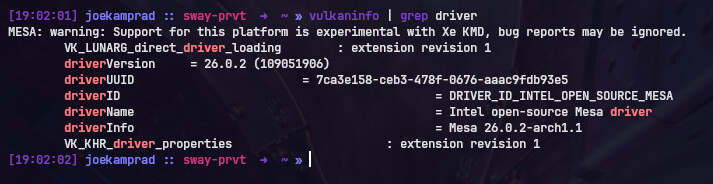
similar to mine:
MESA: warning: Support for this platform is experimental with Xe KMD, bug reports may be ignored.
when using Xe driver instead of i915
WARNING: [Loader Message] Code 0 : ICD for selected physical device does not export vkGetPhysicalDeviceDisplayPlanePropertiesKHR!
WARNING: [Loader Message] Code 0 : ICD for selected physical device does not export vkGetPhysicalDeviceDisplayPropertiesKHR!
        VK_LUNARG_direct_driver_loading        : extension revision 1
        driverVersion     = 26.0.99 (109052003)
        driverUUID                        = 414d442d-4d45-5341-2d44-525600000000
        driverID                                             = DRIVER_ID_MESA_RADV
        driverName                                           = radv
        driverInfo                                           = Mesa 26.1.0-devel (git-e09c47cd67)
        VK_KHR_driver_properties                      : extension revision 1
        driverVersion     = 26.0.99 (109052003)
        driverUUID                        = 6c6c766d-7069-7065-5555-494400000000
        driverID                                             = DRIVER_ID_MESA_LLVMPIPE
        driverName                                           = llvmpipe
        driverInfo                                           = Mesa 26.1.0-devel (git-e09c47cd67) (LLVM 22.1.1)
        VK_KHR_driver_properties                           : extension revision 1
dalto
March 16, 2026, 6:03pm
16
For what it is worth, the message annoyed me so I suppressed it by putting MESA_VK_IGNORE_CONFORMANCE_WARNING=true in /etc/environment
It only suppresses the message though. It doesn’t change anything else.
DenalB
March 16, 2026, 6:10pm
17
Thanks again, @dalto !
Now the warning is gone.
$ kinfo
Operating System: Arch Linux
KDE Plasma Version: 6.6.2
KDE Frameworks Version: 6.24.0
Qt Version: 6.10.2
Kernel Version: 6.19.8-zen1-1-zen (64-bit)
Graphics Platform: Wayland
Processors: 24 × AMD Ryzen 9 3900X 12-Core Processor
Memory: 32 GiB of RAM (31.3 GiB usable)
Graphics Processor: AMD Radeon RX 9070 XT
[ricklinux@rick-ms7c91 ~]$ vulkaninfo | grep driver
        VK_LUNARG_direct_driver_loading        : extension revision 1
        driverVersion     = 26.0.2 (109051906)
        driverUUID                        = 414d442d-4d45-5341-2d44-525600000000
        driverID                                             = DRIVER_ID_MESA_RADV
        driverName                                           = radv
        driverInfo                                           = Mesa 26.0.2-arch1.1
        VK_KHR_driver_properties                      : extension revision 1
Edit: I don’t get the message with my older Gpu. So I’m only annoyed because you guy’s have the power house Gpu!
DenalB
March 16, 2026, 7:09pm
19
YES! That’s what I wanted to read! We are the POWER GUYS!
Wondered about that too when I got a 9060 last year. Turns it wasn’t certified at Khronos [1]. Now they show up on Linux systems there, but I don’t know how that trickles down to mesa (haven’t used AMD for some years)
[1] https://www.khronos.org/conformance/adopters/conformant-products/vulkan