QEMU KVM seems to make my host keyboard stop working

I’m running EndeavourOS Mercury on my laptop with 2 Windows VMs that I used GPU passthrough on (both are separate VMs that I can’t run together). Haven’t used passthrough for keyboard since I don’t have an extra keyboard yet.

My issue: The desktop environment seems to restart and the host keyboard on the laptop seems to cease functioning (can’t type anything at all).

How are you using the host’s keyboard on the VMs? Can you switch to the host while the VM is running?

I’m not able to re-login when the desktop environment reloads (type the password using the laptop keyboard, except using a virtual keyboard). The touchpad still does work though, but I can’t type the password to login to the VMs.

I still don’t understand how you’re using your host’s keyboard (and assuming mouse, as well) on the VMs. I use evdev settings directly in the VM’s .xml file:

    <input type='evdev'>
      <source dev='/dev/input/by-id/usb-PixArt_Cyberpower_OpticalMouse-event-mouse'/>
    </input>
    <input type='evdev'>
      <source dev='/dev/input/by-id/usb-INSTANT_USB_Keyboard-event-if01' grab='all' repeat='on'/>
    </input>
    <input type='evdev'>
      <source dev='/dev/input/by-id/usb-INSTANT_USB_Keyboard-event-kbd' grab='all' grabToggle='ctrl-ctrl' repeat='on'/>
    </input>

Oh I don’t have a USB keyboard and mouse yet plugged in my laptop so I’ve been using my laptop’s touchpad and keyboard.

I use evdev to share my PC’s keyboard/mouse with the VM, since I have to remove all Spice-related connections when using GPU pass-through. That’s why I’m not understanding why your laptop’s keyboard just “works” in this scenario.

When I setup my VMs, I can hit Left-Ctrl-Right-Ctrl to switch between host/VMs. What you’re describing isn’t what I’m used to.

In my case I couldn’t login since I couldn’t type in anything. Should I upload a journalctl log and video of the error?

I assume that the host laptop went to the VM, but I couldn’t type anything in the VM.

I’m going to need to see the complete config of one of your VMs. Something like sudo virsh dumpxml your_domain_name | eos-sendlog, where your_domain_name is the name of the VM.

https://0x0.st/Pobr.txt

OK, so you’re using Looking Glass. Sorry, I have no experience with that setup. I’ve always used a dedicated 2nd GPU for VMs and shared my keyboard/mouse as I explained earlier.

Using integrated and dedicated GPU so might as well consider the setup as having two GPUs. Should I also add the logs?

Edit: Trying to downgrade to see what happened. Though I’d have to check what went wrong.

Might as well, but I’m not confident I’ll be able to help you. My VMs are completely devoid of spice and its related settings, so I might be comparing apples to oranges here.

1 Like

Oh just need to check what went wrong, I just downgraded back to December 16, as annoying as it is. I’ll probably have to downgrade a bit more.

Was thinking of asking if other people have experienced their keyboards stopping after opening a VM they set to passthrough.

I can’t tell what caused the initial crash, but it definitely took out everything else. Did a full power-off/on get you back up and running?

1 Like

No, I’m still being blocked from using the VM. I’ll be trying to access the host with a keyboard and mouse.

Edit: It got fixed when I plugged in a USB keyboard for some reason but I’m a bit worried that it would be a temporary patch. Is journalctl the only one that logs in system and hardware related issues? I’ll also try doing your option of fixing the keyboard.

I’d probably try to upload the video of the VM crashing everything.
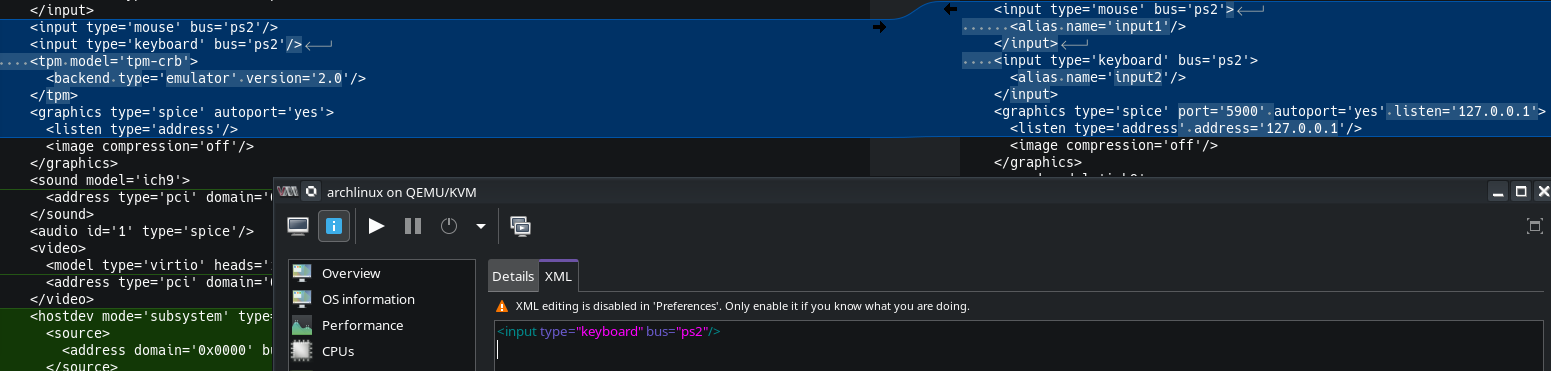
Hi @anon888 and welcome to the forum!
As far as I remember I followed this Guide
I use laptop keyboard and found tpm as a difference:

Has your VM (that you configured for passthrough) ever shut down

I hope so. You mean I kill it? Maybe I don’t understand your question. I’m not savvy at QEMU KVM.
dmesg | grep -i IOMMU
gives 25 groups

Not that savvy either, didn’t have a clue on why my VM shuts down everything.

It says there’s an error when I tried copying it.

Problems now involve looking glass (dev/shm/looking glass, permission denied, failed to map memory)