Hello, my name is Javier, and I live in Galicia (Spain).First I have to say that I don’t have much experience in Linux. I’ve used several distros before, all derived from Debian, but as the months went by, the computer slowed down and I didn’t like it. I have been using endeavouros with budgie for 2 months and I am very happy. I think it is a very stable distro. But I have a major problem, I am not able to install my brother DCP-J140W printer. I have it connected with the USB cable. With the other distros, following the manufacturer’s steps, I managed to install it, sometimes it cost a little, but not now, I have tried the steps indicated in the forum with other similar cases and nothing. I have also tried other methods online. I would like to continue using endeavouros but if I can’t print I will have to go back to debian. If anyone wants to try to help me, I would be very grateful. Thank you so much.
there are drivers in the AUR
did you install these?
I clicked on the link and it says:
No packages matched your search criteria.
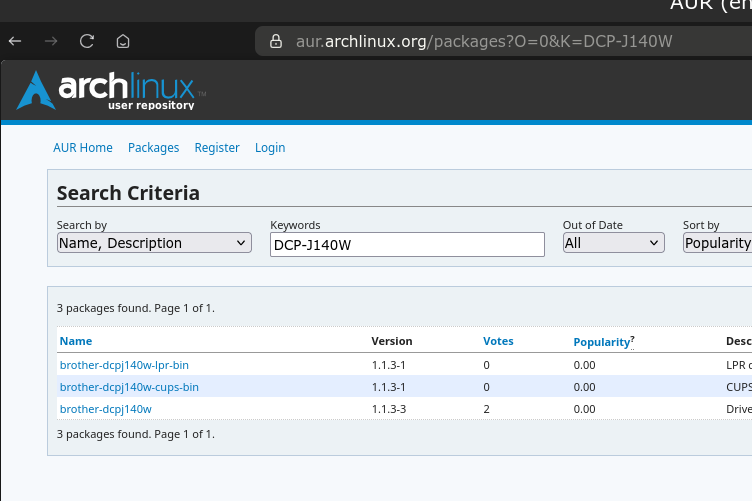
yes. which of the three do I have to download?
I have no idea. I don’t have a printer so I can’t even tell you anything you need. I just looked up your printer to see if Arch had drivers for it and the page above come up.
I think I would try cups as I don’t know what ipr is.
lpr is for laser printers. If the OPs printer is a laser printer, then I would go with that one. If not, go with the cups one. However, it would not harm to grab them all.
it’s not laser
yay -S brother-dcpj140w
[javier@javier-systemproductname ~]$ yay -S brother-dcpj140w
AUR Explicit (1): brother-dcpj140w-1.1.3-3
Sync Dependency (1): a2ps-4.15.7-1
:: PKGBUILD actualizado, omitiendo descarga: brother-dcpj140w
1 brother-dcpj140w (Archivos de compilación existen)
==> ¿Paquetes a limpiar antes de compilar?
==> [N]inguno [A]Todos [Ab]ortar [I]nstalados [No]Instalados o (1 2 3, 1-3, ^4)
==> A
:: Borrando (1/1): /home/javier/.cache/yay/brother-dcpj140w
HEAD está ahora en b3df418 rm makedep from PKGBUILD and add README
Borrando dcpj140wcupswrapper-1.1.3-6.i386.rpm
Borrando dcpj140wlpr-1.1.3-6.i386.rpm
Borrando src/
1 brother-dcpj140w (Archivos de compilación existen)
==> ¿Diffs a mostrar?
==> [N]inguno [A]Todos [Ab]ortar [I]nstalados [No]Instalados o (1 2 3, 1-3, ^4)
==> A
diff --git /home/javier/.cache/yay/brother-dcpj140w/LISEZMOI /home/javier/.cache/yay/brother-dcpj140w/LISEZMOI
new file mode 100644
index 0000000..e6c8cf2
— /dev/null
+++ /home/javier/.cache/yay/brother-dcpj140w/LISEZMOI
@@ -0,0 +1,26 @@
+Le pilote fourni par Brother étant écrit en 32 bits,
+installez d’abord lib32-libstdc ++ 5 depuis aur:
+
+1. Avec git :
- $ git clone https://aur.archlinux.org/lib32-libstdc++5.git
- $ cd lib32-libstdc ++ 5
- $ makepkg -si
+2. Avec curl :
- $ curl -L -O https://aur.archlinux.org/cgit/aur.git/snapshot/lib32-libstdc++5.tar.gz
- $ rm “lib32-libstdc++5.tar.gz”
- $ cd lib32-libstdc++5
- $ makepkg -si"
+3. avec wget :
- $ wget “https://aur.archlinux.org/cgit/aur.git/snapshot/lib32-libstdc++5.tar.gz”
- $ tar vxf “lib32-libstdc++5.tar.gz”
- $ rm “lib32-libstdc++5.tar.gz”
- $ cd lib32-libstdc++5
- $ makepkg -si"
+REMARQUES :
+Installez le pilote brother-dcpj140w par l’une des méthodes ci-dessus.
+
+Le pilote du scanner de cette imprimante est disponible dans aur :
+https://aur.archlinux.org/packages/brscan4/
diff --git /home/javier/.cache/yay/brother-dcpj140w/PKGBUILD /home/javier/.cache/yay/brother-dcpj140w/PKGBUILD
new file mode 100644
index 0000000..6af2a99
— /dev/null
+++ /home/javier/.cache/yay/brother-dcpj140w/PKGBUILD
@@ -0,0 +1,42 @@
+# Contributor: Alessio Bianchi venator85@gmail.com
+# Contributor: Jacek Roszkowski j.roszk@gmail.com
+# Contributor: Javier Cordero jneight@gmail.com
+# Contributor: M. Arnout
+# Maintainer: M. Arnout
+
+pkgname=brother-dcpj140w
+pkgver=1.1.3
+pkgrel=3
+pkgdesc=“Driver for the Brother DCP-j140w wifi multifuncional printer”
+url=“http://solutions.brother.com/linux/en_us/index.html”
+license=(‘custom:brother’)
+depends=(‘a2ps’ ‘cups’)
+install=“brother-dcpj140w.install”
+arch=(‘i686’ ‘x86_64’)
+
+md5sums=(‘69229583e5d43d82e5655f74729c05ba’
-
'599a7667f2c805d5dbc2fa655832f17c' -
'fa2d50677492bfc83e27184f316061c3')
+source=(
- “fix_lp.patch” \
- “http://www.brother.com/pub/bsc/linux/dlf/dcpj140wlpr-$pkgver-6.i386.rpm” \
-
"http://www.brother.com/pub/bsc/linux/dlf/dcpj140wcupswrapper-$pkgver-6.i386.rpm"
+)
+
+build() {
- cd “$srcdir”
- patch -Np0 < fix_lp.patch
+}
+post_install() {
- /opt/brother/Printers/dcpj140w/cupswrapper/cupswrapperdcpj140w
+}
+package()
+{
- install -d $pkgdir/usr/bin
- install -d $pkgdir/var/spool/lpd
- install -Dm755 “$srcdir”/usr/bin/brprintconf_dcpj140w “$pkgdir”/usr/bin/
- cp -R $srcdir/opt $pkgdir/opt
+}
diff --git /home/javier/.cache/yay/brother-dcpj140w/README /home/javier/.cache/yay/brother-dcpj140w/README
new file mode 100644
index 0000000..96d00d3
— /dev/null
+++ /home/javier/.cache/yay/brother-dcpj140w/README
@@ -0,0 +1,26 @@
+As the driver provided by Brother is written in 32 bits,
+first install lib32-libstdc++5 from aur :
+1. With git:
- $ git clone https://aur.archlinux.org/lib32-libstdc++5.git
- $ cd lib32-libstdc ++ 5
- $ makepkg -si
+2. With curl:
- $ curl -L -O https://aur.archlinux.org/cgit/aur.git/snapshot/lib32-libstdc++5.tar.gz
- $ rm “lib32-libstdc ++ 5.tar.gz”
- $ cd lib32-libstdc ++ 5
- $ makepkg -si "
+3. With wget:
- $ wget “https://aur.archlinux.org/cgit/aur.git/snapshot/lib32-libstdc++5.tar.gz”
- $ tar vxf “lib32-libstdc ++ 5.tar.gz”
- $ rm “lib32-libstdc ++ 5.tar.gz”
- $ cd lib32-libstdc ++ 5
- $ makepkg -si "
+NOTES:
+Install the brother-dcpj140w driver by one of the methods above.
+
+The scanner driver for this printer is available in aur:
+https://aur.archlinux.org/packages/brscan4/
diff --git /home/javier/.cache/yay/brother-dcpj140w/brother-dcpj140w.install /home/javier/.cache/yay/brother-dcpj140w/brother-dcpj140w.install
new file mode 100644
index 0000000..51bfdab
— /dev/null
+++ /home/javier/.cache/yay/brother-dcpj140w/brother-dcpj140w.install
@@ -0,0 +1,27 @@
+post_install() {
-
# lpr -
/opt/brother/Printers/dcpj140w/inf/setupPrintcapij dcpj140w -i -
# cupswrapper -
/opt/brother/Printers/dcpj140w/cupswrapper/cupswrapperdcpj140w -
systemctl restart org.cups.cupsd.service
+}
+
+post_upgrade() {
-
/bin/true
+}
+
+pre_remove() {
-
# lpr -
/opt/brother/Printers/dcpj140w/inf/setupPrintcapij dcpj140w -e -
# cupswrapper -
/opt/brother/Printers/dcpj140w/cupswrapper/cupswrapperdcpj140w -e
+}
+
+op=$1
+shift
+
+$op “$@”
+
diff --git /home/javier/.cache/yay/brother-dcpj140w/fix_lp.patch /home/javier/.cache/yay/brother-dcpj140w/fix_lp.patch
new file mode 100644
index 0000000..a3cb76c
— /dev/null
+++ /home/javier/.cache/yay/brother-dcpj140w/fix_lp.patch
@@ -0,0 +1,11 @@
±-- opt/brother/Printers/dcpj140w/inf/setupPrintcapij.old 2008-09-15 22:01:07.000000000 +0200
++++ opt/brother/Printers/dcpj140w/inf/setupPrintcapij 2008-09-15 22:01:26.000000000 +0200
+@@ -34,7 +34,7 @@
-
if [ ! -d $SPOOLER_NAME ]; then -
mkdir $SPOOLER_NAME -
fi
± chown lp $SPOOLER_NAME
++ chown root $SPOOLER_NAME
-
chgrp lp $SPOOLER_NAME -
chmod 700 $SPOOLER_NAME
(END)
do I have to restart the computer?
when I try to print something, a box appears that says printing and after a few seconds it says full print, but it doesn’t print anything
I would only install the -bin package.
plus you ALWAYS reboot with this stuff.
also just because you installed doesn’t mean Endevour would see it. you have to navigate Endeavour to where it’s at in the print dialogue box
2 cents
PS-always grab any brother stuff the /extra gives you I always cast a wide wide net that way I never know what actually helped me. really
PSS—that dcp looks like one of them all-in-one dealios with scanner. if true, aur will have you covered with the scanner package. doubt they are in the -bin
3 cents I guess but easily worth one
Which desktop? Plasma?
Did you know and follow the recommendations in:
https://discovery.endeavouros.com/printers/printers/2021/03/
?
Hello, I don’t really understand everything you say (translator). how do I install only the -bin package? Today it no longer appears printing and then finished.
budgie
The exact same way you install the other packages.
yay -S $PACKAGE
Yes and the scanner works.