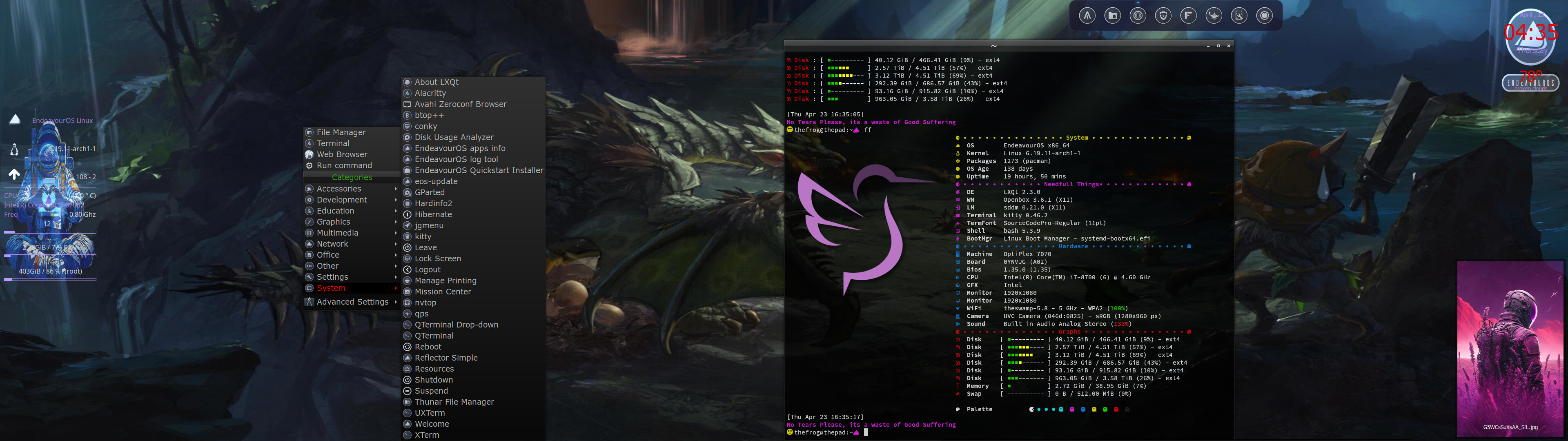
Solus just went 10.10.2 on Budgie so been testing this all week.
That means for my EOS I want things smoooooth from here on out as I’m testing Budgie here as well.
Everytime I ever used OpenBox I liked it. I didn’t know honestly if it was a WM masquerading as a DE or a DE masquerading as a WM. Always seemed like some old school conundrum.
Questions:
reliable DD?
do I need a compositor?
is it dock-friendly (plank etc)?
is it gtk-based or kde or bsd? what is it exactly?
video players, freetube all render normal, right?
headaches?
thank ye for any replies leading my brain where it needs to be !
EOS with LXQt and OpenBox runs fantastic. I’ve noticed some nice things with the new LXQt 2.4.0 that just dropped. I also run Archcraft with Openbox … also very very nice. One of my favorites
Correction: If you want to see how good Openbox can look, check out Archcraft.
But don’t recommend installing it.
That guy is starting to feel himself too much and making unnecessary changes to the config, while simultaneously adding himself to your installation, like making a silhouette of himself be your user account pic.
That last one is somewhat simple to change, but his configs have become purposely convoluted now. This, of course, only really affects new installations.
So while I used to champion his distro, the next time I reinstall, I’m likely switch to something else. I may even switch to Tumbleweed.
To my mind the two best openbox distros and tool sets are both on Debian (no need for a bleeding edge distro on a functionally stabilized WM). Here they are- both are amazingly complete and tailorable. #1: Lilidog : https://sourceforge.net/projects/lilidog/#2: Bunsenlabs: https://www.bunsenlabs.org/ FWIW I use a skinny version of Lilidog (called Beardog) with dwm,i3wm, and openbox everyday.
I didn’t know about any of that. I try to follow Archcraft on Reddit, but it’s nothing but dead space. Luckily, my install is several months old. It’s earned a permanent spot.
… Forgot about Bunsen. I think I ran it on VM for awhile … Very nice too!
Mine was a few years old, but I reinstalled in December because I wanted a fresh start. Huge mistake. Luckily I found the old config, extracted it and replaced the new convoluted mess.
Not paying for another premium config from him as a result.
I remember my current install was done end of December when I got a new SSD drive, but I’m sure I used an ISO I had stored from Aug/Sept time frame. Have not noticed anything odd, but now you have me curious … LOL
If you have an old ISO and the one that was available in December, you’d only need to extract it to check how different the configs are. No need to install it to see the difference. It’s the same visual result (UI/UX) in the end, but there are a lot more files since he’s added a bunch of in-file references to other files.
Yes, the file contents look a little cleaner, but the number of references make it not feel that way in the slightest. In any case, if you’ve never used Openbox before and need a good visual representation of how nice it can look, then Archcraft, imho, is the best example.
@drunkenvicar
Oh, and I daily drive Openbox: screensharing, gaming, watching vids, etc. all work just fine. I do use PICOM, and recommend it as well.
I guess the possibly big difference here is Crunchbang/++ probably offers one theme out of the box, whereas Archcraft offers ten. At least, the Crunchbang website doesn’t really illustrate different themes. Just a very simple and basic setup. One that would not make me want to use Openbox if I wasn’t familiar with it, which again, is subjective.
When you look at the Archcraft website, you get 10 simple looks with varying themes, fonts, and icons, and you can either use Polybar or Tint2, so a user is likely to find something that suits them.
I couldn’t decide so I use both Had fun setting up the polybar to my liking. Tint2 is basic and on auto-popup … most of the time I never use/see it. Menu/Programs is a right-click away, which I find very convenient. Kinda wish the EOS LXQt/Openbox had that … probably can be done, but I’m only a few weeks into a fresh install on that one. I’ve got MX Fluxbox too … thats another good one to tinker with.
I daily drove it a very, very long time ago, like over a decade, but I think openbox hasn’t been updated for a really long time which is not confidence inspiring. The last stable release was in 2015, so it looks kinda abandoned.
You do not strictly need a compositor no, but sometimes if you’re having graphical glitches or issues in that general direction a compositor can help resolve them (I used compton, i think it’s been renamed though… yah it’s called picom now, i don’t think there are any better options)
Openbox is a window manager, and its not masquerading as anything else, it’s not qt or gtk based, and i’m not sure where you’re getting kde or bsd from those are some odd questions.
For headaches, it’s x11 based, which means you will probably have to run it on xlibre as the official x server hasn’t been updated for a million years.
Openbox was reliable when i was using it about a decade ago, but it hasn’t been updated for a bouta decade ither so that might not be true anymore, there are other similar options however like i3, icewm, awesome, dwm, and a ton more you could choose from.
You could also go for the wayland ones like Hyprland (if you like openbox you will probably like Hyprland, i think there’s also a hypr which is x11 based but not 100% on that) and sway.
 !
! .
.