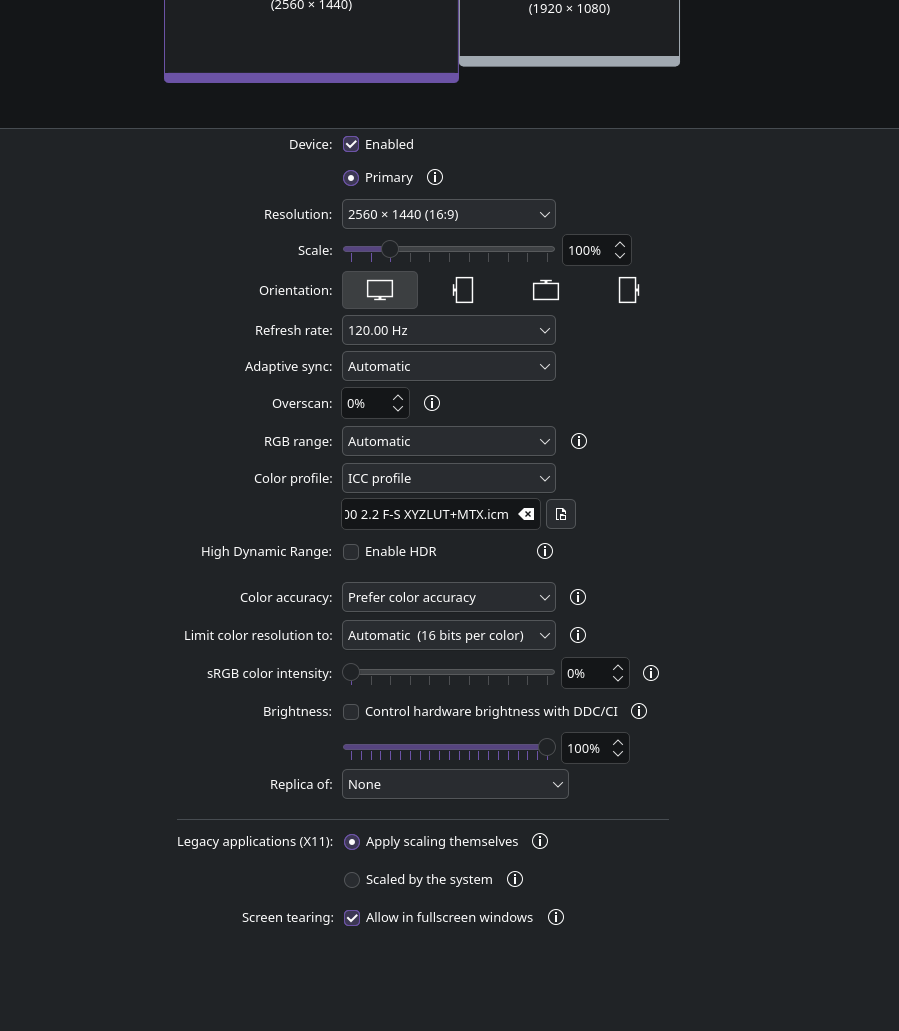
Nvidia to AMD swap. Main monitor going black with gpu accelerated task

Hello,

I recently changed from a 2080 Super to a RX 9070 XT on the 2nd. Removed the nvidia drivers, installed AMD drivers and it worked until today (July 7th).

Now whenever a program that requires/uses hardware acceleration (videos, games, discord) my main monitor only will go black until the program is unfocused/tabbed out, closed, or the video has buffered.

The issue happens in my installed OS, a liveISO, but does not persist in Windows 11 and journalctl isn’t producing any logs.

inxi -SMGxx --za

  Kernel: 7.1.2-arch3-1 arch: x86_64 bits: 64 compiler: gcc v: 16.1.1
  Desktop: KDE Plasma v: 6.7.2 tk: Qt v: N/A wm: kwin_wayland dm: SDDM
    Distro: EndeavourOS base: Arch Linux
Machine:
  Type: Desktop System: Gigabyte product: X570 I AORUS PRO WIFI v: -CF
    serial: <superuser required>
  Mobo: Gigabyte model: X570 I AORUS PRO WIFI serial: <superuser required>
    Firmware: UEFI vendor: American Megatrends LLC. v: F40a date: 04/14/2026
Graphics:
  Device-1: Advanced Micro Devices [AMD/ATI] Navi 48 [Radeon RX 9070/9070
    XT/9070 GRE] vendor: Tul / PowerColor driver: amdgpu v: kernel
    arch: RDNA-4 pcie: speed: 32 GT/s lanes: 16 ports: active: DP-3,HDMI-A-1
    empty: DP-1,DP-2,Writeback-1 bus-ID: 0c:00.0 chip-ID: 1002:7550
  Display: wayland server: X.org v: 1.21.1.23 with: Xwayland v: 24.1.12
    compositor: kwin_wayland driver: X: loaded: amdgpu unloaded: modesetting
    alternate: fbdev,vesa dri: radeonsi gpu: amdgpu d-rect: 4480x2520
    display-ID: 0
  Monitor-1: DP-3 pos: bottom-r model: Acer XF240H res: 1920x1080 hz: 120
    dpi: 92 diag: 609mm (24")
  Monitor-2: HDMI-A-1 pos: primary,top-left model: Acer XV272U
    res: 2560x1440 hz: 120 dpi: 109 diag: 685mm (27")
  API: EGL v: 1.5 platforms: device: 0 drv: radeonsi device: 1 drv: swrast
    gbm: drv: radeonsi surfaceless: drv: radeonsi wayland: drv: radeonsi x11:
    drv: radeonsi
  API: OpenGL v: 4.6 vendor: amd mesa v: 26.1.4-arch1.1 glx-v: 1.4
    direct-render: yes renderer: AMD Radeon RX 9070 XT (radeonsi gfx1201 ACO
    DRM 3.64 7.1.2-arch3-1) device-ID: 1002:7550 display-ID: :1.0
  API: Vulkan v: 1.4.350 surfaces: N/A device: 0 type: discrete-gpu
    driver: mesa radv device-ID: 1002:7550
  Info: Tools: api: clinfo, eglinfo, glxinfo, vulkaninfo
    de: kscreen-console,kscreen-doctor wl: wayland-info
    x11: xdpyinfo, xprop, xrandr

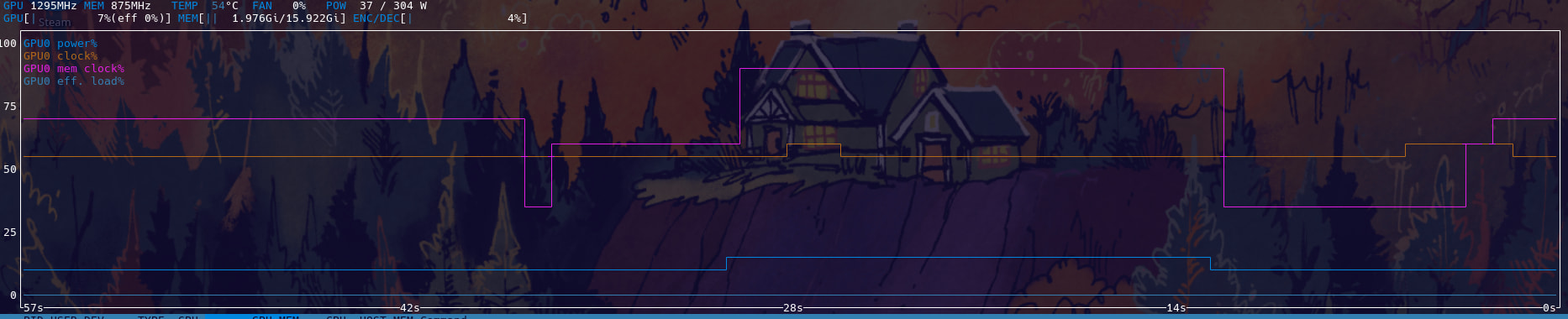
Edit: It appears to happen only when memory clock changes.

Welcome to the community @girlypop :waving_hand::smiley: :enos_flag:

The curious things about the issue, is it only began today, and you’ve confirmed it also happens in the live ISO environment.

That would suggest to me, that the issue is not driver/OS related strictly speaking, but perhaps something external to that, like a cable or adaptor. Also, with AMD drivers, there are currently occasions where something that works under Windows, may not work under Linux.

Could you please share the output of:

inxi -SMGxx --za

Edit: Scratch that, your updated post carries those details.

Sorry, was writing the post on my windows and just swapped back to EOS to update it

Which one of these is your “main” monitor?

I assume it’s the Acer? (sorry, just realised they’re both Acer, I meant the first one there specified as primary)

HDMI-A-1

I have a weird 3 monitor setup usually but I am waiting for more displayport cables to arrive

I did just swap the HDMI cable to test but that would be really weird that it only happens under heavy load

In Plasma’s display configuration, can you take a screenshot of your Acer XV272U’s settings please?

My PSU was just making a terrible coil whine for the first time :C

More than likely the issue. It’s an 850w EVGA psu so it should have been more than enough headroom.

Going to double check the power cables to the psu now. Already re-seated the GPU power pins.

The PSU is worth confirming. That may explain the content specific issue (higher load = :face_with_crossed_out_eyes:).

Here’s some things I recommend though.

  • Switch your higher resolution Acer XV272U to the DisplayPort cable where it will have more headroom.
  • The Acer XF240H then gets the HDMI cable which should be more than sufficient.
  • If the issue persists, disable Adaptive sync in display properties.
  • If the issue still persists, confirm that it still happens even if you reduce the refresh rate to 60Hz (just a test, not a solution).

With only 1 monitor plugged in and adaptive sync off, it has no issue (still a little bit of coil whine on the psu).

I plug in the second monitor and it starts having issues again.

Not sure if it’s PSU or GPU at this point but the PSU making coil whine after not having that issue 4 years has me pointing at the PSU just not liking a transient spike or something.

This might not be definitive due to the complexities of how power is delivered by the PSU, but are there other components you can temporarily disconnect to attempt to test the PSU under lower load?

Not really. I used a powered USB hub for most things to take load off the USB ports (I did unplug and see if that changed anything and it did not)

I think your hypothesis regarding the PSU has some legs to it, but it’d be nice to be certain before forking out for a new one.

I don’t suppose you have access to another you can hook up temporarily to test (just connect it from outside the case, to the motherboard, GPU and any drives that might need it if not using M.2).

I do. This might have to be a tomorrow thing so I will update you then.

My PSU has a 10 year warranty so it’s not like I will be paying for a new one if needed.

Hooked up another PSU, issue still persists.

Wondering if it could SOMEHOW be the displayport cable on the other monitor causing a weird issue/short when two screens are plugged in. I might have another to try any test.

EDIT: I remember the last thing I did the night before was use the Fusion 360 install script from CryFly from codeburg (where the repo is now) then uninstalling due to it not working and going to bed.

Maybe that broke my drivers?

I am making a new iso drive with the newest version of the OS to see if that changes anything

Edit: yeah still not working in the liveiso but works fine in windows


Only main monitor is going black when memory clock changes at all. It’s fine if it never changes or is the only screen plugged in.

Swapped the Displayport cable and the HDMI cable around and it doesn’t happen anymore.

This is so weird/odd.

I shouldn’t have been hitting the max for the cable after using it for 4 years with no issues and all of the sudden there is one.

It’s great you were able to isolate the issue :smiley::+1:

Not all HDMI cables are equal.

To achieve reliable 2560x1440 @ 120Hz, you’d need a cable that complies with at least HDMI 2.0. Other factors come into that too, such as cable length, cable condition, etc.

It’s the reason I suggested:

HDMI cables are quite susceptible to signal degradation over relatively short distances.
Swapped back PSUs and now it’s happening again on the XF240H (the one with the HDMI now). I can’t figure out what it’s tied to this time though.

Going to try out a few different HDMI cables

inxi -SMGxx --za output:

  Kernel: 7.0.13-arch1-1 arch: x86_64 bits: 64 compiler: gcc v: 16.1.1
  Desktop: KDE Plasma v: 6.7.2 tk: Qt v: N/A wm: kwin_wayland dm: SDDM
    Distro: EndeavourOS base: Arch Linux
Machine:
  Type: Desktop System: Gigabyte product: X570 I AORUS PRO WIFI v: -CF
    serial: <superuser required>
  Mobo: Gigabyte model: X570 I AORUS PRO WIFI serial: <superuser required>
    Firmware: UEFI vendor: American Megatrends LLC. v: F40a date: 04/14/2026
Graphics:
  Device-1: Advanced Micro Devices [AMD/ATI] Navi 48 [Radeon RX 9070/9070
    XT/9070 GRE] vendor: Tul / PowerColor driver: amdgpu v: kernel
    arch: RDNA-4 pcie: speed: 32 GT/s lanes: 16 ports: active: DP-2,HDMI-A-1
    empty: DP-1,DP-3,Writeback-1 bus-ID: 0c:00.0 chip-ID: 1002:7550
  Display: wayland server: X.org v: 1.21.1.24 with: Xwayland v: 24.1.13
    compositor: kwin_wayland driver: X: loaded: amdgpu unloaded: modesetting
    alternate: fbdev,vesa dri: radeonsi gpu: amdgpu d-rect: 4480x1440
    display-ID: 0
  Monitor-1: DP-2 pos: primary,left model: Acer XV272U res: 2560x1440
    hz: 120 dpi: 109 diag: 685mm (27")
  Monitor-2: HDMI-A-1 pos: right model: Acer XF240H res: 1920x1080 hz: 120
    dpi: 92 diag: 609mm (24")
  API: EGL v: 1.5 platforms: device: 0 drv: radeonsi device: 1 drv: swrast
    gbm: drv: radeonsi surfaceless: drv: radeonsi wayland: drv: radeonsi x11:
    drv: radeonsi
  API: OpenGL v: 4.6 vendor: amd mesa v: 26.1.4-arch1.1 glx-v: 1.4
    direct-render: yes renderer: AMD Radeon RX 9070 XT (radeonsi gfx1201 ACO
    DRM 3.64 7.0.13-arch1-1) device-ID: 1002:7550 display-ID: :1.0
  API: Vulkan v: 1.4.350 surfaces: N/A device: 0 type: discrete-gpu
    driver: mesa radv device-ID: 1002:7550
  Info: Tools: api: clinfo, eglinfo, glxinfo, vulkaninfo
    de: kscreen-console,kscreen-doctor wl: wayland-info
    x11: xdpyinfo, xprop, xrandr

The thing is, I’ve been using the same cable for 4 years and it’s hdmi 2.0 compliant and doesn’t have this issue in windows

There’s also a post talking about flickering bug in plasma 6.7. When was the most recent release of 6.7.2 pushed to EOS?

I’d be interested to see how those other HDMI cables go, or both using DisplayPort cables once those arrive.