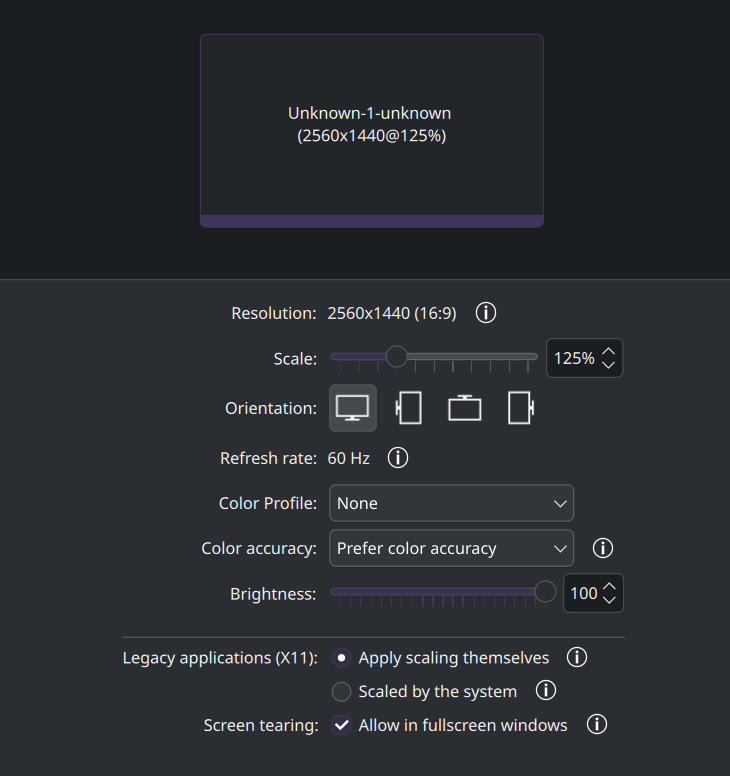
Hello, I have two 180Hz MSI monitors connected to my RTX 5080, which uses open drivers. I have a problem that plasma doesn’t detect any monitor (in display configuration, all I can see is one monitor called as “Uknown-1”), also the configuration or xrandr are saying that monitors doesn’t have higher refresh rate than 60 Hz. Also the output I am seeing is mirrored between both monitors.
My specs: https://0x0.st/8EUl.txt
Boot log: https://0x0.st/8EUU.txt
Xrandr: https://0x0.st/8EUG.txt
nvidia-smi does detect card:
Fri Jun 13 16:47:49 2025
+-----------------------------------------------------------------------------------------+
| NVIDIA-SMI 575.57.08              Driver Version: 575.57.08      CUDA Version: 12.9     |
|-----------------------------------------+------------------------+----------------------+
| GPU  Name                 Persistence-M | Bus-Id          Disp.A | Volatile Uncorr. ECC |
| Fan  Temp   Perf          Pwr:Usage/Cap |           Memory-Usage | GPU-Util  Compute M. |
|                                         |                        |               MIG M. |
|=========================================+========================+======================|
|   0  NVIDIA GeForce RTX 5080        Off |   00000000:01:00.0 Off |                  N/A |
| 43%   30C    P0             31W /  360W |       0MiB /  16303MiB |      2%      Default |
|                                         |                        |                  N/A |
+-----------------------------------------+------------------------+----------------------+

+-----------------------------------------------------------------------------------------+
| Processes:                                                                              |
|  GPU   GI   CI              PID   Type   Process name                        GPU Memory |
|        ID   ID                                                               Usage      |
|=========================================================================================|
|  No running processes found                                                             |
+-----------------------------------------------------------------------------------------+
$ pacman -Qs nvidia
local/egl-gbm 1.1.2.1-1
    The GBM EGL external platform library
local/egl-wayland 4:1.1.19-1
    EGLStream-based Wayland external platform
local/egl-x11 1.0.2-1
    NVIDIA XLib and XCB EGL Platform Library
local/libvdpau 1.5-3
    Nvidia VDPAU library
local/libxnvctrl 575.57.08-1
    NVIDIA NV-CONTROL X extension
local/nvidia-open 575.57.08-5
    NVIDIA open kernel modules
local/nvidia-settings 575.57.08-1
    Tool for configuring the NVIDIA graphics driver
local/nvidia-utils 575.57.08-3
    NVIDIA drivers utilities
Thank you for any advice.