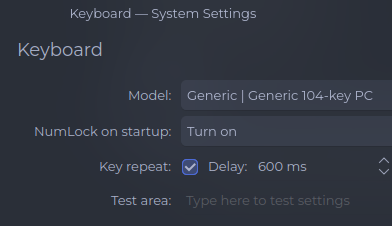
using kde plasma. Probably a security feature but the numlock is always turned off during the lockscreen. Changing the settings only apply to after the lockscreen. Is it possible to have numlock always on, even during boot and then lockscreen.
Well not sure where you change this settings but if you go to system settings>keyboard>numlock and set it to numlock turn on at startup (or something like that) and click on apply it should stick.
You can also look for the setting in .config/kcminputrc that should look like this
[Keyboard]
NumLock=0
Or check your bios if you can enable it.
Unfortunally setting the numlock to on in the BIOS doesn’t seem to work in Plasma or XFCE, but maybe it will work for someone else, you never know.
I have only a few minutes before I have to start work. Apologies for the terseness.
There are several places numlock can be forced on. I use them all. I haven’t experienced the issue you describe, but I can test later at home.
System settings (mentioned above) is the first place. After doing that, don’t forget it doesn’t carry over to the login screen until after to you go into Security & Privacy, Login Screen and choose “Apply Plasma Settings” at the top. That might be the entire solution.
Other places to try are adding numlock or sd-numlock (as appropriate) after keyboard in the HOOKS line in mkinitcpio.conf. Remember to sudo mkinitcpio -P afterwards.
Finally, add numlockontty from the AUR. Enable it with
sudo systemctl enable numLockOnTty.service
sudo systemctl start numLockOnTty.service
As mentioned by @keescase, I just enabled it under Keyboard in System Settings, and it stays enabled even on the lock screen.